<?xml version="1.0" encoding="utf-8"?><feed xmlns="http://www.w3.org/2005/Atom" ><generator uri="https://jekyllrb.com/" version="4.4.1">Jekyll</generator><link href="https://www.naleid.com/feed.xml" rel="self" type="application/atom+xml" /><link href="https://www.naleid.com/" rel="alternate" type="text/html" /><updated>2026-09-06T18:15:46+00:00</updated><id>https://www.naleid.com/feed.xml</id><title type="html">Ted Naleid’s Notes</title><subtitle>Notes on software engineering: Kafka, command line tooling, JVM performance, and whatever else turns out to be worth writing down.</subtitle><entry><title type="html">Understanding Kafka Compaction</title><link href="https://www.naleid.com/2023/07/30/understanding-kafka-compaction.html" rel="alternate" type="text/html" title="Understanding Kafka Compaction" /><published>2023-07-30T00:00:00+00:00</published><updated>2023-07-30T00:00:00+00:00</updated><id>https://www.naleid.com/2023/07/30/understanding-kafka-compaction</id><content type="html" xml:base="https://www.naleid.com/2023/07/30/understanding-kafka-compaction.html"><![CDATA[<h2 id="understanding-kafka-compaction-and-partition-cleaning">Understanding Kafka Compaction And Partition Cleaning</h2>

<p>Without a <a href="https://kafka.apache.org/documentation/#topicconfigs_cleanup.policy">cleanup.policy</a> Kafka topics would eventually accumulate enough events to fill the disk and be unable to accept new events.</p>

<p>We need a way to tell Kafka which events are OK to purge.</p>

<p>The <a href="https://kafka.apache.org/documentation/#topicconfigs_cleanup.policy">cleanup.policy</a> configuration value controls this.  It has three valid settings:</p>

<ul>
  <li><code class="language-plaintext highlighter-rouge">cleanup.policy=delete</code> - This is the default setting.  This policy gives Kafka permission to occasionally remove events older than <a href="https://kafka.apache.org/documentation/#topicconfigs_retention.ms">retention.ms</a> (default: 7 days) or larger than <a href="https://kafka.apache.org/documentation/#topicconfigs_retention.bytes">retention.bytes</a> (defaut: infinity).</li>
  <li><code class="language-plaintext highlighter-rouge">cleanup.policy=compact</code> - This policy gives Kafka permission to occasionally remove events that share a key with a newer event as long as <a href="https://kafka.apache.org/documentation/#topicconfigs_min.compaction.lag.ms">min.compaction.lag.ms</a> (default: <code class="language-plaintext highlighter-rouge">0</code>) has passed.</li>
  <li><code class="language-plaintext highlighter-rouge">cleanup.policy=compact,delete</code> - Both settings can be used, and this gives Kafka permission to occasionally remove events using the rules for each setting.  Think of this as an <code class="language-plaintext highlighter-rouge">OR</code> condition.  Events will be removed if <code class="language-plaintext highlighter-rouge">delete</code> OR <code class="language-plaintext highlighter-rouge">compact</code> says that event can be removed.  <code class="language-plaintext highlighter-rouge">compact,delete</code> removes the <code class="language-plaintext highlighter-rouge">compact</code>-only guarantee of keeping at least one event per key.</li>
</ul>

<p>I intentionally say “permission to occasionally remove events” because there are no hard guarantees on when partition cleaning will happen.  Compacted topics will not immediately remove older events with duplicate keys.  <code class="language-plaintext highlighter-rouge">delete</code> policy topics will not instantly remove events exceeding the retention config settings.  There are lots of nuances to how cleaning works.</p>

<p>This post details what I’ve learned about partition cleaning from using Kafka since 2016; many details are not documented elsewhere.  I’ve only found the answers by digging into the <a href="https://github.com/apache/kafka">source code</a>.</p>

<h2 id="frequently-asked-questions-about-compaction">Frequently Asked Questions about Compaction</h2>

<p>These are intended to be tl;dr entries for (relatively) quick answers.</p>

<p>Understanding the content below the FAQ will give a more thorough understanding of why I’ve given these answers.</p>

<h4 id="should-i-use-topic-compaction">Should I use topic compaction?</h4>

<p>Maybe!  It depends on the requirements of the topic consumers.</p>

<ul>
  <li>Do new consumers want to see the latest value for every key?</li>
  <li>Are the message keys finite (unique keys per partition no more than 10s to 100s of millions)?</li>
  <li>Will new events completely replace previous events with the same key?  (new events are not deltas from previous events)</li>
</ul>

<p>If the answer to those questions is “yes,” then compaction is worth considering.   If the answer to any of those questions is “no,” compaction will not meet your requirements.</p>

<h4 id="can-i-tune-compaction-so-there-are-never-two-events-with-the-same-key">Can I tune compaction so there are never two events with the same key?</h4>

<p>No.  You’re looking for a database.  Try <a href="https://www.postgresql.org/">PostgreSQL</a>.</p>

<p>Even if all Kafka config values are tuned to constantly run compaction on a single partition (don’t do this), duplicate events with the same key will exist.  Events are appended to the open segment log file on disk and do not replace previous events with the same key until the open segment is closed and the asynchronous background cleaning process selects this partition for cleaning.</p>

<p>With significant tuning, the lifetime of duplicates can be in the single-digit hour range.  I’ve never used compaction for anything short of 24 hours.</p>

<h4 id="can-i-trigger-compaction-to-run">Can I trigger compaction to run?</h4>

<p>No, not directly.</p>

<p>The most direct lever would be to set the topic’s <a href="https://kafka.apache.org/documentation/#topicconfigs_max.compaction.lag.ms">max.compaction.lag.ms</a> to 24 hours to get it to run once a day.  This config is not set by default.</p>

<p>I prefer this over setting a low <a href="https://docs.confluent.io/platform/current/installation/configuration/topic-configs.html#min-cleanable-dirty-ratio">min.cleanable.dirty.ratio</a> (default: 0.5), as that can cause compaction to run much more frequently than necessary on fast-moving topics and cause undue load on brokers.</p>

<h4 id="what-is-the-dirty-ratio-and-what-does-it-mean-for-a-partition-to-be-dirty">What is the “dirty ratio,” and what does it mean for a partition to be dirty?</h4>

<p>Kafka has no idea how many duplicate events you have on a topic.</p>

<p>Kafka saves events in sequential append-only segment files on-disk for each topic partition.  Segment file name are zero-padded and denote the first <code class="language-plaintext highlighter-rouge">offset</code> that segment holds.</p>

<p>The dirty ratio is the ratio of the number of bytes in uncleaned, “dirty”, segments (where duplicates might occur) to the total number of bytes for all closed segments.</p>

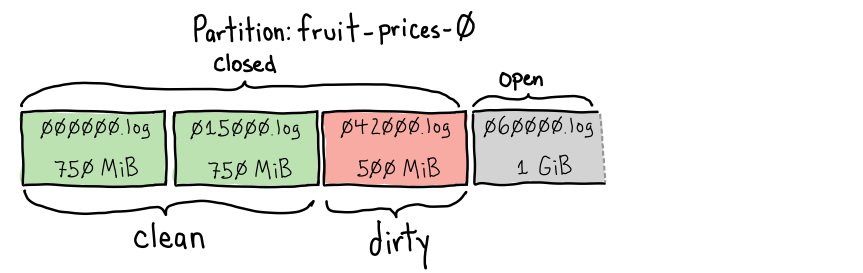
<p>Here’s an example showing how Kafka uses the dirty ratio as a proxy for how many cleanable duplicates a partition might have.</p>

<p><img src="/images/2023/07/dirty-ratio-1.png" alt="dirty ratio 0.25" title="dirty ratio 0.25" class="center-image" /></p>

<p>dirty ratio: <code class="language-plaintext highlighter-rouge">0.25</code> - clean</p>

<p>We have two previously cleaned closed segments:</p>
<ul>
  <li><code class="language-plaintext highlighter-rouge">000000.log</code> holding unique keys between offsets 0-14,999 and is 750MiB in size.  It likely does not have 15,000 events, as cleaning would have removed duplicates.</li>
  <li><code class="language-plaintext highlighter-rouge">015000.log</code> holds unique keys for offsets between 15,000-41,999 and is also 750MiB in size.  Again, there will be gaps in offsets where duplicates were removed by cleaning.</li>
</ul>

<p>We also have <code class="language-plaintext highlighter-rouge">042000.log</code>, a 500MiB closed, immutable segment that is dirty because it has not yet been cleaned.  Because it has not been cleaned, it contains all offsets between <code class="language-plaintext highlighter-rouge">42000</code> and <code class="language-plaintext highlighter-rouge">59999</code>.</p>

<p>The currently open segment, <code class="language-plaintext highlighter-rouge">060000.log</code>, is where new records are appended.  It currently has <code class="language-plaintext highlighter-rouge">1GiB</code> of data.  It is ineligible for compaction.  The bytes in this file are not part of determining the dirty ratio.</p>

<p>We have <code class="language-plaintext highlighter-rouge">750MiB + 750MiB = 1.5GiB</code> of “clean” bytes on this partition.  We have <code class="language-plaintext highlighter-rouge">500MiB</code> of “dirty” bytes eligible for compaction that have not been cleaned on this partition.</p>

<p>This partition’s dirty ratio is <code class="language-plaintext highlighter-rouge">0.25</code> (<code class="language-plaintext highlighter-rouge">500MiB dirty / 2iGB total closed</code>), and (with the default <code class="language-plaintext highlighter-rouge">min.cleanable.dirty.ratio=0.5</code>) it is considered “clean” and will not be selected for cleaning.</p>

<p>But what happens when we close the open segment?</p>

<p><img src="/images/2023/07/dirty-ratio-2.png" alt="dirty ratio 0.5" title="dirty ratio 0.5" class="center-image" /></p>

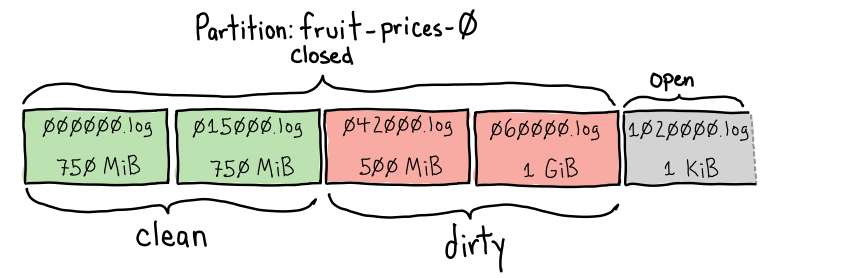
<p>Dirty ratio: <code class="language-plaintext highlighter-rouge">0.5</code> - filthy!</p>

<p>Closing the open <code class="language-plaintext highlighter-rouge">060000.log</code> segment has added <code class="language-plaintext highlighter-rouge">1GiB</code> to the number of dirty bytes on this partition.</p>

<p>We now have <code class="language-plaintext highlighter-rouge">1.5GiB</code> of clean bytes and <code class="language-plaintext highlighter-rouge">1.5GiB</code> of dirty bytes.  A <code class="language-plaintext highlighter-rouge">0.5</code> dirty ratio (<code class="language-plaintext highlighter-rouge">1.5GiB dirty/3.0GiB total closed</code>).  This partition is now eligible for cleaning.  The log cleaner thread will clean this partition on the following cleaning pass if it is the dirtiest
partition on the broker.</p>

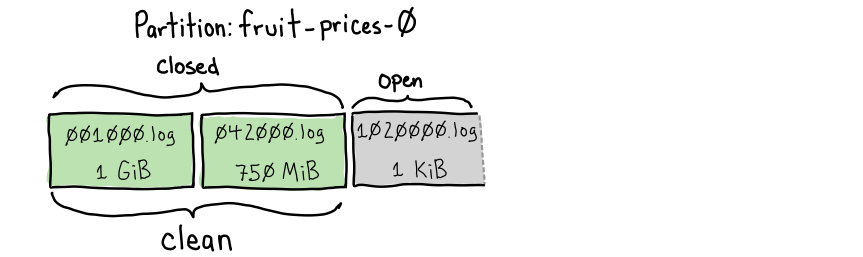
<p>Once cleaning completes, it could look like this:</p>

<p><img src="/images/2023/07/dirty-ratio-3.png" alt="dirty ratio 0.0" title="dirty ratio 0.0" class="center-image" /></p>

<p>Dirty ratio: <code class="language-plaintext highlighter-rouge">0.0</code> - squeaky clean!</p>

<p>Notice a couple of things about these new segments:</p>
<ul>
  <li>The first starting segment has gone from <code class="language-plaintext highlighter-rouge">000000.log</code> to <code class="language-plaintext highlighter-rouge">001000.log</code>.  All keys for offsets between <code class="language-plaintext highlighter-rouge">0</code> and <code class="language-plaintext highlighter-rouge">999</code> 
must have had new events sharing the same key get purged as duplicates.  The first surviving offset on this topic is <code class="language-plaintext highlighter-rouge">1000</code>.</li>
  <li>We went from four closed segments to two.  As segments are compacted, they reconsolidate into larger segments.  <code class="language-plaintext highlighter-rouge">segment.bytes</code> determines the maximum segment size.</li>
</ul>

<h4 id="what-configs-should-i-change-to-get-better-compaction">What configs should I change to get better compaction?</h4>

<p>Short answer:</p>

<ul>
  <li><a href="https://kafka.apache.org/documentation/#topicconfigs_segment.ms">segment.ms</a> (default: <code class="language-plaintext highlighter-rouge">604800000</code>, seven days) - change to <code class="language-plaintext highlighter-rouge">43200000</code> (12 hours)</li>
  <li><a href="https://kafka.apache.org/documentation/#topicconfigs_max.compaction.lag.ms">max.compaction.lag.ms</a> (default: infinity) - change to <code class="language-plaintext highlighter-rouge">86400000</code> (24 hours)</li>
</ul>

<p>Changing <code class="language-plaintext highlighter-rouge">segment.ms</code> will close the open segment at least every 12 hours so that it is “dirty” and eligible to be compacted.  If this is not changed, slow-moving topics (less than <code class="language-plaintext highlighter-rouge">segment.bytes=1GiB</code> of compacted data per week) will take one week to close the partition.</p>

<p>Changing <code class="language-plaintext highlighter-rouge">max.compaction.lag.ms</code> to 24 hours will make this partition eligible for compactions once per day.</p>

<p>Longer answer:</p>

<p>Most people see <code class="language-plaintext highlighter-rouge">min.cleanable.dirty.ratio</code> (default <code class="language-plaintext highlighter-rouge">0.5</code>) and think that’s the correct config to tweak.</p>

<p>Changing the <code class="language-plaintext highlighter-rouge">min.cleanable.dirty.ratio</code> is a poor choice for almost all topics.  Most people don’t understand what this does and it leads to behavior that can be hard to understand.   It can also cause a partition to be cleaned far more often than is useful on fast-moving topics and can crowd out cleaning on other partitions.</p>

<p>I prefer setting <code class="language-plaintext highlighter-rouge">segment.ms</code> to 12 hours instead of 7 days, as closing a partition twice a day is not expensive.  This is better than changing <code class="language-plaintext highlighter-rouge">segment.bytes</code> (default <code class="language-plaintext highlighter-rouge">1GiB</code> of compacted data) as that can be dangerous for fast-moving topics.  Setting <code class="language-plaintext highlighter-rouge">segment.bytes</code> to <code class="language-plaintext highlighter-rouge">1MiB</code> on a topic producing gigabytes of data per day would create thousands of files on disk.  If we set <code class="language-plaintext highlighter-rouge">segment.ms</code> to 12 hours and it only has a few megabytes of data, compaction will reconsolidate those segments back into larger <code class="language-plaintext highlighter-rouge">segment.bytes</code>-sized segments when compaction runs.</p>

<p>Setting <code class="language-plaintext highlighter-rouge">max.compaction.lag.ms</code> to 24 hours will make the partition eligible for cleaning once per day.  It does 
not force the log cleaner to clean it exactly at the 24-hour mark.  The log cleaner will still clean the “dirtiest” eligible partition.  This setting makes the partition eligible once per day.</p>

<h4 id="i-published-a-new-event-with-the-same-key-as-an-older-event-when-will-the-older-event-be-deleted">I published a new event with the same key as an older event, when will the older event be deleted?</h4>

<p>With default topic settings on a slow-moving topic, duplicate events can take weeks to compact.  With a tuned topic, you’re likely looking at ~24 hours before duplicates are removed.</p>

<p>Many things need to happen before an event is removed by compaction:</p>

<ol>
  <li>The event’s open log segment needs to be closed so it is no longer getting new events appended.</li>
  <li>The partition must be eligible for cleaning either because <code class="language-plaintext highlighter-rouge">max.compaction.lag.ms</code> has elapsed or the <code class="language-plaintext highlighter-rouge">min.cleanable.dirty.ratio</code> for the topic has been breached.</li>
  <li>The partition needs to be selected for cleaning by the log cleaner.  The log cleaner always picks the “dirtiest” partition to clean, regardless of the <code class="language-plaintext highlighter-rouge">min.cleanable.dirty.ratio</code>.</li>
  <li>The log cleaner needs enough memory to clean all unique “dirty” keys in a single pass.  Otherwise, multiple cleaning passes will be necessary.  With default settings, the broker can <a href="#logmanager-and-logcleaner">clean no more than ~5 million keys on a partition</a> in a single pass</li>
</ol>

<p><a href="#what-configs-should-i-change-to-get-better-compaction">Another FAQ entry</a> has suggestions for configs to consider if you’re not seeing the compaction you want.</p>

<h4 id="how-do-i-delete-all-events-sharing-a-key-on-a-compacted-topic">How do I delete all events sharing a key on a compacted topic?</h4>

<p>Publish a new event with the same key and a <code class="language-plaintext highlighter-rouge">null</code> body to the partition for that key.  This is called a “tombstone”. Tombstones signal to the Kafka broker and consumers that the key should be removed.</p>

<p>If a new event is published after the tombstone with the same key, that new event will be kept by compaction.</p>

<h4 id="i-still-see-tombstones-on-my-partition-when-will-they-be-removed">I still see tombstones on my partition, when will they be removed?</h4>

<p>Tombstones must be cleaned at least twice before being removed from a partition.</p>

<p>The first time the log cleaner sees the tombstone, it is not deleted as that could cause a race condition for consumers.  If a tombstone was added to the open segment just before it is closed, then compaction runs right after it is closed.  That might not give consumers enough time to see the tombstone before it is deleted.</p>

<p>Kafka avoids this race condition with <a href="https://kafka.apache.org/documentation/#topicconfigs_delete.retention.ms">delete.retention.ms</a> (default 24 hours).  This config value (which should be named <code class="language-plaintext highlighter-rouge">tombstone.retention.ms</code> IMO) determines how long the tombstone should be preserved in the logs after its first cleaning.</p>

<p>When the log cleaner first sees a tombstone, it writes it to the new segment along with a timestamp that it is safe to delete (cleaning time + <code class="language-plaintext highlighter-rouge">delete.retention.ms</code>).  Subsequent cleaning passes will only remove the tombstone if it is after that timestamp.</p>

<h4 id="how-can-i-tell-if-compaction-has-failed-on-a-partition">How can I tell if compaction has failed on a partition?</h4>

<p>Partitions can be <a href="https://github.com/apache/kafka/blob/3ba718e1599dabcf737106df27d260ba518919e1/core/src/main/scala/kafka/log/LogCleaner.scala#L397-L399">marked as “uncleanable”</a> if the log cleaner hits an exception while trying to clean it.  I’ve seen this happen when segment file on disk is corrupted and is unable to be parsed.</p>

<p>The <code class="language-plaintext highlighter-rouge">WARN</code>-level log message will look like this:</p>

<div class="language-plaintext highlighter-rouge"><div class="highlight"><pre class="highlight"><code>[kafka-log-cleaner-thread-0]: Unexpected exception thrown when cleaning log Log(dir=/data/kafka/fruit-prices-0, topic=fruit-prices, partition=0, highWatermark=1256427521, lastStableOffset=1256427521, logStartOffset=1165979137, logEndOffset=1256427521). Marking its partition (fruit-prices-0) as uncleanable
</code></pre></div></div>

<p>As cleaning is done independently on each broker, as long as the topic has a replication factor greater than one, the broker with the uncleanable partition can be removed from the topic.  A new broker will be elected as a partition replica, and it will copy the partition from another (hopefully healthy) replica.</p>

<h4 id="when-cleaning-runs-is-it-guaranteed-to-clean-all-duplicates">When cleaning runs, is it guaranteed to clean all duplicates?</h4>

<p>Nope.</p>

<p>There are two reasons why duplicates will not be cleaned in a single pass.</p>

<ol>
  <li>
    <p>A newer key is in the open segment.  Cleaning looks at closed segments. 
If the latest event is still in the open segment (with default settings, this can take seven days), the log cleaner will not see the new event.</p>
  </li>
  <li>
    <p>The number of unique keys on a partition is more than the log cleaner can keep in memory.  The log cleaner will clean the subset it can remember.  The partition will then need to be selected again as the most “dirty” partition for subsequent cleaning.</p>
  </li>
</ol>

<p>Kafka brokers have config values controlling how many unique keys it can clean in a single pass.</p>

<p>See <a href="#logmanager-and-logcleaner">“Log Manager and Log Cleaner”</a> for a lot more detail.</p>

<h4 id="how-can-i-count-the-number-of-records-on-a-topic">How can I count the number of records on a topic?</h4>

<p>The math is easy if the topic is not compacted (<code class="language-plaintext highlighter-rouge">cleanup.policy=delete</code>).  Take the offset of the latest record and subtract the offset of the earliest record still on the topic.  No compaction has happened on this partition, so all events between those offsets are guaranteed to exist still.</p>

<p>There’s no quick and accurate answer if the topic is compacted (<code class="language-plaintext highlighter-rouge">cleanup.policy=compact</code>).  You’ve got a few options:</p>

<ol>
  <li>Iterate over all events on the topic and count them.  Iterating is the only way to get an exact count.</li>
  <li>Iterate over all of the events on a partition and count them.  Then multiply that by the number of partitions.  You can check the size on the disk of all partitions to ensure a good distribution of events.</li>
  <li>Do an exact count once, then determine the average size of events given the compression ratio.  In the future, divide the current size of the partition by that known average event size for a reasonable estimate.</li>
</ol>

<h4 id="what-signals-tell-if-compaction-cannot-fully-clean-a-partition-in-a-single-pass">What signals tell if compaction cannot fully clean a partition in a single pass?</h4>

<p>If you’ve got access to your Kafka brokers logs, look for messages like this that are a signal that the partition cannot be cleaned in a single pass:</p>

<p><code class="language-plaintext highlighter-rouge">INFO</code> log level <code class="language-plaintext highlighter-rouge">kafka.log.LogCleaner</code>:</p>

<div class="language-plaintext highlighter-rouge"><div class="highlight"><pre class="highlight"><code>[kafka-log-cleaner-thread-2]:
  Log cleaner thread 2 cleaned log fruit-prices-12 (dirty section = [310715098, 325968881])
  25,706.8 MB of log processed in 1,554.6 seconds (16.5 MB/sec).
  Indexed 12,405.3 MB in 484.9 seconds (25.6 Mb/sec, 31.2% of total time)
  Buffer utilization: 90.0%
  Cleaned 25,706.8 MB in 1069.7 seconds (24.0 Mb/sec, 68.8% of total time)
  Start size: 25,706.8 MB (49,042,590 messages)
  End size: 13,219.4 MB (33,931,680 messages)
  48.6% size reduction (30.8% fewer messages)
</code></pre></div></div>

<p><code class="language-plaintext highlighter-rouge">DEBUG</code> log level <code class="language-plaintext highlighter-rouge">kafka.log.LogCleaner</code>:</p>

<div class="language-plaintext highlighter-rouge"><div class="highlight"><pre class="highlight"><code>Cleaner 3: Offset map is full, 1 segments fully mapped, segment with base offset 470931255 is partially mapped
</code></pre></div></div>

<p>Notice the <code class="language-plaintext highlighter-rouge">Buffer utilization: 90%</code>?  That’s our signal that we’ve hit the <code class="language-plaintext highlighter-rouge">0.9</code> default value for <code class="language-plaintext highlighter-rouge">log.cleaner.io.buffer.load.factor</code>.  The number of unique keys on this partition exceeds what can be cleaned in a single pass.</p>

<p>Not having enough room in the <code class="language-plaintext highlighter-rouge">OffsetMap</code> for all keys in a single segment is <em>very</em> expensive.  Each cleaning pass needs to create a map of dirty keys and then compare those keys against all clean keys to remove duplicates.</p>

<h4 id="what-is-the-maximum-number-of-unique-keys-i-should-have-per-partition">What is the maximum number of unique keys I should have per partition?</h4>

<p>Low tens of millions with default settings to low hundreds of millions with modified cleaner settings.</p>

<p>With default settings, ~5 million dirty keys on a partition can be cleaned in a single pass.  See <a href="#logmanager-and-logcleaner">“Log Manager and Log Cleaner”</a> for more details.</p>

<h4 id="how-can-i-tell-when-compaction-last-ran-on-a-partition">How can I tell when compaction last ran on a partition?</h4>

<p>Kafka broker logs are the best place to check.</p>

<p>If you don’t have access to those, but you can consume from a topic using <code class="language-plaintext highlighter-rouge">kcat</code> and have GNU <code class="language-plaintext highlighter-rouge">awk</code> installed, you could try this script.  This will find the date of the earliest event where the prior offset is no longer present on the topic.  This is the last place where compaction provably happened.</p>

<p>This script uses <code class="language-plaintext highlighter-rouge">kcat</code> to emit the offset (<code class="language-plaintext highlighter-rouge">%o</code>) and timestamp (<code class="language-plaintext highlighter-rouge">%T</code>) of each event on partition <code class="language-plaintext highlighter-rouge">0</code> of <code class="language-plaintext highlighter-rouge">my-topic</code> on <code class="language-plaintext highlighter-rouge">mybroker.example.com:9092</code>.  If your topic has security on it, you’ll need to add additional flags to <code class="language-plaintext highlighter-rouge">kcat</code> to provide those credentials.</p>

<div class="language-shell highlighter-rouge"><div class="highlight"><pre class="highlight"><code>kcat <span class="nt">-C</span> <span class="nt">-e</span> <span class="nt">-q</span> <span class="nt">-b</span> <span class="s2">"mybroker.example.com:9092"</span> <span class="nt">-t</span> <span class="s2">"my-topic"</span> <span class="nt">-p</span> 0 <span class="nt">-f</span> <span class="s1">'%o\t%T\n'</span> |
  gawk<span class="s1">'
    $1 &gt; last_offset + 1 {
      last_gap_offset = $1
      last_gap_epoch = $2
      last_gap_row = NR
    }
    {
      last_offset = $1
      last_row = NR
    }
    END {
      print "last gap offset: ", last_gap_offset
      print "last gap row: ", last_gap_row
      print "last gap time: ", strftime("%Y-%m-%dT%H:%M:%S", substr(last_gap_epoch, 1, 10))
      print "last offset: ", last_offset
      print "last row: ", last_row
      print "contiguous ~dirty since gap: ", last_row - last_gap_row
    }
  '</span>
last gap offset:  4156372102
last gap row:  39182297
last gap <span class="nb">time</span>:  2023-07-28T11:01:18
last offset:  4161793692
last row:  44603887
contiguous ~dirty rows since gap:  5421590
</code></pre></div></div>

<p>So this shows that the last time compaction ran on partition <code class="language-plaintext highlighter-rouge">0</code> on the lead broker was July 28th, 2023.</p>

<p>The <code class="language-plaintext highlighter-rouge">contiguous ~dirty rows since gap</code> value shows how many events are on the topic that could be dirty and eligible for compaction (once they are in a closed segment).</p>

<p>This script is the most accurate on fast-moving topics where duplicate events are relatively common.</p>

<h4 id="can-a-topic-be-compacted-and-use-time-based-deletion">Can a topic be compacted and use time-based deletion?</h4>

<p>Yes!  If the topic uses <code class="language-plaintext highlighter-rouge">cleanup.policy=compact,delete</code>.</p>

<p>The partitions on this topic will delete all records older than <a href="https://kafka.apache.org/documentation/#topicconfigs_retention.ms">retention.ms</a> (default: 7 days), even if they are the only record with that key.</p>

<p>Within that <code class="language-plaintext highlighter-rouge">retention.ms</code> period, closed segments will be compacted if the partition’s “dirty ratio” (default <code class="language-plaintext highlighter-rouge">0.5</code>) threshold is surpassed.  The dirty ratio is the ratio of bytes on “dirty” closed segments that might have duplicates to total bytes (clean + dirty) in closed segments.</p>

<p>Compaction with deletion enabled removes the guarantee of preserving at least one value per key.  It adds a time horizon where even unique keys will be dropped.</p>

<p><code class="language-plaintext highlighter-rouge">compact,delete</code> is used in situations where:</p>
<ul>
  <li>values are time-sensitive and are not useful after some time</li>
  <li>downstream consumers do not need an explicit tombstone to signal deletion</li>
  <li>there is a periodic repopulation of all valid records on the topic</li>
</ul>

<p>An example would be a topic with a 3-week <code class="language-plaintext highlighter-rouge">retention.ms</code>, and new values for the currently valid objects are published at least once per week.  This allows compaction within the 3-week window but values older than that will drop off the topic.</p>

<h4 id="how-can-i-use-compaction-but-give-consumers-a-guaranteed-time-window-to-see-all-messages-before-they-are-compacted">How can I use compaction but give consumers a guaranteed time window to see all messages before they are compacted?</h4>

<p>You’re looking for <a href="https://kafka.apache.org/documentation/#topicconfigs_min.compaction.lag.ms">min.compaction.lag.ms</a> (default: <code class="language-plaintext highlighter-rouge">0</code>).  Set this to the number of hours/days that your consumers will be guaranteed to have consumed an event.</p>

<p>This gives you the advantages of compaction but guarantees consumers get time to see all events.</p>

<h4 id="if-i-have-a-compacted-topic-can-i-change-the-number-of-partitions">If I have a compacted topic, can I change the number of partitions?</h4>

<p>Yes, but you will need to clear all data on the topic first.  Then change the number of partitions.  Finally, replay the upstream data so that all values are on the correct partition.  If you don’t have a non-Kafka source of truth for the data, you could create a job to forward all existing events to a new topic with the desired partition count.</p>

<p>Kafka does not have any magic around re-partitioning.  Events are not shuffled as Kafka has no idea what partitioning strategy the publishers used to send messages.</p>

<p>If you do not do this, you will have old messages that live forever and that will never get updated.  Compaction is done per-partition and does not look at events that might share the same key on other partitions.  It assumes a consistent hashing strategy where all values with the same key are guaranteed to be on a single partition.</p>

<h2 id="how-topic-compaction-works">How Topic Compaction Works</h2>

<p>Kafka stores events published to a topic on a partition (topics have <code class="language-plaintext highlighter-rouge">3</code> partitions by default).  Each event has a <code class="language-plaintext highlighter-rouge">key</code>, a <code class="language-plaintext highlighter-rouge">value</code>, and optional <code class="language-plaintext highlighter-rouge">headers</code>.  Kafka appends new events to the end of that partition’s open segment log file.  Events are assigned an <code class="language-plaintext highlighter-rouge">offset</code> that is a unique identifier for this event.  As events get appended to the end of the log, they do not share the <code class="language-plaintext highlighter-rouge">offset</code> or replace any previous events with the same key.</p>

<p>Events with the same key are <a href="/2021/05/02/kafka-topic-partitioning-replication.html#how-are-kafka-topics-structured">guaranteed to all be stored on the same partition</a>.  All new events will have an <code class="language-plaintext highlighter-rouge">offset</code> value one greater than the previous event.</p>

<p>Compaction happens at the partition-level, not at the topic-level.  If your topic somehow has the same key on multiple partitions, both partitions will keep a different event for that key (most common <a href="#if-i-have-a-compacted-topic-can-i-change-the-number-of-partitions">if the number of partitions are changed</a>).</p>

<p>When compaction runs, it creates a map of the new keys on the partition paired with the highest offset of any event seen with that key.  It will then scan the partition from the beginning and purge older events now known to have been replaced by a newer event.</p>

<p>Compaction is enabled by setting the topic’s <a href="https://kafka.apache.org/documentation/#topicconfigs_cleanup.policy">cleanup.policy</a> configuration value to <code class="language-plaintext highlighter-rouge">compact</code>.</p>

<h3 id="partition-compaction-example">Partition Compaction Example</h3>

<p>Kafka stores partitions on disk in log files called “segments”.  Each partition has one “open” segment where new event record batches will be appended.  Each event in the record batch will be assigned a monotonically increasing <code class="language-plaintext highlighter-rouge">offset</code>.  The first event on a partition will be at offset <code class="language-plaintext highlighter-rouge">0</code>.</p>

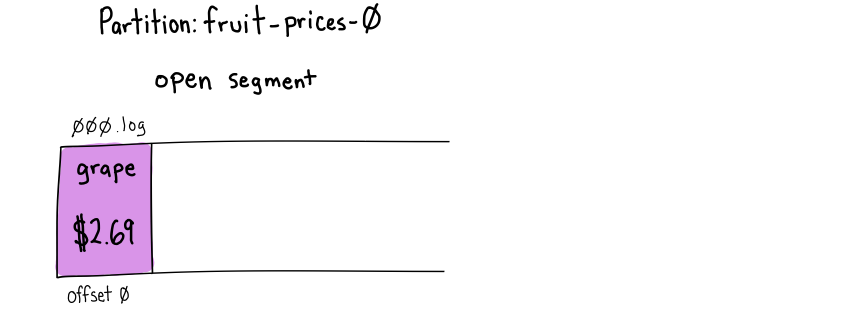
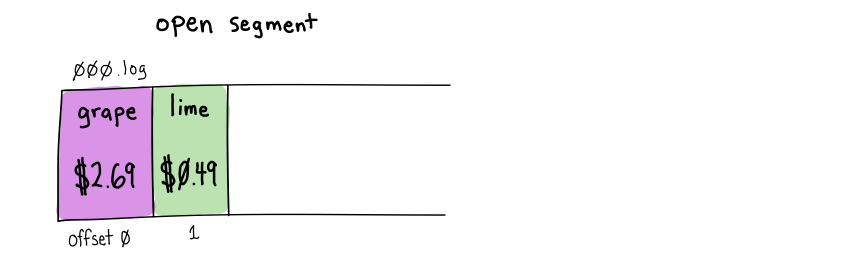
<p>Here we’ve got a newly created topic, <code class="language-plaintext highlighter-rouge">fruit-prices</code>.  It likely has multiple partitions, but we’re going to look at how events published to partition <code class="language-plaintext highlighter-rouge">0</code> are added and then compacted away.</p>

<p>The open segment file is <code class="language-plaintext highlighter-rouge">000.log</code> (the file name denotes the first <code class="language-plaintext highlighter-rouge">offset</code> in the segment with some zero-padding).</p>

<p><img src="/images/2023/07/compaction-1.png" alt="&quot;grape&quot; event published to open segment" title="'grape' event published to open segment" class="center-image" /></p>

<p>The first event comes in with a key of <code class="language-plaintext highlighter-rouge">grape</code> and a value of <code class="language-plaintext highlighter-rouge">$2.69</code>.  It is appended to the open segment at offset <code class="language-plaintext highlighter-rouge">0</code>.</p>

<p><img src="/images/2023/07/compaction-2.png" alt="'lime' event published to open segment" title="'lime' event published to open segment" class="center-image" /></p>

<p>A second event is published with the key <code class="language-plaintext highlighter-rouge">lime</code> and a value of <code class="language-plaintext highlighter-rouge">$0.49</code>.  It is appended to the open segment at offset <code class="language-plaintext highlighter-rouge">1</code>.</p>

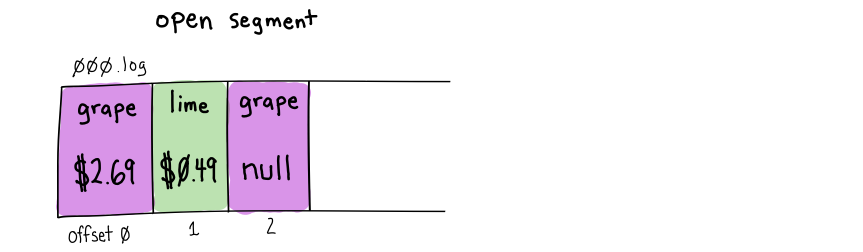
<p><img src="/images/2023/07/compaction-3.png" alt="new 'grape' tombstone event published to open segment" title="new 'grape' tombstone event published to open segment" class="center-image" /></p>

<p>A third event, with a <code class="language-plaintext highlighter-rouge">null</code> body, shares the <code class="language-plaintext highlighter-rouge">grape</code> key with our earlier event.  Events with <code class="language-plaintext highlighter-rouge">null</code> bodies are called “tombstones” and signal to Kafka and consumers to delete all prior <code class="language-plaintext highlighter-rouge">grape</code> values.  This event is appended to the open segment at offset <code class="language-plaintext highlighter-rouge">2</code>.  Notice that the previous <code class="language-plaintext highlighter-rouge">grape</code> value still exists at offset <code class="language-plaintext highlighter-rouge">0</code>.</p>

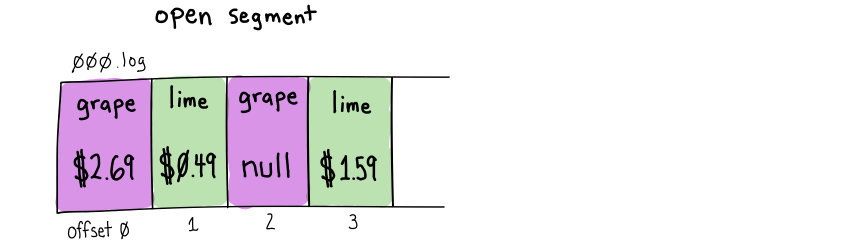
<p><img src="/images/2023/07/compaction-4.png" alt="'lime' event published to open segment" title="'lime' event published to open segment" class="center-image" /></p>

<p>The next event also has the <code class="language-plaintext highlighter-rouge">lime</code> key, with an updated price value of <code class="language-plaintext highlighter-rouge">$1.59</code>.  This event is again appended to the open segment at offset <code class="language-plaintext highlighter-rouge">3</code>.  The <code class="language-plaintext highlighter-rouge">lime</code> event at offset <code class="language-plaintext highlighter-rouge">1</code> still exists and will be read by consumers, but they will eventually see <code class="language-plaintext highlighter-rouge">lime</code>’s updated price at offset <code class="language-plaintext highlighter-rouge">3</code>.</p>

<p>Until now, no compaction has occurred or could occur, as compaction never runs on the open segment.</p>

<p>A segment must be closed for it to be eligible for compaction.  Segments are closed for two reasons:</p>

<ol>
  <li>Enough time passes.  When a segment has been open for <a href="https://kafka.apache.org/documentation/#topicconfigs_segment.ms">segment.ms</a> it will be closed.  The default is <code class="language-plaintext highlighter-rouge">604800000</code> (seven days).</li>
  <li>Enough data has been published to the partition.  When the open segment has had <a href="https://kafka.apache.org/documentation/#topicconfigs_segment.bytes">segment.bytes</a> of events written, it will be closed.  The default is <code class="language-plaintext highlighter-rouge">1073741824</code> bytes (<code class="language-plaintext highlighter-rouge">1GiB</code>).  This includes the event keys, bodies, headers, and a small number of bytes for each record batch.  When topic compression is used, this byte size is calculated after compression.</li>
</ol>

<p>If you’re using a <a href="https://kafka.apache.org/documentation/#brokerconfigs_compression.type">compression.type</a> of <code class="language-plaintext highlighter-rouge">zstd</code> and getting 90% compression on a topic with ten partitions, you’d need to write approximately ~100GiB of data to the topic for the open segment to exceed <code class="language-plaintext highlighter-rouge">1GiB</code> (default <code class="language-plaintext highlighter-rouge">segment.bytes</code>) and be closed in less than 7 days (default <code class="language-plaintext highlighter-rouge">segment.ms</code>).  1/10th of the keys are assigned to each partition, and each event is compressed to 1/10th of its original size, so we need to write ~100x the <code class="language-plaintext highlighter-rouge">segment.bytes</code> value within <code class="language-plaintext highlighter-rouge">segment.ms</code> for the open segment to be closed.</p>

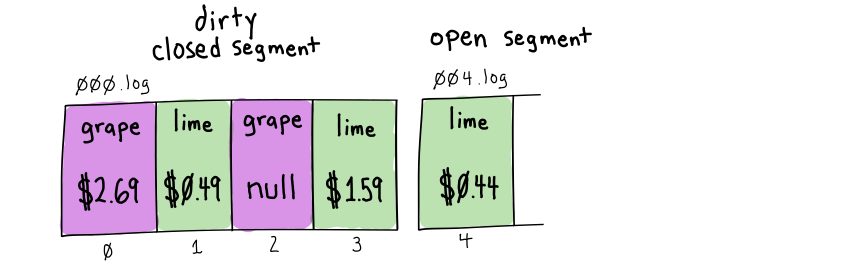
<p><img src="/images/2023/07/compaction-5.png" alt="close first segment, open new segment with new 'lime' value" title="close first segment, open new segment with new 'lime' value" class="center-image" /></p>

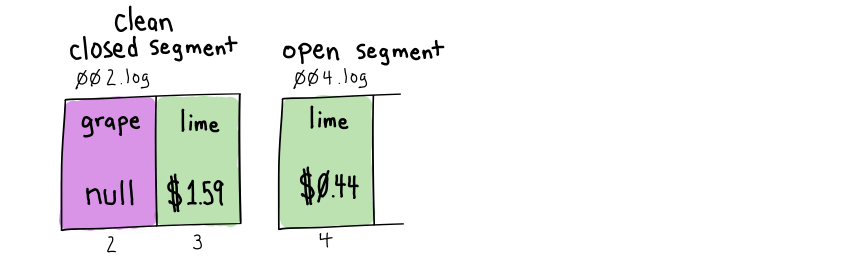
<p>For our example, let’s say that seven days have passed since we wrote the first four events, hitting the default <code class="language-plaintext highlighter-rouge">segment.ms</code> threshold.  The <code class="language-plaintext highlighter-rouge">000.log</code> segment is closed and marked as “dirty,” as it might have duplicates.  A new segment, <code class="language-plaintext highlighter-rouge">004.log</code>, is opened, and a new event with the key <code class="language-plaintext highlighter-rouge">lime</code> is appended to the open segment with an offset of <code class="language-plaintext highlighter-rouge">4</code>.</p>

<p>We need to talk about “dirty ratios”. Kafka does not know how many duplicate keys are on a partition.  It only knows the number of uncleaned bytes in closed segments versus previously cleaned bytes in closed segments.</p>

<p>The dirty ratio is the ratio of bytes for dirty events in closed segments divided by the total number of bytes in closed segments.  As this topic has never been cleaned, its dirty ratio is <code class="language-plaintext highlighter-rouge">1.0</code>.</p>

<p>This partition will be selected for cleaning when its dirty ratio exceeds the <code class="language-plaintext highlighter-rouge">0.5</code> value that is the default <a href="https://kafka.apache.org/documentation/#topicconfigs_min.cleanable.dirty.ratio">min.cleanable.dirty.ratio</a>.</p>

<p><img src="/images/2023/07/compaction-6.png" alt="compaction runs on dirty closed segment, leaves tombstone" title="compaction runs on dirty closed segment, leaves tombstone" class="center-image" /></p>

<p>Kafka adds this partition to the list of partitions ready to be cleaned by a log cleaner thread.   The log cleaner scans the closed, dirty <code class="language-plaintext highlighter-rouge">000.log</code> segment where duplicates might occur.  It creates a map of 16-byte MD5 hashes of the keys and the highest offset (an 8-byte long) seen for that key within the dirty segment.  Each <code class="language-plaintext highlighter-rouge">md5(key)</code> and <code class="language-plaintext highlighter-rouge">offset</code> pair takes up 24 bytes of memory in the log cleaner’s map.</p>

<div class="language-plaintext highlighter-rouge"><div class="highlight"><pre class="highlight"><code>md5(grape): 2
md5(lime): 3
</code></pre></div></div>

<p>Then the log cleaner starts reading from the beginning of the partition and creates a new “clean” segment file that keeps only the latest offsets for each key.  The new segment file is called <code class="language-plaintext highlighter-rouge">002.log</code> as offset <code class="language-plaintext highlighter-rouge">2</code> is the first offset it contains.  This new clean segment is closed when all unique dirty events in closed segments have been processed, or when the new segment hits the <a href="https://kafka.apache.org/documentation/#topicconfigs_segment.bytes">segment.bytes</a> (default <code class="language-plaintext highlighter-rouge">1073741824</code>/<code class="language-plaintext highlighter-rouge">1GiB</code>). The new clean segment is swapped in to replace the old <code class="language-plaintext highlighter-rouge">000.log</code> segment.</p>

<p>The <code class="language-plaintext highlighter-rouge">grape</code> event at offset <code class="language-plaintext highlighter-rouge">0</code> and <code class="language-plaintext highlighter-rouge">lime</code> at offset <code class="language-plaintext highlighter-rouge">1</code> are not copied into the new segment as their offsets are less than the highest offset the log cleaner has found in the dirty section for those keys.</p>

<p>Notice that the <code class="language-plaintext highlighter-rouge">grape</code> tombstone at offset <code class="language-plaintext highlighter-rouge">2</code> was kept.  When written to <code class="language-plaintext highlighter-rouge">002.log</code>, Kafka added a timestamp to the tombstone when it is safe to delete (cleaning time + <code class="language-plaintext highlighter-rouge">delete.retention.ms</code>).  Kafka will keep tombstones (and transaction markers) to avoid race conditions for at least <a href="https://kafka.apache.org/documentation/#topicconfigs_delete.retention.ms">delete.retention.ms</a> (default 24 hours) after the first cleaning.</p>

<p>Tombstones <em>need to be cleaned at least twice</em> before they are removed.</p>

<p>I believe <code class="language-plaintext highlighter-rouge">delete.retention.ms</code> is a confusingly named config value.  It would be better with a name like “tombstone.retention.ms”.  This property only controls when tombstones/transaction markers can be removed from the partition.  Many engineers I’ve talked with wrongly believe it controls how long Kafka will retain all events before deletion (it does not).</p>

<p>We also have a <code class="language-plaintext highlighter-rouge">lime</code> event in the open segment at offset <code class="language-plaintext highlighter-rouge">4</code>, but as the Kafka cleaner does not look at the open segment, we still have the <code class="language-plaintext highlighter-rouge">lime</code> event at offset <code class="language-plaintext highlighter-rouge">3</code> visible to consumers.</p>

<p>After compaction, the dirty ratio for the partition above is <code class="language-plaintext highlighter-rouge">0.0</code>.  All closed segments have been cleaned and are free of duplicates.  The partition will not be cleaned again until the open partition is closed.</p>

<p><img src="/images/2023/07/compaction-7.png" alt="more events come into open segment, which is closed" title="more events come into open segment, which is closed" class="center-image" /></p>

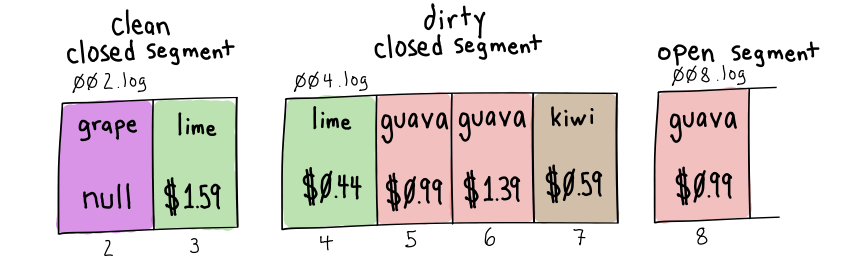
<p>More time passes, and we’ve written a few more values for <code class="language-plaintext highlighter-rouge">guava</code> and <code class="language-plaintext highlighter-rouge">kiwi</code> to our <code class="language-plaintext highlighter-rouge">004.log</code> open segment.  After a week, segment <code class="language-plaintext highlighter-rouge">004.log</code> is closed and marked “dirty”. A new segment, <code class="language-plaintext highlighter-rouge">008.log</code>, is opened, and a new value for <code class="language-plaintext highlighter-rouge">guava</code> is appended at offset <code class="language-plaintext highlighter-rouge">8</code>.</p>

<p><img src="/images/2023/07/compaction-8.png" alt="compaction runs again and removes the 'lime' tombstone" title="compaction runs again and removes the 'lime' tombstone" class="center-image" /></p>

<p>Our dirty ratio (assuming all events are the same size) is now <code class="language-plaintext highlighter-rouge">0.67</code> (two events in the previously cleaned segment/six events in all closed segments).</p>

<p>The <code class="language-plaintext highlighter-rouge">0.67</code> dirty ratio exceeds the <code class="language-plaintext highlighter-rouge">min.cleanable.dirty.ratio</code> of <code class="language-plaintext highlighter-rouge">0.5</code>, and the partition is eligible to be cleaned.  The cleaner scans over the dirty offsets in the newly closed segment and creates a map MD5 key hashes to the highest offsets seen for that key:</p>

<div class="language-plaintext highlighter-rouge"><div class="highlight"><pre class="highlight"><code>md5(lime): 4
md5(guava): 6
md5(kiwi): 7
</code></pre></div></div>

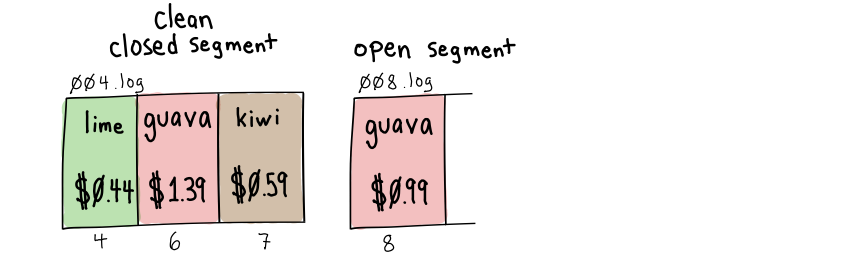
<p>Notice that <code class="language-plaintext highlighter-rouge">grape</code> is not in the map.  That key only exists in the previously cleaned portion of the topic, where all keys are unique.</p>

<p>The log cleaner scans from the beginning of the partition and writes unique values to the new segment.</p>

<p>More than 24 hours (<code class="language-plaintext highlighter-rouge">delete.retention.ms</code>) have passed since first cleaning the <code class="language-plaintext highlighter-rouge">grape</code> tombstone, so it can finally be omitted from the new segment.</p>

<p>The new segment is named <code class="language-plaintext highlighter-rouge">004.log</code>; its first offset is <code class="language-plaintext highlighter-rouge">4</code>.</p>

<p>After cleaning, our partition again has a dirty ratio of <code class="language-plaintext highlighter-rouge">0.0</code>.  All closed segments are guaranteed to have unique keys.</p>

<p>Kafka’s append-only design with background cleaning threads allows it to read and write quickly.  Writing never needs to read previous values.  It only appends them.  Reading can stream sequential segment files to consumers as they are already sorted by offset.</p>

<h2 id="log-cleaner-architecture-and-configuration">Log Cleaner Architecture and Configuration</h2>

<p>Kafka brokers have many configuration values that impact how cleaning works.</p>

<p>If brokers aren’t given enough cleaning resources, your partition might never get cleaned because the cleaning time is spent on the “dirtiest” partitions.</p>

<h3 id="logmanager-and-logcleaner">LogManager and LogCleaner</h3>

<p>Each broker has a single <a href="https://github.com/apache/kafka/blob/3.5/core/src/main/scala/kafka/log/LogManager.scala">LogManger</a> thread and zero or more <a href="https://github.com/apache/kafka/blob/3.5/core/src/main/scala/kafka/log/LogCleaner.scala">LogCleaner</a> threads.</p>

<p>The <code class="language-plaintext highlighter-rouge">LogManager</code> is responsible for:</p>
<ul>
  <li>truncating any partitions with a <code class="language-plaintext highlighter-rouge">cleanup.policy</code> of <code class="language-plaintext highlighter-rouge">delete</code></li>
  <li>creating any <code class="language-plaintext highlighter-rouge">LogCleaner</code> threads, <code class="language-plaintext highlighter-rouge">LogCleaner</code> threads handle any partitions with a <code class="language-plaintext highlighter-rouge">cleanup.policy</code> of <code class="language-plaintext highlighter-rouge">compact</code></li>
</ul>

<p>At startup, the <code class="language-plaintext highlighter-rouge">LogManager</code> checks to see if <a href="https://kafka.apache.org/documentation/#brokerconfigs_log.cleaner.enable">log.cleaner.enable</a> is <code class="language-plaintext highlighter-rouge">true</code> (by default, it is on).  If it is enabled, it will create <a href="https://kafka.apache.org/documentation/#brokerconfigs_log.cleaner.threads">log.cleaner.threads</a> (default: <code class="language-plaintext highlighter-rouge">1</code>)  <code class="language-plaintext highlighter-rouge">LogCleaner</code> instances.</p>

<h4 id="topics-with-cleanuppolicy-of-delete">Topics with <code class="language-plaintext highlighter-rouge">cleanup.policy</code> of <code class="language-plaintext highlighter-rouge">delete</code></h4>

<p>The <code class="language-plaintext highlighter-rouge">LogManager</code> removes events on partitions with a <code class="language-plaintext highlighter-rouge">cleanup.policy=delete</code> (but does not handle those with <code class="language-plaintext highlighter-rouge">compact</code> or <code class="language-plaintext highlighter-rouge">compact,delete</code>).</p>

<p>On startup, it <a href="https://github.com/apache/kafka/blob/3.5/core/src/main/scala/kafka/log/LogManager.scala#L546-L550">schedules</a> a <code class="language-plaintext highlighter-rouge">kafka-log-retention</code> thread that will run every <a href="https://kafka.apache.org/documentation/#brokerconfigs_log.retention.check.interval.ms">log.retention.check.interval.ms</a> (default 5 minutes).</p>

<p>When the <code class="language-plaintext highlighter-rouge">kafka-log-retention</code> job executes, it will start at the oldest log segment and <a href="https://github.com/apache/kafka/blob/938fee2b1fec52fa336f68118da120190bff4600/core/src/main/scala/kafka/log/LogManager.scala#L1253">delete entire segments</a> where the newest events are older than <code class="language-plaintext highlighter-rouge">retention.ms</code> or that bring the partition log size above <code class="language-plaintext highlighter-rouge">retention.bytes</code>.</p>

<p>Note that this is intended to be a quick operation.  Segments are not split.  All events must be older than the retention period for a segment to be deleted.</p>

<h4 id="topics-with-a-cleanuppolicy-of-compact">Topics with a <code class="language-plaintext highlighter-rouge">cleanup.policy</code> of <code class="language-plaintext highlighter-rouge">compact</code></h4>

<p>If <code class="language-plaintext highlighter-rouge">log.cleaner.enable</code> is <code class="language-plaintext highlighter-rouge">true</code> and <code class="language-plaintext highlighter-rouge">log.cleaner.threads</code> is greater than <code class="language-plaintext highlighter-rouge">0</code>, the <code class="language-plaintext highlighter-rouge">LogManager</code> will instantiate independent <code class="language-plaintext highlighter-rouge">LogCleaner</code> threads that are responsible for compacting partitions with a <code class="language-plaintext highlighter-rouge">cleanup.policy</code> of <code class="language-plaintext highlighter-rouge">compact</code>.</p>

<p>Each <code class="language-plaintext highlighter-rouge">LogCleaner</code> thread runs independently, but locks ensure that two cleaning threads do not attempt to clean the same partition.</p>

<p>The high-level steps <code class="language-plaintext highlighter-rouge">LogCleaners</code> use for compacting topics are:</p>

<ol>
  <li>Determine which partitions are eligible for cleaning.  A partition is eligible for cleaning either because:
    <ul>
      <li>the “dirty ratio” of uncleaned bytes in closed segments divided by bytes on all closed segments is compared against the <a href="https://kafka.apache.org/documentation/#topicconfigs_min.cleanable.dirty.ratio">min.cleanable.dirty.ratio</a> (default <code class="language-plaintext highlighter-rouge">0.5</code>).  Note that this has nothing to do with the number of duplicate keys.  Kafka has no idea how many duplicate keys exist in a dirty segment till it is cleaned.</li>
      <li>the partition has closed segments that have not been cleaned within <a href="https://kafka.apache.org/documentation/#topicconfigs_max.compaction.lag.ms">max.compaction.lag.ms</a>.  By default, this configuration is set to <code class="language-plaintext highlighter-rouge">9223372036854775807</code> (max long) so it is not enabled.  I recommend setting this value to the cadence you’d like cleaning to happen (ex: 24 hours) rather than changing the <code class="language-plaintext highlighter-rouge">min.cleanable.dirty.ratio</code>.  It will give much more predictable behavior.</li>
      <li>if no partitions are eligible for cleaning, the thread sleeps for ~15 seconds and then checks again.</li>
    </ul>
  </li>
  <li>Pick the partition with the highest dirty ratio from the list of partitions eligible for cleaning.
    <ul>
      <li>note that this means that if one high-traffic partition is constantly the dirtiest one, it can delay the cleaning of other less dirty partitions.</li>
    </ul>
  </li>
  <li>Scan over the dirty events on the partition, add the 16-byte <a href="https://github.com/apache/kafka/blob/3ba718e1599dabcf737106df27d260ba518919e1/storage/src/main/java/org/apache/kafka/storage/internals/log/CleanerConfig.java#L23">MD5</a> hash of the <code class="language-plaintext highlighter-rouge">key</code> and the current <code class="language-plaintext highlighter-rouge">offset</code> (an 8-byte <code class="language-plaintext highlighter-rouge">Long</code>) to the <code class="language-plaintext highlighter-rouge">OffsetMap</code>.
    <ul>
      <li>Each entry in the <code class="language-plaintext highlighter-rouge">OffsetMap</code> takes up 24 bytes of memory.</li>
      <li>To prevent <code class="language-plaintext highlighter-rouge">OutOfMemoryError</code> exceptions, the size of the <code class="language-plaintext highlighter-rouge">OffsetMap</code> is constrained.</li>
      <li><a href="https://kafka.apache.org/documentation/#brokerconfigs_log.cleaner.dedupe.buffer.size">log.cleaner.dedupe.buffer.size</a> (default: <code class="language-plaintext highlighter-rouge">134217728</code>/128MiB) is divided equally across all <code class="language-plaintext highlighter-rouge">LogCleaner</code> threads.   If there is one thread, it gets all 128MiB.  If there are four threads, each one gets 32MiB.</li>
      <li><a href="https://kafka.apache.org/documentation/#brokerconfigs_log.cleaner.io.buffer.load.factor">log.cleaner.io.buffer.load.factor</a> (default: <code class="language-plaintext highlighter-rouge">0.9</code>/90%) is the maximum amount of memory used in the <code class="language-plaintext highlighter-rouge">OffsetMap</code>.  Inserts into the <code class="language-plaintext highlighter-rouge">OffsetMap</code> are slower when the map approaches capacity.</li>
      <li>So if we have a single cleaning thread with 128MiB of memory and a buffer load factor of 90%, we only have 115.2MiB of usable space.</li>
      <li>With each entry taking 24 bytes, we can fit slightly over 5 million keys into the 115.2MiB <code class="language-plaintext highlighter-rouge">ByteBuffer</code> backing the <code class="language-plaintext highlighter-rouge">OffsetMap</code></li>
      <li>If your partition has more than 5 million unique keys on it, it will not be able to be entirely cleaned in a single pass!  You can either increase the number of partitions on the topic or give the cleaner more memory.</li>
    </ul>
  </li>
  <li>Scan from beginning of the partition and write events to a new clean segment if:
    <ul>
      <li>The <code class="language-plaintext highlighter-rouge">md5(key)</code> is absent in the <code class="language-plaintext highlighter-rouge">OffsetMap</code>.  This event has the key’s highest known offset that we want to keep.</li>
      <li>The <code class="language-plaintext highlighter-rouge">offset</code> for this event is the same as the <code class="language-plaintext highlighter-rouge">offset</code> stored at <code class="language-plaintext highlighter-rouge">md5(key)</code> in the <code class="language-plaintext highlighter-rouge">OffsetMap</code>.  This event is the newest seen with that key.</li>
      <li>If the <a href="https://kafka.apache.org/documentation/#topicconfigs_compression.type">compression.type</a> of the topic is <code class="language-plaintext highlighter-rouge">producer</code> (the default), maintain the compression type for this event’s record batch.  Otherwise, use the compression type specified for the topic.</li>
    </ul>
  </li>
  <li>If we find a tombstone or transaction marker in the “clean” section, check the age of the event’s last cleaned timestamp.  If it is greater than <code class="language-plaintext highlighter-rouge">delete.retention.ms</code>, delete it.  Otherwise, preserve it.  Tombstones must be cleaned <em>at least twice</em> before they’re removed from the partition.</li>
  <li>If we write a maximum of <code class="language-plaintext highlighter-rouge">segment.bytes</code> (default: <code class="language-plaintext highlighter-rouge">1GiB</code> of data using the <code class="language-plaintext highlighter-rouge">compression.type</code>) to the new clean segment, close it and open a new segment.</li>
  <li>Swap completed segments in for the old segments and mark old segments for deletion.</li>
  <li>We’re done if the <code class="language-plaintext highlighter-rouge">cleanup.policy</code> is just <code class="language-plaintext highlighter-rouge">compact</code>.  If <code class="language-plaintext highlighter-rouge">cleanup.policy=compact,delete</code>, the <code class="language-plaintext highlighter-rouge">LogCleaner</code> will then <a href="https://github.com/apache/kafka/blob/3ba718e1599dabcf737106df27d260ba518919e1/core/src/main/scala/kafka/log/LogCleaner.scala#L427">delete segments</a> using the same logic above used by the <code class="language-plaintext highlighter-rouge">LogManager</code> for <code class="language-plaintext highlighter-rouge">cleanup.policy=delete</code>.</li>
  <li>GOTO #1, where the <code class="language-plaintext highlighter-rouge">LogCleaner</code> will recalculate the “filthiest” partition.  If this partition was not fully cleaned, it could pick the same partition again.</li>
</ol>

<h2 id="further-resources-on-compaction">Further Resources on Compaction</h2>

<ul>
  <li>The official <a href="https://kafka.apache.org/documentation/#compaction">Confluent Kafka documentation on compaction</a></li>
  <li><a href="https://developer.confluent.io/courses/architecture/compaction/">Topic Compaction</a>, by Jun Rao, as part of Confluent’s “Kafka Internals” video series.</li>
  <li><a href="https://cwiki.apache.org/confluence/display/KAFKA/KIP-58+-+Make+Log+Compaction+Point+Configurable">KIP-58: Make Log Compaction Point Configurable</a></li>
  <li><a href="https://cwiki.apache.org/confluence/display/KAFKA/KIP-71%3A+Enable+log+compaction+and+deletion+to+co-exist">KIP-71: Enable log compaction and deletion to co-exist</a></li>
  <li><a href="https://cwiki.apache.org/confluence/display/KAFKA/KIP-87+-+Add+Compaction+Tombstone+Flag">KIP-87: Add Compaction Tombstone Flag</a></li>
  <li><a href="https://cwiki.apache.org/confluence/display/KAFKA/KIP-280%3A+Enhanced+log+compaction">KIP-280: Enhanced Log Compaction</a></li>
  <li><a href="https://cwiki.apache.org/confluence/display/KAFKA/KIP-354%3A+Add+a+Maximum+Log+Compaction+Lag">KIP-354: Add a Maximum Log Compaction Lag</a></li>
</ul>]]></content><author><name></name></author><summary type="html"><![CDATA[Understanding Kafka Compaction And Partition Cleaning]]></summary></entry><entry><title type="html">Kafka Topic Partitioning and Replication Critical Configuration Tips</title><link href="https://www.naleid.com/2021/05/02/kafka-topic-partitioning-replication.html" rel="alternate" type="text/html" title="Kafka Topic Partitioning and Replication Critical Configuration Tips" /><published>2021-05-02T00:00:00+00:00</published><updated>2021-05-02T00:00:00+00:00</updated><id>https://www.naleid.com/2021/05/02/kafka-topic-partitioning-replication</id><content type="html" xml:base="https://www.naleid.com/2021/05/02/kafka-topic-partitioning-replication.html"><![CDATA[<h4 id="tldr---kafka-configs-you-should-consider-using">tl;dr - Kafka configs you should consider using</h4>

<h5 id="brokertopic-configs">Broker/Topic Configs</h5>
<ul>
  <li><code class="language-plaintext highlighter-rouge">min.insync.replicas=2</code> (default: 1)</li>
  <li><code class="language-plaintext highlighter-rouge">compression.type=producer</code> (keep this default)</li>
  <li>create topics with a partition replication factor of <code class="language-plaintext highlighter-rouge">3</code></li>
</ul>

<h5 id="producer-configs">Producer Configs</h5>
<ul>
  <li><code class="language-plaintext highlighter-rouge">acks=all</code> (default: <code class="language-plaintext highlighter-rouge">1</code>)</li>
  <li><code class="language-plaintext highlighter-rouge">compression.type=lz4</code> (default: <code class="language-plaintext highlighter-rouge">none</code>)</li>
  <li><code class="language-plaintext highlighter-rouge">linger.ms=100</code> (default: <code class="language-plaintext highlighter-rouge">0</code>, Kafka Streams uses <code class="language-plaintext highlighter-rouge">100</code> ms)</li>
  <li><code class="language-plaintext highlighter-rouge">max.request.size=4194304</code> (4MB, default: <code class="language-plaintext highlighter-rouge">1048576</code> - 1MB)</li>
  <li><code class="language-plaintext highlighter-rouge">batch.size=972800</code> - ~95% of topic’s <code class="language-plaintext highlighter-rouge">message.max.bytes</code> (default: <code class="language-plaintext highlighter-rouge">16384</code> - 16KB)</li>
  <li><code class="language-plaintext highlighter-rouge">buffer.memory=67108864</code> - increase for high-throughput apps (default: <code class="language-plaintext highlighter-rouge">33554432</code> - 32MB)</li>
  <li>if order matters
    <ul>
      <li>add a <code class="language-plaintext highlighter-rouge">key</code> to all of your messages</li>
      <li><code class="language-plaintext highlighter-rouge">max.in.flight.requests.per.connection=1</code> (default: <code class="language-plaintext highlighter-rouge">5</code>)</li>
    </ul>
  </li>
</ul>

<p>There are caveats for all of these, read on for further discussion.</p>

<h2 id="who-is-this-post-intended-for">Who is this post intended for?</h2>

<p>This is the information about understanding Kafka partitioning and replication that I’ve been trying to search for
the last couple of years.  I finally stopped searching and <a href="https://github.com/apache/kafka/tree/trunk/core/src/main">read the source code</a>.</p>

<p>This post assumes quite a bit of familiarity with how Kafka works at the 10k foot level. It dives into the details
and describes which config settings you should be looking at when tuning your system.</p>

<h2 id="how-are-kafka-topics-structured">How are Kafka Topics structured?</h2>

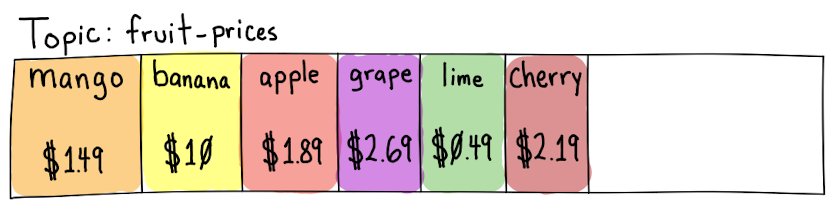
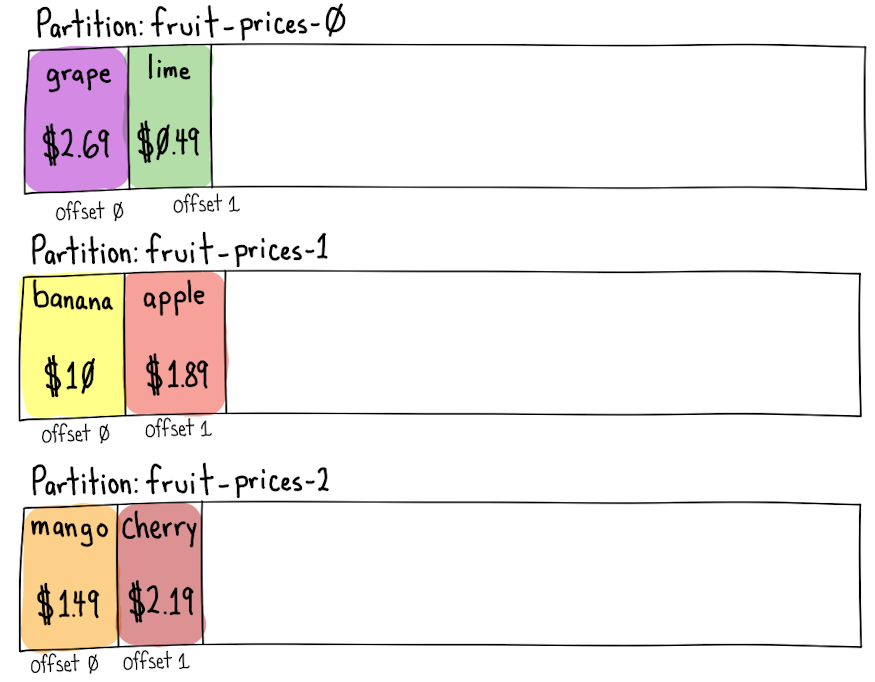
<p>Kafka topics hold a series of ordered events (also called records). The <code class="language-plaintext highlighter-rouge">mango</code> record is the oldest and <code class="language-plaintext highlighter-rouge">cherry</code> is 
the newest.  Any new records would be added after <code class="language-plaintext highlighter-rouge">cherry</code>.</p>

<p><img src="/images/2021/05/kafka_topic.png" alt="Kafka Topic" title="Kafka Topic" class="center-image" /></p>

<p>This conceptual model breaks down when you learn more about Kafka. In reality, Kafka topics have a number of components 
to increase the reliability and throughput of each topic. These components also increase complexity and are worth
learning more about if you want to be able to reason about how your data will flow through the system.</p>

<h3 id="topic-partitions">Topic Partitions</h3>

<p>A topic is split into one or more zero-based partitions, with each partition having approximately the same fraction
of records on it.</p>

<p>It is the Kafka producer’s job to create new records and decide which partition a record should go to.  It uses a
<a href="https://kafka.apache.org/documentation/#producerconfigs_partitioner.class">partitioning strategy</a>
to decide which partition a record should be sent to.</p>

<p>The 
<a href="https://github.com/apache/kafka/blob/2.8/clients/src/main/java/org/apache/kafka/clients/producer/internals/DefaultPartitioner.java#L25-L33">default partitioner</a>
uses this algorithm:</p>

<ol>
  <li>if the user assigned an explicit partition, use it</li>
  <li>else if the record has a key, use the key’s hash to determine the partition</li>
  <li>else add the record to a batch and send it to a random partition</li>
</ol>

<h3 id="default-partitioner-algorithm-details">Default Partitioner Algorithm Details</h3>
<h4 id="1-if-the-user-assigned-an-explicit-partition-use-it">1. If the user assigned an explicit partition, use it</h4>

<p>If the producer has manually assigned a record to a partition, it will honor that choice.  If explicit partitions are used, it 
is the producer’s responsibility to ensure that records are balanced across the partitions.</p>

<p>This is useful when you want to partition your records using something other than just the key.</p>

<p>Kafka <a href="https://docs.confluent.io/platform/current/clients/consumer.html#consumer-groups">uses this strategy internally on its <code class="language-plaintext highlighter-rouge">__consumer_offsets</code> topic</a> 
that tracks the state all consumers’ <code class="language-plaintext highlighter-rouge">group.id</code>s. Messages are keyed on <code class="language-plaintext highlighter-rouge">group.id</code> + topic name + partition, but are 
partitioned on just the <code class="language-plaintext highlighter-rouge">groupId</code> (<a href="https://github.com/apache/kafka/blob/2.8/core/src/main/scala/kafka/coordinator/group/GroupMetadataManager.scala#L188">using <code class="language-plaintext highlighter-rouge">String.hashCode()</code></a>).<br />
This allows new consumers to subscribe to a single partition that will hold all 
updates for their <code class="language-plaintext highlighter-rouge">group.id</code>.</p>

<p>Example command to see data on the <code class="language-plaintext highlighter-rouge">__consumer_offsets</code> topic</p>
<div class="language-plaintext highlighter-rouge"><div class="highlight"><pre class="highlight"><code>kafka-console-consumer --bootstrap-server localhost:9092 --topic __consumer_offsets \
  --formatter 'kafka.coordinator.group.GroupMetadataManager$OffsetsMessageFormatter' \
  --partition 0 --from-beginning
</code></pre></div></div>

<p>Here are two example output lines for from <code class="language-plaintext highlighter-rouge">__consumer_offsets</code> partition <code class="language-plaintext highlighter-rouge">0</code>. It shows two records
for the <code class="language-plaintext highlighter-rouge">my-group-id-14</code> group id on the <code class="language-plaintext highlighter-rouge">fruit-prices</code> topic.  One for partition <code class="language-plaintext highlighter-rouge">1</code> with a 
commit value at <code class="language-plaintext highlighter-rouge">offset=5497</code>, and another for partition <code class="language-plaintext highlighter-rouge">0</code> with a value of <code class="language-plaintext highlighter-rouge">offset=3550</code>.</p>

<div class="language-plaintext highlighter-rouge"><div class="highlight"><pre class="highlight"><code>[my-group-id-14,fruit-prices,1]::OffsetAndMetadata(offset=5497, leaderEpoch=Optional.empty, metadata=, commitTimestamp=1619425537926, expireTimestamp=None)
[my-group-id-14,fruit-prices,0]::OffsetAndMetadata(offset=3550, leaderEpoch=Optional.empty, metadata=, commitTimestamp=1619425553694, expireTimestamp=None)
</code></pre></div></div>

<h4 id="2-else-if-the-record-has-a-key-use-the-keys-hash-to-determine-the-partition">2. else if the record has a key, use the key’s hash to determine the partition</h4>

<p>If the record hasn’t been assigned an explicit partition, but it does have a key, then the partition is determined by 
calculating the <a href="https://github.com/apache/kafka/blob/2.8/clients/src/main/java/org/apache/kafka/clients/producer/internals/DefaultPartitioner.java#L71"><code class="language-plaintext highlighter-rouge">murmur2</code> 32-bit hash of the key</a>
turning that into a <a href="https://github.com/apache/kafka/blob/2.8/clients/src/main/java/org/apache/kafka/common/utils/Utils.java#L1019-L1034">“positive value” with some clever bit twiddling</a> 
and then modulus the number of partitions on the topic<sup id="fnref:kafkapartitions"><a href="#fn:kafkapartitions" class="footnote" rel="footnote" role="doc-noteref">1</a></sup>.</p>

<div class="language-plaintext highlighter-rouge"><div class="highlight"><pre class="highlight"><code>positiveValue(murmur2_32("grape")) % 3 -&gt; partition 0
positiveValue(murmur2_32("lime")) % 3 -&gt; partition 0
positiveValue(murmur2_32("banana")) % 3 -&gt; partition 1
positiveValue(murmur2_32("apple")) % 3 -&gt; partition 1
positiveValue(murmur2_32("mango")) % 3 -&gt; partition 2
positiveValue(murmur2_32("cherry")) % 3 -&gt; partition 2
</code></pre></div></div>

<p><img src="/images/2021/05/kafka_keys_to_partitions.png" alt="Keys to Partitions" title="Keys to Partitions" class="center-image" /></p>

<p>Each record is stored with an <code class="language-plaintext highlighter-rouge">offset</code> number. An <code class="language-plaintext highlighter-rouge">offset</code> is a monotonically increasing sequence number that starts 
at <code class="language-plaintext highlighter-rouge">0</code>.  A partition will never change the offset assigned to a record and will never assign a different record to 
that offset.</p>

<p>Example: The record with the key <code class="language-plaintext highlighter-rouge">"lime"</code> hashes to partition <code class="language-plaintext highlighter-rouge">0</code>.  It was assigned an offset of <code class="language-plaintext highlighter-rouge">1</code> because it is
the second record on that partition.</p>

<p>Adding a <code class="language-plaintext highlighter-rouge">key</code> to a record will ensure that all messages with the same key will be sent to the same partition.  This
is useful for consumers who only care about a subset of the data.  It also ensures that there aren’t race conditions
when updating a value or, if you’re using a compacted topic, that the latest value is preserved.</p>

<h4 id="3-else-add-the-record-to-a-batch-and-send-it-to-a-random-partition">3. else add the record to a batch and send it to a random partition</h4>

<p>If the record wasn’t assigned an explicit partition and it doesn’t have a key, it will be added to a batch of records 
that will be <a href="https://github.com/apache/kafka/blob/2.8/clients/src/main/java/org/apache/kafka/clients/producer/internals/StickyPartitionCache.java#L60-L63">sent to a random partition</a>.</p>

<p>After each record batch is sent, a new partition <a href="https://github.com/apache/kafka/blob/2.8/clients/src/main/java/org/apache/kafka/clients/producer/internals/DefaultPartitioner.java#L76-L82">will be picked for the next batch</a>
(assuming there is more than one partition for the topic).</p>

<h3 id="producer-record-batching">Producer Record Batching</h3>

<p>Once the partition for a record has been determined, the producer will add that record to a <a href="https://kafka.apache.org/documentation/#recordbatch">record batch</a> 
destined for that topic partition.</p>

<p>Record batches have a few benefits:</p>

<ul>
  <li>more efficient compression, all records in the batch are compressed together</li>
  <li>they reduce the number of individual requests to the Kafka brokers which reduces overhead and increases throughput</li>
</ul>

<h4 id="record-batch-compression">Record Batch Compression</h4>

<p>Compressing record batches trades a little bit of CPU for a significant reduction in network bandwidth and disk space 
usage.</p>

<p>Unless the values of your records are already compressed, your producers should be using compression. 
Start with <a href="https://kafka.apache.org/documentation/#producerconfigs_compression.type"><code class="language-plaintext highlighter-rouge">compression.type</code></a> of <code class="language-plaintext highlighter-rouge">lz4</code> in 
your producer config.  It can be worth comparing <code class="language-plaintext highlighter-rouge">lz4</code> compressed size and performance with <code class="language-plaintext highlighter-rouge">snappy</code> and <code class="language-plaintext highlighter-rouge">zstd</code> 
with your real data.</p>

<p>Don’t use <code class="language-plaintext highlighter-rouge">gzip</code>, it is almost always strictly worse than the other options.</p>

<p>Even if your individual record values are already compressed, there can be advantages to using compression as the 
entire <a href="https://kafka.apache.org/documentation/#record">record (including the key, value, headers and other attributes)</a>
will be added to a <a href="https://kafka.apache.org/documentation/#recordbatch">record batch</a>.  This lets the compression
algorithm find repeated sections across all records in the batch.</p>

<p>Most broker/topic configs should keep the default <a href="https://kafka.apache.org/documentation/#brokerconfigs_compression.type"><code class="language-plaintext highlighter-rouge">compression.type</code></a>
of <code class="language-plaintext highlighter-rouge">producer</code>. This lets the Kafka broker know that the <a href="https://github.com/apache/kafka/blob/2.8/core/src/main/scala/kafka/message/CompressionCodec.scala#L61-L66">producer will handle compression</a> 
and it will not spend time re-compressing the record batch.</p>

<p>If your broker specifies a codec that <a href="https://github.com/apache/kafka/blob/2.8/core/src/main/scala/kafka/log/LogValidator.scala#L377">is different than the producer’s codec</a> 
it will re-encode the batch with the broker’s preferred codec.  This can put significant burden on the brokers’ memory
and CPU. It is better to offload compression to the producers if possible.</p>

<h3 id="how-many-records-will-fit-in-a-batch">How Many Records will fit in a Batch?</h3>

<p>Napkin math: (average compressed record’s size in bytes)/(batch.size bytes - 61 bytes)</p>

<p>The batch record header always takes up <a href="https://github.com/apache/kafka/blob/2.8/clients/src/main/java/org/apache/kafka/common/record/DefaultRecordBatch.java#L127">61 bytes</a>.</p>

<p>So if your average compressed record (including key, value, and headers) is 500 bytes and you use the <code class="language-plaintext highlighter-rouge">batch.size</code> of
<code class="language-plaintext highlighter-rouge">16384</code>, you can expect to have 32 records in the average batch.</p>

<p>If your average compressed record takes up 32KB, every “batch” will be a record by itself.</p>

<h4 id="batch-config-details">Batch Config Details</h4>

<p>A producer will batch up to <a href="https://kafka.apache.org/documentation/#producerconfigs_batch.size"><code class="language-plaintext highlighter-rouge">batch.size</code></a> bytes 
(default <code class="language-plaintext highlighter-rouge">16384</code> - 16KB) of compressed records (minus a little overhead for the batch’s metadata) per topic partition.</p>

<p>When creating a new batch, Kafka will allocate a byte buffer for that batch that is the larger of <code class="language-plaintext highlighter-rouge">batch.size</code> (default <code class="language-plaintext highlighter-rouge">16384</code>)
or the <em>uncompressed</em> size of the record it wants to add to the batch.  It then compresses the record and adds it to 
the batch.</p>

<p>When the next record comes in, if that batch hasn’t been sent yet, it will see if the existing batch <a href="https://github.com/apache/kafka/blob/2.8/clients/src/main/java/org/apache/kafka/common/record/MemoryRecordsBuilder.java#L797-L801">has room for</a>
the record by seeing if the <em>uncompressed</em> record will fit into the batch.  If there isn’t room, it will close that 
batch and allocate a new buffer with this</p>

<p>If there is room, it will compress and add the record to the batch and leave the batch open for new records to be added.</p>

<p>This means that if all of your messages are 32K uncompressed, every batch you have will have a single record in it.<br />
If you increase the <code class="language-plaintext highlighter-rouge">batch.size</code> to 32K, you will still only have a single record in each batch.  <em>To get 2 or more 
records in a batch, your <code class="language-plaintext highlighter-rouge">batch.size</code> must be greater than <code class="language-plaintext highlighter-rouge">(uncompressed message size) + (prevously compressed message size)</code>.</em></p>

<p>In testing messages that were 750KiB in size, I’ve gotten 3x the performance by increasing my <code class="language-plaintext highlighter-rouge">batch.size</code> from 750K to
950K because compression was allowing 2 compressed messages to fit in the batch and still seeing enough room to add
one more 750K message.</p>

<p>Additionally, the producer will allocate a pool of <a href="https://kafka.apache.org/documentation/#producerconfigs_buffer.memory"><code class="language-plaintext highlighter-rouge">buffer.memory</code></a>
(default: <code class="language-plaintext highlighter-rouge">33554432</code> - 32MB) bytes that is shared for all active and in-flight compressed record batches across every 
topic partition.</p>

<p>The pool of <code class="language-plaintext highlighter-rouge">buffer.memory</code> will be allocated in <code class="language-plaintext highlighter-rouge">batch.size</code> chunks that are cleared and reused by the producer for
garbage collection efficiency reasons.</p>

<p>If a batch isn’t full it will wait up to <a href="https://kafka.apache.org/documentation/#producerconfigs_linger.ms"><code class="language-plaintext highlighter-rouge">linger.ms</code></a> 
milliseconds (default <code class="language-plaintext highlighter-rouge">0</code>) after the last message has been added to the batch before sending it. <code class="language-plaintext highlighter-rouge">linger.ms</code> is not enabled by 
default, but can help reduce the number of requests sent without much additional latency if you set it to a low value.</p>

<p>So if your average compressed record is 32KB, you’ll want to test out significantly increasing <code class="language-plaintext highlighter-rouge">batch.size</code> by<br />
10-20x and possibly also <code class="language-plaintext highlighter-rouge">buffer.memory</code> depending on how many unique topic partitions you could produce to.</p>

<p>If you increase <code class="language-plaintext highlighter-rouge">batch.size</code>, you’ll want to be sure to use compression.  I believe the existing setting is for
<code class="language-plaintext highlighter-rouge">compression.type</code> of <code class="language-plaintext highlighter-rouge">none</code>. In my testing, larger batches left at <code class="language-plaintext highlighter-rouge">none</code> do far worse, but with compression on
can do much better.</p>

<p>The maximum value of <code class="language-plaintext highlighter-rouge">batch.size</code> should be no larger than about 95% of <a href="https://kafka.apache.org/documentation/#topicconfigs_max.message.bytes"><code class="language-plaintext highlighter-rouge">message.max.bytes</code></a>
for the topic/broker.  Values much larger than this risk being rejected by the broker and sent back to the producer
to split up and resend in smaller batches.  If a broker has 1MiB (1024*1024) <code class="language-plaintext highlighter-rouge">message.max.bytes</code>, I suggest trying 
<code class="language-plaintext highlighter-rouge">batch.size=972800</code> (<code class="language-plaintext highlighter-rouge">1024*950</code>, 950KiB) to allow large batches without them being too large.</p>

<h3 id="what-configs-limit-the-maximum-record-size">What Configs Limit the Maximum Record Size?</h3>

<p>The producer’s <a href="https://kafka.apache.org/documentation/#producerconfigs_max.request.size"><code class="language-plaintext highlighter-rouge">max.request.size</code></a> (default 1MB)
config controls the maximum size of a record in <strong>uncompressed bytes</strong><sup id="fnref:gorydetailsmaxrequestsize"><a href="#fn:gorydetailsmaxrequestsize" class="footnote" rel="footnote" role="doc-noteref">2</a></sup>.</p>

<p>This can be a very confusing setting, because there is a similar sounding
<a href="https://kafka.apache.org/documentation/#brokerconfigs_message.max.bytes">broker</a> / <a href="https://kafka.apache.org/documentation/#topicconfigs_max.message.bytes">topic</a>
config called <code class="language-plaintext highlighter-rouge">message.max.bytes</code> that <em>also</em> has a default of 1MB, but <code class="language-plaintext highlighter-rouge">message.max.bytes</code> is what the broker 
will accept <strong>after compression</strong>.</p>

<p>This means that if you’re compressing messages on the producer and want to send <strong>compressed</strong> records as large as
1MB over the wire, you will want to increase the producer’s <code class="language-plaintext highlighter-rouge">max.request.size</code> by 400%+ to 4MB (this assumes your 
compressed messages are &lt;25% the uncompressed size).  The broker will still reject batches with compressed records 
that are above its <code class="language-plaintext highlighter-rouge">message.max.bytes</code> limit with a <code class="language-plaintext highlighter-rouge">RecordTooLargeException</code>.</p>

<h3 id="will-a-broker-ever-store-records-in-a-different-order-than-they-were-sent">Will a Broker ever store records in a different order than they were sent?</h3>

<p>With the default settings? Yes, record batches on the same partition can end up in a different order than intended.</p>

<p>Records within a record batch will always be in the order that they were sent.</p>

<p>By default, a producer will <a href="https://kafka.apache.org/documentation/#producerconfigs_retries">retry failed requests</a>
and it also allows <a href="https://kafka.apache.org/documentation/#producerconfigs_max.in.flight.requests.per.connection">multiple concurrent record batches to be in-flight to a broker simultaneously</a>.</p>

<p>With these settings, if record batch <code class="language-plaintext highlighter-rouge">A</code> fails and is retried, it could arrive after record batch <code class="language-plaintext highlighter-rouge">B</code> has been 
saved and acknowledged by the broker.</p>

<p>Some options for preventing this:</p>
<ol>
  <li>Set <code class="language-plaintext highlighter-rouge">max.in.flight.requests.per.connection=1</code> to allow only one batch to be sent to a broker at a time<sup id="fnref:guaranteemessageorder"><a href="#fn:guaranteemessageorder" class="footnote" rel="footnote" role="doc-noteref">3</a></sup>.</li>
  <li>Set <code class="language-plaintext highlighter-rouge">retries=0</code> and crash before committing if a publish fails.  On restart, the messages will be tried again.</li>
  <li>Keep track of the offset assigned to records in the producer’s <code class="language-plaintext highlighter-rouge">send</code> callback and crash before committing if they are ever out of order.  On restart, the messages will be sent again.</li>
  <li>Turn on idempotent messages with <a href="https://kafka.apache.org/documentation/#producerconfigs_enable.idempotence"><code class="language-plaintext highlighter-rouge">enable.idempotence=true</code></a> or <code class="language-plaintext highlighter-rouge">processing.guarantee=exactly_once</code> <a href="https://www.confluent.io/blog/enabling-exactly-once-kafka-streams/">with Kafka Streams</a>.  This adds transactions and <a href="https://cwiki.apache.org/confluence/display/KAFKA/KIP-447%3A+Producer+scalability+for+exactly+once+semantics">“exactly once” delivery of messages</a> which have their own costs.</li>
</ol>

<p>Option #1 is probably the easiest, though it’s worth testing the effect of your system’s throughput.</p>

<h2 id="partition-leader-and-replicas">Partition Leader and Replicas</h2>

<p>For each topic partition, there will be a broker that is the partition’s “leader”, and zero or more “replicas”.</p>

<p>A topic has a <a href="https://kafka.apache.org/documentation.html#basic_ops_add_topic">replication factor</a> that determines how 
many copies of data should be kept. A replication factor of <code class="language-plaintext highlighter-rouge">1</code> means that the records will only exist on the partition
leader.  If that broker crashes, the data can be lost.  All replicas after the first are backup copies of the data. 
Their data will only be used if the leader dies, or a new leader is elected.</p>

<p><strong>Data is written to, and read from, the broker that is the partition’s leader.</strong>  If you try to consume directly
from a replica, it will redirect you to the current leader for the partition.<sup id="fnref:rackawareconsumer"><a href="#fn:rackawareconsumer" class="footnote" rel="footnote" role="doc-noteref">4</a></sup></p>

<p>For topics where you want to avoid data loss, you should have a replication factor of <code class="language-plaintext highlighter-rouge">3</code> (all data on the leader + 2 replicas)
and set <a href="https://kafka.apache.org/documentation.html#topicconfigs_min.insync.replicas"><code class="language-plaintext highlighter-rouge">min.insync.replicas=2</code></a> 
to ensure that the leader and at least one replica must acknowledge receipt of the record.</p>

<p>The producer should use <a href="https://docs.confluent.io/platform/current/clients/producer.html#ak-producer-configuration"><code class="language-plaintext highlighter-rouge">acks=all</code></a> (default: <code class="language-plaintext highlighter-rouge">1</code>).
This tells the producer to wait for the leader and all currently in-sync replicas to acknowledge that they’ve 
persisted the record.  The default of <code class="language-plaintext highlighter-rouge">1</code> will only wait for the leader to acknowledge it, if the leader dies before
the data is replicated those records could be lost.</p>

<h3 id="replication-example">Replication Example</h3>

<p>Our <code class="language-plaintext highlighter-rouge">fruit-prices</code> topic has <code class="language-plaintext highlighter-rouge">3</code> partitions, a <code class="language-plaintext highlighter-rouge">replication-factor</code> of <code class="language-plaintext highlighter-rouge">3</code>, <code class="language-plaintext highlighter-rouge">min.insync.replicas=2</code> and a producer using 
<code class="language-plaintext highlighter-rouge">acks=all</code>.</p>

<h4 id="scenario-1-all-replicas-are-in-sync-with-the-leader">Scenario 1: all replicas are in-sync with the leader</h4>

<p>When producing a record, it will be sent to the leader (Broker 101) as well as both in-sync replicas 
(Brokers 100 and 104).</p>

<p>When consumers read a record, it will always come from the leader (Broker 101).</p>

<p><img src="/images/2021/05/kafka_replication_happy.png" alt="Happy Kafka Partition Replication" title="Happy Kafka Replication" class="center-image" /></p>

<p>If you <code class="language-plaintext highlighter-rouge">describe</code> a kafka topic in this state you’ll see:</p>

<div class="language-plaintext highlighter-rouge"><div class="highlight"><pre class="highlight"><code>kafka-topics --bootstrap-server 127.0.0.1:9092 --topic user-events --describe
Topic:user-events	PartitionCount:3	ReplicationFactor:3	Configs:min.insync.replicas=2,cleanup.policy=compact,segment.bytes=1073741824,retention.ms=172800000,min.cleanable.dirty.ratio=0.5,delete.retention.ms=86400000
Topic: user-events  Partition: 0	Leader: 101	Replicas: 101,100,104	Isr: 101,100,104
Topic: user-events  Partition: 1	Leader: 104	Replicas: 104,101,102	Isr: 104,101,102
Topic: user-events  Partition: 2	Leader: 102	Replicas: 102,100,103	Isr: 102,100,103
</code></pre></div></div>

<p>The <code class="language-plaintext highlighter-rouge">Isr</code> (“In Sync Replicas”) column shows that all replicas are in-sync with the leader of the partition.</p>

<h4 id="scenario-2-only-one-replica-is-in-sync-with-the-leader">Scenario 2: only one replica is in-sync with the leader</h4>

<p>If one broker becomes unreachable, or is lagging behind for some reason, you’re still able to produce to the topic and
consume from it.</p>

<p>This is why having a replication factor of 3 is often desirable.  The cluster can tolerate a broker being down but still
maintain guarantees about not having the data in a single, vulnerable place.</p>

<p><img src="/images/2021/05/kafka_replication_caution.png" alt="Kafka Partition Replication Caution" title="Kafka Replication Caution" class="center-image" /></p>

<p>The <code class="language-plaintext highlighter-rouge">"guava"</code> record is able to be produced to Broker 101 and replicated to Broker 100.  The consumer is able to 
consume the <code class="language-plaintext highlighter-rouge">"guava"</code> record from the leader, Broker 101.  Broker 104 being out of sync doesn’t stop the cluster from continuing to work.</p>

<p>If you <code class="language-plaintext highlighter-rouge">describe</code> a Kafka topic in this state it will look like this:</p>

<div class="language-plaintext highlighter-rouge"><div class="highlight"><pre class="highlight"><code>kafka-topics --bootstrap-server 127.0.0.1:9092 --topic user-events --describe
Topic:user-events	PartitionCount:3	ReplicationFactor:3	Configs:min.insync.replicas=2,cleanup.policy=compact,segment.bytes=1073741824,retention.ms=172800000,min.cleanable.dirty.ratio=0.5,delete.retention.ms=86400000
Topic: user-events  Partition: 0	Leader: 101	Replicas: 101,100,104	Isr: 101,100
Topic: user-events  Partition: 1	Leader: 104	Replicas: 104,101,102	Isr: 104,101,102
Topic: user-events  Partition: 2	Leader: 102	Replicas: 102,100,103	Isr: 102,100,103
</code></pre></div></div>

<p>The <code class="language-plaintext highlighter-rouge">Replicas</code> column shows that there are three replicas, but only 2 <code class="language-plaintext highlighter-rouge">Isr</code> (In Sync Replicas): 101 and 100. Broker 
104 is a replica, but it is not in-sync.  It is likely trying to catch up, but this is a signal that the broker should 
be looked at to see why it is not caught up if it lasts more than a minute or two.</p>

<h4 id="scenario-3-no-replicas-in-sync-with-the-leader">Scenario 3: no replicas in-sync with the leader</h4>

<p>No replicas are currently in-sync with the leader, all producers are halted because the cluster cannot meet 
the <code class="language-plaintext highlighter-rouge">min.insync.replicas=2</code> setting.</p>

<p>Consumers <em>can</em> still retrieve any values they haven’t seen (as long as they can reach the leader), but will soon
run out of events to process.</p>

<p><img src="/images/2021/05/kafka_replication_unhappy.png" alt="Kafka Partition Replication Unhappy" title="Unhappy Kafka Replication" class="center-image" /></p>

<p>If you <code class="language-plaintext highlighter-rouge">describe</code> this Kafka topic you’ll see that there is only a single <code class="language-plaintext highlighter-rouge">Isr</code> (“In Sync Replica”), Broker 101, the leader.</p>

<div class="language-plaintext highlighter-rouge"><div class="highlight"><pre class="highlight"><code>kafka-topics --bootstrap-server 127.0.0.1:9092 --topic user-events --describe
Topic:user-events	PartitionCount:3	ReplicationFactor:3	Configs:min.insync.replicas=2,cleanup.policy=compact,segment.bytes=1073741824,retention.ms=172800000,min.cleanable.dirty.ratio=0.5,delete.retention.ms=86400000
Topic: user-events  Partition: 0	Leader: 101	Replicas: 101,100,104	Isr: 101
Topic: user-events  Partition: 1	Leader: 104	Replicas: 104,101,102	Isr: 104,101,102
Topic: user-events  Partition: 2	Leader: 102	Replicas: 102,100,103	Isr: 102,100,103
</code></pre></div></div>

<p>One way to get in this situation would be if the other replicas’ brokers crashed and new brokers were picked to
be replicas for the partition. Those brokers will start streaming the existing records from the leader, but will not 
be “in sync” till they have replicated all the data on the leader.</p>

<p>The leader <a href="https://github.com/apache/kafka/blob/2.8/core/src/main/scala/kafka/cluster/Partition.scala#L1062-L1063">checks that there are enough in-sync replicas</a>
before persisting the record batch, but there is a possible race condition where it can persist to its log before 
discovering the outage. In this case, it will <a href="https://github.com/apache/kafka/blob/2.8/core/src/main/scala/kafka/cluster/Partition.scala#L845-L848">return an error to the producer</a> 
so it will resend the record batch.</p>

<div class="footnotes" role="doc-endnotes">
  <ol>
    <li id="fn:kafkapartitions">
      <p>I’ve created a <a href="https://github.com/tednaleid/kotlin-scripts/blob/master/scripts/kafkapartition.main.kts">simple kotlin script</a> that can determine the partition for a given key. <a href="#fnref:kafkapartitions" class="reversefootnote" role="doc-backlink">&#8617;</a></p>
    </li>
    <li id="fn:gorydetailsmaxrequestsize">
      <p>If you want the gory details for where the producer calculates the uncompressed size of a record look at the <a href="https://github.com/apache/kafka/blob/2.8/clients/src/main/java/org/apache/kafka/clients/producer/KafkaProducer.java#L937-L939"><code class="language-plaintext highlighter-rouge">KafkaProducer</code></a> and <a href="https://github.com/apache/kafka/blob/2.8/clients/src/main/java/org/apache/kafka/common/record/AbstractRecords.java#L135"><code class="language-plaintext highlighter-rouge">AbstractRecords</code></a> classes. <a href="#fnref:gorydetailsmaxrequestsize" class="reversefootnote" role="doc-backlink">&#8617;</a></p>
    </li>
    <li id="fn:guaranteemessageorder">
      <p>Kafka translates this <a href="https://github.com/apache/kafka/blob/2.8/clients/src/main/java/org/apache/kafka/clients/producer/KafkaProducer.java#L475">setting to <code class="language-plaintext highlighter-rouge">guaranteeMessageOrder</code> on the <code class="language-plaintext highlighter-rouge">Sender</code> class</a> and will “mute” other partitions from being sent while that one is in-flight. <a href="#fnref:guaranteemessageorder" class="reversefootnote" role="doc-backlink">&#8617;</a></p>
    </li>
    <li id="fn:rackawareconsumer">
      <p>One caveat to this is if you’re using Kafka’s <a href="https://kafka.apache.org/documentation/#basic_ops_racks">rudimentary rack awareness feature</a> with this, it is possible for the read to <a href="https://cwiki.apache.org/confluence/display/KAFKA/KIP-392%3A+Allow+consumers+to+fetch+from+closest+replica">come from a replica</a> where the <a href="https://kafka.apache.org/documentation.html#brokerconfigs_broker.rack"><code class="language-plaintext highlighter-rouge">broker.rack</code></a> matches the <a href="https://kafka.apache.org/documentation.html#consumerconfigs_client.rack"><code class="language-plaintext highlighter-rouge">client.rack</code></a>. <a href="#fnref:rackawareconsumer" class="reversefootnote" role="doc-backlink">&#8617;</a></p>
    </li>
  </ol>
</div>]]></content><author><name></name></author><summary type="html"><![CDATA[tl;dr - Kafka configs you should consider using]]></summary></entry><entry><title type="html">Using HTTP APIs on the Command Line - Part 3 - ganda</title><link href="https://www.naleid.com/2018/04/04/using-http-apis-on-the-command-line-3-ganda.html" rel="alternate" type="text/html" title="Using HTTP APIs on the Command Line - Part 3 - ganda" /><published>2018-04-04T00:00:00+00:00</published><updated>2018-04-04T00:00:00+00:00</updated><id>https://www.naleid.com/2018/04/04/using-http-apis-on-the-command-line-3-ganda</id><content type="html" xml:base="https://www.naleid.com/2018/04/04/using-http-apis-on-the-command-line-3-ganda.html"><![CDATA[<p>This is part 3 of a series of posts on Using HTTP APIs on the command line:</p>

<ul>
  <li><a href="/2017/11/26/using-http-apis-on-the-command-line-1-curl.html">curl</a> - making requests on the command line</li>
  <li><a href="/2017/12/17/using-http-apis-on-the-command-line-2-jq.html">jq</a> - a command-line stream editor for JSON</li>
  <li><a href="/2018/04/04/using-http-apis-on-the-command-line-3-ganda.html">ganda (with a little awk)</a> - this post</li>
</ul>

<h2 id="what-is-ganda">What is <code class="language-plaintext highlighter-rouge">ganda</code>?</h2>

<p><code class="language-plaintext highlighter-rouge">ganda</code> is an open-source golang app <a href="https://github.com/tednaleid/ganda">on github</a>.  It was designed to be able to do up to millions of parallel HTTP/HTTPS requests in just a few minutes from a single box.</p>

<p>It expects to be piped a stream of urls that it will request in parallel:</p>

<div class="language-plaintext highlighter-rouge"><div class="highlight"><pre class="highlight"><code>cat file_of_urls | ganda
</code></pre></div></div>

<p>or if you’re averse to <a href="https://porkmail.org/era/unix/award.html#cat">useless uses of <code class="language-plaintext highlighter-rouge">cat</code></a>:</p>

<div class="language-plaintext highlighter-rouge"><div class="highlight"><pre class="highlight"><code>ganda &lt; file_of_urls
</code></pre></div></div>

<p>(for the rest of the post, I’m going to use <code class="language-plaintext highlighter-rouge">cat</code>, even though it is “useless” as I find it clearer and easier to switch to some other utility like <code class="language-plaintext highlighter-rouge">head</code> or <code class="language-plaintext highlighter-rouge">grep</code> if I don’t want a full file.)</p>

<h2 id="why-ganda-and-not-curl">Why <code class="language-plaintext highlighter-rouge">ganda</code> and not <code class="language-plaintext highlighter-rouge">curl</code>?</h2>

<p>I created <code class="language-plaintext highlighter-rouge">ganda</code> to fill what I saw as a gap in command-line tooling.  We saw in <a href="/2017/11/26/using-http-apis-on-the-command-line-1-curl.html">part 1</a> of this series how <code class="language-plaintext highlighter-rouge">curl</code> can be used to make individual requests which could then be saved or <a href="/2017/12/17/using-http-apis-on-the-command-line-2-jq.html">piped into tools such as <code class="language-plaintext highlighter-rouge">jq</code></a>.</p>

<p><code class="language-plaintext highlighter-rouge">curl</code> knows how to request a single url, but what if we want to make more than a single request and process all of the results?  Well, you can use a <a href="https://en.wikipedia.org/wiki/Xargs">utility like <code class="language-plaintext highlighter-rouge">xargs</code></a> to create many instances of <code class="language-plaintext highlighter-rouge">curl</code>:</p>

<div class="language-plaintext highlighter-rouge"><div class="highlight"><pre class="highlight"><code>time seq 10000 |\
 awk '{printf "http://localhost:1323/%s\n", $1}' |\
 xargs -I {} -P 8 curl -s {} &gt; /dev/null
</code></pre></div></div>

<p>This creates a sequence of numbers from 1 to 10,000 and pipes them to <code class="language-plaintext highlighter-rouge">awk</code> to create the urls <code class="language-plaintext highlighter-rouge">http://localhost:1323/1</code> to <code class="language-plaintext highlighter-rouge">http://localhost:1323/10000</code>.  Those urls are then piped to <code class="language-plaintext highlighter-rouge">xargs</code> which uses 8 parallel threads to do <code class="language-plaintext highlighter-rouge">curl</code> requests to a local server running an <a href="https://github.com/tednaleid/echoserver">echoserver process</a> running on port <code class="language-plaintext highlighter-rouge">1323</code>. We throw away the results by piping to <code class="language-plaintext highlighter-rouge">/dev/null</code> for this test.</p>

<p><code class="language-plaintext highlighter-rouge">echoserver</code> simply echos back the path it is passed, so it returns responses from 1 through 10000.</p>

<p>On my 2-core, 3 Ghz mac-mini it takes slightly over 2 minutes, for <code class="language-plaintext highlighter-rouge">xargs</code> and <code class="language-plaintext highlighter-rouge">curl</code> to make those 10k requests:</p>

<div class="language-plaintext highlighter-rouge"><div class="highlight"><pre class="highlight"><code>seq 10000  0.01s user 0.00s system 84% cpu 0.010 total
awk '{printf "http://localhost:1323/%s\n", $1}'  0.02s user 0.00s system 0% cpu 44.851 total
xargs -I {} -P 8 curl -s {} &gt; /dev/null  110.73s user 84.53s system 237% cpu 1:22.25 total
</code></pre></div></div>

<p>if we instead pipe those urls to <code class="language-plaintext highlighter-rouge">ganda</code>:</p>

<div class="language-plaintext highlighter-rouge"><div class="highlight"><pre class="highlight"><code>time seq 10000 |\
 awk '{printf "http://localhost:1323/%s\n", $1}' |\
 ganda -s &gt; /dev/null
</code></pre></div></div>

<p>It is able to make all 10,000 requests in 1 second:</p>

<div class="language-plaintext highlighter-rouge"><div class="highlight"><pre class="highlight"><code>seq 10000  0.00s user 0.00s system 87% cpu 0.008 total
awk '{printf "http://localhost:1323/%s\n", $1}'  0.02s user 0.00s system 2% cpu 0.866 total
ganda -s &gt; /dev/null  0.85s user 0.37s system 106% cpu 1.150 total
</code></pre></div></div>

<p>The one advantage that <code class="language-plaintext highlighter-rouge">curl</code> does have over <code class="language-plaintext highlighter-rouge">ganda</code> is that it is likely already installed on your system.  If you have to make hundreds (or more) requests, you’ll save time by installing <code class="language-plaintext highlighter-rouge">ganda</code> first.</p>

<h2 id="installing-ganda">Installing <code class="language-plaintext highlighter-rouge">ganda</code></h2>

<p>On Macs, you can use <a href="https://brew.sh/"><code class="language-plaintext highlighter-rouge">homebrew</code></a> to install the latest version:</p>

<div class="language-plaintext highlighter-rouge"><div class="highlight"><pre class="highlight"><code>brew tap tednaleid/homebrew-ganda
brew install ganda
</code></pre></div></div>

<p>On linux, you can download a binary from the <a href="https://github.com/tednaleid/ganda/releases">releases page</a> and put it in your path.</p>

<p>or compile it from source if you have the golang toolchain available:</p>

<div class="language-plaintext highlighter-rouge"><div class="highlight"><pre class="highlight"><code>go get -u github.com/tednaleid/ganda
</code></pre></div></div>

<h2 id="how-to-use-ganda">How to use <code class="language-plaintext highlighter-rouge">ganda</code></h2>

<p><code class="language-plaintext highlighter-rouge">ganda</code> wants to be piped urls. You can create a list of urls as a pre-step.  This creates <code class="language-plaintext highlighter-rouge">/tmp/list_of_urls</code> with 3 httpbin urls and then pipes them to ganda:</p>

<div class="language-plaintext highlighter-rouge"><div class="highlight"><pre class="highlight"><code>cat &lt;&lt; EOF &gt; /tmp/list_of_urls
http://httpbin.org/anything/1
http://httpbin.org/anything/2
http://httpbin.org/anything/3
EOF

cat /tmp/list_of_urls | ganda
</code></pre></div></div>

<p>the output of this is:</p>

<div class="language-plaintext highlighter-rouge"><div class="highlight"><pre class="highlight"><code>Response: 200 http://httpbin.org/anything/3
{
  "args": {},
  "data": "",
  "files": {},
  "form": {},
  "headers": {
    "Accept-Encoding": "gzip",
    "Connection": "close",
    "Host": "httpbin.org",
    "User-Agent": "Go-http-client/1.1"
  },
  "json": null,
  "method": "GET",
  "url": "http://httpbin.org/anything/3"
}
Response: 200 http://httpbin.org/anything/1
{
  "args": {},
  "data": "",
  "files": {},
  "form": {},
  "headers": {
    "Accept-Encoding": "gzip",
    "Connection": "close",
    "Host": "httpbin.org",
    "User-Agent": "Go-http-client/1.1"
  },
  "json": null,
  "method": "GET",
  "url": "http://httpbin.org/anything/1"
}
Response: 200 http://httpbin.org/anything/2
{
  "args": {},
  "data": "",
  "files": {},
  "form": {},
  "headers": {
    "Accept-Encoding": "gzip",
    "Connection": "close",
    "Host": "httpbin.org",
    "User-Agent": "Go-http-client/1.1"
  },
  "json": null,
  "method": "GET",
  "url": "http://httpbin.org/anything/2"
}
</code></pre></div></div>

<p>As you can see, the results are not guaranteed to come back in the same order that they were requested (on this run they came back in 3, 1, 2 order).  The <code class="language-plaintext highlighter-rouge">Response: &lt;STATUS_CODE&gt; url</code> line is written to stderr and the body of the response is written to stdout.  This lets us use a tool like <code class="language-plaintext highlighter-rouge">jq</code> to process the results:</p>

<div class="language-plaintext highlighter-rouge"><div class="highlight"><pre class="highlight"><code>cat /tmp/list_of_urls | ganda | jq -c '[.method, .url]'

Response: 200 http://httpbin.org/anything/2
["GET","http://httpbin.org/anything/2"]
Response: 200 http://httpbin.org/anything/1
["GET","http://httpbin.org/anything/1"]
Response: 200 http://httpbin.org/anything/3
["GET","http://httpbin.org/anything/3"]
</code></pre></div></div>

<p>The <code class="language-plaintext highlighter-rouge">Response</code> line can be silenced with the <code class="language-plaintext highlighter-rouge">-s</code> flag so that you only see the info piped to stdout:</p>

<div class="language-plaintext highlighter-rouge"><div class="highlight"><pre class="highlight"><code>cat /tmp/list_of_urls | ganda -s | jq -c '[.method, .url]'

["GET","http://httpbin.org/anything/1"]
["GET","http://httpbin.org/anything/2"]
["GET","http://httpbin.org/anything/3"]
</code></pre></div></div>

<h3 id="using-awk-to-construct-urls-in-a-pipeline-to-ganda">Using <code class="language-plaintext highlighter-rouge">awk</code> to construct urls in a pipeline to <code class="language-plaintext highlighter-rouge">ganda</code></h3>

<p>Say I have a file of IDs (and other values that vary in the url):</p>

<div class="language-plaintext highlighter-rouge"><div class="highlight"><pre class="highlight"><code>cat &lt;&lt; EOF &gt; /tmp/list_of_id_and_param
1000 foo
2000 bar
3000 baz
EOF
</code></pre></div></div>

<p>I can use <code class="language-plaintext highlighter-rouge">awk</code> to construct urls out of that file:</p>

<div class="language-plaintext highlighter-rouge"><div class="highlight"><pre class="highlight"><code>cat /tmp/list_of_id_and_param |\
  awk '{printf "http://httpbin.org/anything/%s?value=%s\n", $1, $2}'
</code></pre></div></div>

<p>outputs:</p>

<div class="language-plaintext highlighter-rouge"><div class="highlight"><pre class="highlight"><code>http://httpbin.org/anything/1000?value=foo
http://httpbin.org/anything/2000?value=bar
http://httpbin.org/anything/3000?value=baz
</code></pre></div></div>

<p>Instead of creating a file out of that, I’ll just pipe it directly to <code class="language-plaintext highlighter-rouge">ganda</code> and then process the results:</p>

<div class="language-plaintext highlighter-rouge"><div class="highlight"><pre class="highlight"><code>cat /tmp/list_of_id_and_param |\
  awk '{printf "http://httpbin.org/anything/%s?value=%s\n", $1, $2}' |\
  ganda -s |\
  jq -c "[.url, .args]"
</code></pre></div></div>

<p>results in:</p>

<div class="language-plaintext highlighter-rouge"><div class="highlight"><pre class="highlight"><code>["http://httpbin.org/anything/2000?value=bar",{"value":"bar"}]
["http://httpbin.org/anything/3000?value=baz",{"value":"baz"}]
["http://httpbin.org/anything/1000?value=foo",{"value":"foo"}]
</code></pre></div></div>

<h2 id="workers-and-throttling">Workers and throttling</h2>

<p><em>WARNING <code class="language-plaintext highlighter-rouge">ganda</code> used without some care can easily send more requests than many servers can handle.</em></p>

<p>Please don’t abuse it or free services like <code class="language-plaintext highlighter-rouge">httpbin.org</code> with thousands of requests.  Use it on your own servers however you like.</p>

<p>By default, <code class="language-plaintext highlighter-rouge">ganda</code> uses 30 parallel workers (goroutines that listen to a channel of incoming requests).  This is the maximum number of requests that will be made in parallel.  You can adjust the number of workers with the <code class="language-plaintext highlighter-rouge">-W</code> flag, using <code class="language-plaintext highlighter-rouge">-W 1</code> will make <code class="language-plaintext highlighter-rouge">ganda</code> use a single worker and a single request at a time:</p>

<div class="language-plaintext highlighter-rouge"><div class="highlight"><pre class="highlight"><code>cat /tmp/list_of_urls | ganda -W 1 | grep url
Response: 200 http://httpbin.org/anything/1
  "url": "http://httpbin.org/anything/1"
Response: 200 http://httpbin.org/anything/2
  "url": "http://httpbin.org/anything/2"
Response: 200 http://httpbin.org/anything/3
  "url": "http://httpbin.org/anything/3"
</code></pre></div></div>

<p>You can also throttle the number of requests that are made per second with the <code class="language-plaintext highlighter-rouge">-t &lt;max per second&gt;</code> flag.  This throttles it to 1 request per second, even though it is using 30 workers:</p>

<div class="language-plaintext highlighter-rouge"><div class="highlight"><pre class="highlight"><code>time cat /tmp/list_of_urls | ganda -W 30 -t 1 &gt; /dev/null
Response: 200 http://httpbin.org/anything/1
Response: 200 http://httpbin.org/anything/2
Response: 200 http://httpbin.org/anything/3
cat /tmp/list_of_urls  0.00s user 0.00s system 75% cpu 0.004 total
ganda -W 30 -t 1 &gt; /dev/null  0.01s user 0.01s system 0% cpu 3.131 total
</code></pre></div></div>

<h2 id="saving-results-to-individual-files">Saving results to individual files</h2>

<p>If you want to save the response data rather than using them in a pipe, you can use the <code class="language-plaintext highlighter-rouge">-o &lt;directory&gt;</code> flag to specify a directory where the individual results should be saved:</p>

<div class="language-plaintext highlighter-rouge"><div class="highlight"><pre class="highlight"><code>cat /tmp/list_of_urls | ganda -o /tmp/output
Response: 200 http://httpbin.org/anything/1 -&gt; /tmp/output/http-httpbin-org-anything-1
Response: 200 http://httpbin.org/anything/2 -&gt; /tmp/output/http-httpbin-org-anything-2
Response: 200 http://httpbin.org/anything/3 -&gt; /tmp/output/http-httpbin-org-anything-3
</code></pre></div></div>

<p>It will transform the url into a filename within that directory and save the results:</p>

<div class="language-plaintext highlighter-rouge"><div class="highlight"><pre class="highlight"><code>cat /tmp/output/http-httpbin-org-anything-1
{
  "args": {},
  "data": "",
  "files": {},
  "form": {},
  "headers": {
    "Accept-Encoding": "gzip",
    "Connection": "close",
    "Host": "httpbin.org",
    "User-Agent": "Go-http-client/1.1"
  },
  "json": null,
  "method": "GET",
  "url": "http://httpbin.org/anything/1"
}
</code></pre></div></div>

<p>If you will be saving more than a few thousand results to files, you likely want to save them in multiple subdirectories otherwise your operating system will be cranky when you <code class="language-plaintext highlighter-rouge">ls</code> that directory.  <code class="language-plaintext highlighter-rouge">ganda</code> can hash the url and put the response in a subdirectory with the <code class="language-plaintext highlighter-rouge">-S &lt;subdir length&gt;</code> flag, use <code class="language-plaintext highlighter-rouge">2</code> for more than about 5k urls, and <code class="language-plaintext highlighter-rouge">4</code> for more than 5 million urls:</p>

<div class="language-plaintext highlighter-rouge"><div class="highlight"><pre class="highlight"><code>cat /tmp/list_of_urls | ganda -o /tmp/output -S 2
Response: 200 http://httpbin.org/anything/2 -&gt; /tmp/output/64/http-httpbin-org-anything-2
Response: 200 http://httpbin.org/anything/1 -&gt; /tmp/output/99/http-httpbin-org-anything-1
Response: 200 http://httpbin.org/anything/3 -&gt; /tmp/output/b6/http-httpbin-org-anything-3
</code></pre></div></div>

<p>Notice that the files are now in subdirectories within the <code class="language-plaintext highlighter-rouge">/tmp/output</code> output directory.</p>

<h2 id="authentication-with-headers">Authentication with headers</h2>

<p>Like <code class="language-plaintext highlighter-rouge">curl</code>, <code class="language-plaintext highlighter-rouge">ganda</code> supports the <code class="language-plaintext highlighter-rouge">-H &lt;header&gt;</code> flags to send headers with each request:</p>

<div class="language-plaintext highlighter-rouge"><div class="highlight"><pre class="highlight"><code>cat /tmp/list_of_urls | ganda -H "Authorization: Bearer &lt;mytoken&gt;" | grep -E "Authorization|url"
Response: 200 http://httpbin.org/anything/1
    "Authorization": "Bearer &lt;mytoken&gt;",
  "url": "http://httpbin.org/anything/1"
Response: 200 http://httpbin.org/anything/3
    "Authorization": "Bearer &lt;mytoken&gt;",
  "url": "http://httpbin.org/anything/3"
Response: 200 http://httpbin.org/anything/2
    "Authorization": "Bearer &lt;mytoken&gt;",
  "url": "http://httpbin.org/anything/2"
</code></pre></div></div>

<h2 id="using-other-request-methods">Using other request methods</h2>

<p>By default, <code class="language-plaintext highlighter-rouge">ganda</code> makes <code class="language-plaintext highlighter-rouge">GET</code> requests.  You can use the <code class="language-plaintext highlighter-rouge">-X &lt;method&gt;</code> flag to use another request type, ex:</p>

<div class="language-plaintext highlighter-rouge"><div class="highlight"><pre class="highlight"><code>cat /tmp/list_of_urls | ganda -X POST | grep -E "method|url"
Response: 200 http://httpbin.org/anything/2
  "method": "POST",
  "url": "http://httpbin.org/anything/2"
Response: 200 http://httpbin.org/anything/1
  "method": "POST",
  "url": "http://httpbin.org/anything/1"
Response: 200 http://httpbin.org/anything/3
  "method": "POST",
  "url": "http://httpbin.org/anything/3"
</code></pre></div></div>

<h3 id="adding-data-to-the-body-of-the-request">adding data to the body of the request</h3>

<p><code class="language-plaintext highlighter-rouge">ganda</code> allows sending a templated request body via the <code class="language-plaintext highlighter-rouge">-d</code> flag.  If you want the same thing sent with every request you can use a literal string:</p>

<div class="language-plaintext highlighter-rouge"><div class="highlight"><pre class="highlight"><code>cat /tmp/list_of_urls | ganda -X POST -d "foo=bar" | grep -E 'data|url'
Response: 200 http://httpbin.org/anything/1
  "data": "foo=bar",
  "url": "http://httpbin.org/anything/1"
Response: 200 http://httpbin.org/anything/2
  "data": "foo=bar",
  "url": "http://httpbin.org/anything/2"
Response: 200 http://httpbin.org/anything/3
  "data": "foo=bar",
  "url": "http://httpbin.org/anything/3"
</code></pre></div></div>

<p>but ganda also allows you to parameterize the template body if you’d like to vary the body that gets posted with each request.  It will replace each <code class="language-plaintext highlighter-rouge">%s</code> in the body template with a space-delimited values after the urls that it is streamed, so with the file:</p>

<div class="language-plaintext highlighter-rouge"><div class="highlight"><pre class="highlight"><code>cat &lt;&lt; EOF &gt; /tmp/list_of_urls_and_values
http://httpbin.org/anything/1 bar 111
http://httpbin.org/anything/2 baz 222
http://httpbin.org/anything/3 qux 333
EOF
</code></pre></div></div>

<p>We have each url followed by values that should be used in the body that we POST to that url:</p>

<div class="language-plaintext highlighter-rouge"><div class="highlight"><pre class="highlight"><code>cat /tmp/list_of_urls_and_values | ganda -X POST -d '{"first": "%s", "second": "%s"}' | grep -E 'data|url'
Response: 200 http://httpbin.org/anything/3
  "data": "{\"first\": \"qux\", \"second\": \"333\"}",
  "url": "http://httpbin.org/anything/3"
Response: 200 http://httpbin.org/anything/2
  "data": "{\"first\": \"baz\", \"second\": \"222\"}",
  "url": "http://httpbin.org/anything/2"
Response: 200 http://httpbin.org/anything/1
  "data": "{\"first\": \"bar\", \"second\": \"111\"}",
  "url": "http://httpbin.org/anything/1"
</code></pre></div></div>

<p>This can be very useful for hitting things like GraphQL services.</p>

<h2 id="when-to-use-ganda">When to use <code class="language-plaintext highlighter-rouge">ganda</code></h2>

<p>I tend to use <code class="language-plaintext highlighter-rouge">ganda</code> for anything beyond a single url, but still use <code class="language-plaintext highlighter-rouge">curl</code> for singular urls as it is more portable.  It is useful any time I want to make a number of requests and perform an analysis across urls.</p>

<p>Unix tools are best when they do “one thing well” and <code class="language-plaintext highlighter-rouge">ganda</code>’s whole purpose is to make lots and lots of http/https requests.  It composes really well with tools like <code class="language-plaintext highlighter-rouge">jq</code>, <code class="language-plaintext highlighter-rouge">sort</code>, <code class="language-plaintext highlighter-rouge">uniq</code> and <code class="language-plaintext highlighter-rouge">grep</code> and enables many ad-hoc analysis possibilities when you have access to an HTTP endpoint but not direct access to a database.</p>]]></content><author><name></name></author><summary type="html"><![CDATA[This is part 3 of a series of posts on Using HTTP APIs on the command line:]]></summary></entry><entry><title type="html">Using HTTP APIs on the Command Line - Part 2 - jq</title><link href="https://www.naleid.com/2017/12/17/using-http-apis-on-the-command-line-2-jq.html" rel="alternate" type="text/html" title="Using HTTP APIs on the Command Line - Part 2 - jq" /><published>2017-12-17T00:00:00+00:00</published><updated>2017-12-17T00:00:00+00:00</updated><id>https://www.naleid.com/2017/12/17/using-http-apis-on-the-command-line-2-jq</id><content type="html" xml:base="https://www.naleid.com/2017/12/17/using-http-apis-on-the-command-line-2-jq.html"><![CDATA[<p>This is part 2 of a series of posts on Using HTTP APIs on the command line:</p>
<ul>
  <li><a href="/2017/11/26/using-http-apis-on-the-command-line-1-curl.html">curl</a> - making requests on the command line</li>
  <li><a href="/2017/12/17/using-http-apis-on-the-command-line-2-jq.html">jq</a> - this post</li>
  <li><a href="/2018/04/04/using-http-apis-on-the-command-line-3-ganda.html">ganda (with a little awk)</a> - using <code class="language-plaintext highlighter-rouge">ganda</code> to make <em>many</em> requests</li>
</ul>

<h2 id="what-is-jq">What is <code class="language-plaintext highlighter-rouge">jq</code>?</h2>

<p><a href="https://stedolan.github.io/jq/"><code class="language-plaintext highlighter-rouge">jq</code></a> is a command-line JSON stream editor.  It’s like <code class="language-plaintext highlighter-rouge">awk</code> for JSON.</p>

<p>It is one of my favorite command line tools, it is <em>great</em> at one thing, parsing JSON and composes well with other command line utilities (<code class="language-plaintext highlighter-rouge">curl</code>, <code class="language-plaintext highlighter-rouge">cat</code>, <code class="language-plaintext highlighter-rouge">awk</code>, etc).</p>

<p>It has an excellent <a href="https://stedolan.github.io/jq/manual/">manual</a> on the web (most of which is also in the <code class="language-plaintext highlighter-rouge">man jq</code> page).</p>

<p>There is also an online “playground” called <a href="https://jqplay.org/">jqplay</a> where you can try out <code class="language-plaintext highlighter-rouge">jq</code> input with expressions to see what the output would be without installing.</p>

<h2 id="installation">Installation</h2>

<p>Quick install instructions:</p>

<p>OSX, use <a href="https://brew.sh/">homebrew</a></p>

<div class="language-plaintext highlighter-rouge"><div class="highlight"><pre class="highlight"><code>brew install jq
</code></pre></div></div>

<p>Debian/Ubuntu Linux:</p>

<div class="language-plaintext highlighter-rouge"><div class="highlight"><pre class="highlight"><code>sudo apt-get install jq
</code></pre></div></div>

<p>Fedora:</p>

<div class="language-plaintext highlighter-rouge"><div class="highlight"><pre class="highlight"><code>sudo dnf install jq
</code></pre></div></div>

<p>Full instructions, including downloadable binaries for all platforms, are <a href="https://stedolan.github.io/jq/download/">on the <code class="language-plaintext highlighter-rouge">jq</code> site</a>.</p>

<h2 id="jq-basics"><code class="language-plaintext highlighter-rouge">jq</code> basics</h2>

<h3 id="simple-value-extraction">simple value extraction</h3>

<p><code class="language-plaintext highlighter-rouge">jq</code> has a concise mini-programming language for selecting and transforming JSON.  The most basic expression is the <code class="language-plaintext highlighter-rouge">.</code> path selector, which simply selects the root of the current document. By itself it will work as a pretty-printer:</p>

<div class="language-plaintext highlighter-rouge"><div class="highlight"><pre class="highlight"><code>echo '{"foo": "bar", "baz": [1, 2, 3]}' | jq '.'
</code></pre></div></div>

<div class="language-plaintext highlighter-rouge"><div class="highlight"><pre class="highlight"><code>{
  "foo": "bar",
  "baz": [
    1,
    2,
    3
  ]
}
</code></pre></div></div>

<p>You can add the name of a field to narrow what <code class="language-plaintext highlighter-rouge">jq</code> will select:</p>

<div class="language-plaintext highlighter-rouge"><div class="highlight"><pre class="highlight"><code>echo '{"foo": "bar", "baz": [1, 2, 3]}' | jq '.foo'
</code></pre></div></div>
<div class="language-plaintext highlighter-rouge"><div class="highlight"><pre class="highlight"><code>"bar"
</code></pre></div></div>

<p>A nested value can be accessed with dot-notation, just like many programming languages:</p>

<div class="language-plaintext highlighter-rouge"><div class="highlight"><pre class="highlight"><code>echo '{"a": {"b": {"c": {"d": "value"}}}}' | jq '.a.b.c.d'
</code></pre></div></div>
<div class="language-plaintext highlighter-rouge"><div class="highlight"><pre class="highlight"><code>"value"
</code></pre></div></div>

<h2 id="output-options">Output Options</h2>

<h3 id="compact-output-reverse-pretty-printing-with--c">Compact Output (reverse-pretty printing) with <code class="language-plaintext highlighter-rouge">-c</code></h3>

<p>This example uses a <a href="https://www.tldp.org/LDP/abs/html/here-docs.html">heredoc</a> to give <code class="language-plaintext highlighter-rouge">jq</code> pretty-printed JSON and having it compact it to a single line:</p>

<p>input:</p>
<div class="language-plaintext highlighter-rouge"><div class="highlight"><pre class="highlight"><code>cat &lt;&lt;EOF | jq -c '.'
{
  "foo": "bar",
  "baz": [
    1,
    2,
    3
  ]
}
EOF
</code></pre></div></div>

<p>output:</p>
<div class="language-plaintext highlighter-rouge"><div class="highlight"><pre class="highlight"><code>{"foo":"bar","baz":[1,2,3]}
</code></pre></div></div>

<h3 id="raw-string-output-with--r">Raw String Output with <code class="language-plaintext highlighter-rouge">-r</code></h3>

<p>By default, if the result is a string, <code class="language-plaintext highlighter-rouge">jq</code> will emit it with double-quotes around it:</p>

<div class="language-plaintext highlighter-rouge"><div class="highlight"><pre class="highlight"><code>echo '{"foo": "bar", "baz": [1, 2, 3]}' | jq '.foo'
</code></pre></div></div>
<div class="language-plaintext highlighter-rouge"><div class="highlight"><pre class="highlight"><code>"bar"
</code></pre></div></div>

<p>If you want those quotes stripped off (maybe for piping to another command), you can use <code class="language-plaintext highlighter-rouge">-r</code> for raw string output:</p>

<div class="language-plaintext highlighter-rouge"><div class="highlight"><pre class="highlight"><code>echo '{"foo": "bar", "baz": [1, 2, 3]}' | jq -r '.foo'
</code></pre></div></div>
<div class="language-plaintext highlighter-rouge"><div class="highlight"><pre class="highlight"><code>bar
</code></pre></div></div>

<h3 id="output-sorted-json-keys-with--s">Output Sorted JSON Keys with <code class="language-plaintext highlighter-rouge">-S</code></h3>

<p>If you want the JSON that is emitted to have sorted keys (maybe for diffing/comparing to other output), you</p>

<div class="language-plaintext highlighter-rouge"><div class="highlight"><pre class="highlight"><code>echo '{"z": "fourth", "a": "first", "y": "third", "b": "second"}' | jq -S '.'
</code></pre></div></div>
<div class="language-plaintext highlighter-rouge"><div class="highlight"><pre class="highlight"><code>{
  "a": "first",
  "b": "second",
  "y": "third",
  "z": "fourth"
}
</code></pre></div></div>

<h3 id="formattingconstructing-output">Formatting/Constructing Output</h3>

<p><code class="language-plaintext highlighter-rouge">jq</code>’s selectors (like <code class="language-plaintext highlighter-rouge">.</code> and <code class="language-plaintext highlighter-rouge">.foo</code>) will emit whatever matches their expression, but those selectors can be surrounded with valid JSON to create remixed JSON output.</p>

<h4 id="creating-json-objects">Creating JSON Objects</h4>

<p>You can also create remixed JSON objects from your input. Here we are moving the fields in the <code class="language-plaintext highlighter-rouge">user</code> object to the top-level:</p>

<div class="language-plaintext highlighter-rouge"><div class="highlight"><pre class="highlight"><code>cat &lt;&lt;EOF | jq '{first: .user.first, last: .user.last, username: .username}'
{
  "user": {
    "first": "Ted",
    "last": "Naleid"
  },
  "username": "tnaleid"
}
EOF
</code></pre></div></div>
<div class="language-plaintext highlighter-rouge"><div class="highlight"><pre class="highlight"><code>{
  "first": "Ted",
  "last": "Naleid",
  "username": "tnaleid"
}
</code></pre></div></div>

<h3 id="creating-arrays">Creating Arrays</h3>

<p>if you want to turn a couple of JSON object values into an array, just use <code class="language-plaintext highlighter-rouge">[]</code> in your expression:</p>

<div class="language-plaintext highlighter-rouge"><div class="highlight"><pre class="highlight"><code>echo '{"first": "Ted", "last": "Naleid"}' | jq -c '[.first]'
</code></pre></div></div>
<div class="language-plaintext highlighter-rouge"><div class="highlight"><pre class="highlight"><code>["Ted"]
</code></pre></div></div>

<p>You can use multiple selectors in your expression to have multiple values in your output:</p>

<div class="language-plaintext highlighter-rouge"><div class="highlight"><pre class="highlight"><code>echo '{"first": "Ted", "last": "Naleid"}' | jq -c '[.first, .last]'
</code></pre></div></div>
<div class="language-plaintext highlighter-rouge"><div class="highlight"><pre class="highlight"><code>["Ted","Naleid"]
</code></pre></div></div>

<h2 id="other-selectors">Other Selectors</h2>

<h3 id="array-selectors">Array Selectors</h3>

<p>Each element in an array can be emitted with <code class="language-plaintext highlighter-rouge">[]</code>, this will “unwrap” the array:</p>

<div class="language-plaintext highlighter-rouge"><div class="highlight"><pre class="highlight"><code>echo '[1, 2, 3]' | jq '.[]'
</code></pre></div></div>
<div class="language-plaintext highlighter-rouge"><div class="highlight"><pre class="highlight"><code>1
2
3
</code></pre></div></div>

<p>It can also be done on arrays that are nested:</p>

<div class="language-plaintext highlighter-rouge"><div class="highlight"><pre class="highlight"><code>echo '{"ids":[1, 2, 3]}' | jq '.ids[]'
</code></pre></div></div>
<div class="language-plaintext highlighter-rouge"><div class="highlight"><pre class="highlight"><code>1
2
3
</code></pre></div></div>

<p>If you know you want a particular index or slice of an array, you can pass values to the <code class="language-plaintext highlighter-rouge">[]</code>.</p>

<p>To get the first element out of an array pass a <code class="language-plaintext highlighter-rouge">0</code> (it is zero-based):</p>

<div class="language-plaintext highlighter-rouge"><div class="highlight"><pre class="highlight"><code>echo '[1, 2, 3]' | jq '.[0]'
</code></pre></div></div>
<div class="language-plaintext highlighter-rouge"><div class="highlight"><pre class="highlight"><code>1
</code></pre></div></div>

<p>Negative offsets can be used to get elements from the end of an array whose length you are unsure of:</p>

<div class="language-plaintext highlighter-rouge"><div class="highlight"><pre class="highlight"><code>echo '[1, 2, 3, 4, 5, 6, 7]' | jq '.[-1]'
</code></pre></div></div>
<div class="language-plaintext highlighter-rouge"><div class="highlight"><pre class="highlight"><code>7
</code></pre></div></div>

<div class="language-plaintext highlighter-rouge"><div class="highlight"><pre class="highlight"><code>echo '[1, 2, 3, 4, 5, 6, 7]' | jq '.[-3]'
</code></pre></div></div>
<div class="language-plaintext highlighter-rouge"><div class="highlight"><pre class="highlight"><code>5
</code></pre></div></div>

<p>Array slices can be created by giving the start and end element you want, here we get the “tail” of the array by getting the 2nd element (1 as it is zero-based) to the last element in the array:</p>

<div class="language-plaintext highlighter-rouge"><div class="highlight"><pre class="highlight"><code>echo '[1, 2, 3, 4, 5, 6, 7]' | jq -c '.[1:-1]'
</code></pre></div></div>
<div class="language-plaintext highlighter-rouge"><div class="highlight"><pre class="highlight"><code>[2,3,4,5,6]
</code></pre></div></div>

<p>If you want specific values, you can specify those with comma separated indexes:</p>

<div class="language-plaintext highlighter-rouge"><div class="highlight"><pre class="highlight"><code>echo '[1, 2, 3, 4, 5, 6, 7]' | jq '.[1, 3, 5]'
</code></pre></div></div>
<div class="language-plaintext highlighter-rouge"><div class="highlight"><pre class="highlight"><code>2
4
6
</code></pre></div></div>

<h3 id="keys-selector"><code class="language-plaintext highlighter-rouge">keys</code> Selector</h3>

<p>If you want to a list all of the keys in an object, use the <code class="language-plaintext highlighter-rouge">keys</code> selector:</p>

<div class="language-plaintext highlighter-rouge"><div class="highlight"><pre class="highlight"><code>echo '{"z": "fourth", "a": "first", "y": "third", "b": "second"}' | jq -c 'keys'
</code></pre></div></div>
<div class="language-plaintext highlighter-rouge"><div class="highlight"><pre class="highlight"><code>["a","b","y","z"]
</code></pre></div></div>

<h3 id="composing-filters-with---and-">Composing Filters with <code class="language-plaintext highlighter-rouge">|</code>, <code class="language-plaintext highlighter-rouge">,</code> and <code class="language-plaintext highlighter-rouge">()</code></h3>

<p>Just like many shells, <code class="language-plaintext highlighter-rouge">jq</code> has a “pipe” mechanism that allows the results of a selector to be piped to another <code class="language-plaintext highlighter-rouge">jq</code> function.  Every result from the expression on the left of the <code class="language-plaintext highlighter-rouge">|</code> is fed into the expression on the right.</p>

<p>The expression <code class="language-plaintext highlighter-rouge">.a.b.c</code> is equivalent to the expression <code class="language-plaintext highlighter-rouge">.a | .b | .c</code>:</p>

<div class="language-plaintext highlighter-rouge"><div class="highlight"><pre class="highlight"><code>echo '{"a": {"b": {"c": "value"}}}' | jq '.a.b.c'
</code></pre></div></div>
<div class="language-plaintext highlighter-rouge"><div class="highlight"><pre class="highlight"><code>"value"
</code></pre></div></div>

<div class="language-plaintext highlighter-rouge"><div class="highlight"><pre class="highlight"><code>echo '{"a": {"b": {"c": "value"}}}' | jq '.a | .b | .c'
</code></pre></div></div>
<div class="language-plaintext highlighter-rouge"><div class="highlight"><pre class="highlight"><code>"value"
</code></pre></div></div>

<p>A <code class="language-plaintext highlighter-rouge">,</code> is used to separate filters, and the results so far will be composed with each filter:</p>

<div class="language-plaintext highlighter-rouge"><div class="highlight"><pre class="highlight"><code>echo '{"a": {"b": {"c1": "value", "c2": "other"}}}' | jq '.a | .b | .c1, .c2'
</code></pre></div></div>
<div class="language-plaintext highlighter-rouge"><div class="highlight"><pre class="highlight"><code>"value"
"other"
</code></pre></div></div>

<p>Parenthesis can be used to group filters together:</p>

<div class="language-plaintext highlighter-rouge"><div class="highlight"><pre class="highlight"><code>echo '{"a1": {"b": {"c": "value"}}, "a2": "other"}' | jq '(.a1 | .b | .c), .a2'
</code></pre></div></div>
<div class="language-plaintext highlighter-rouge"><div class="highlight"><pre class="highlight"><code>"value"
"other"
</code></pre></div></div>

<h3 id="using-select-to-filter-results">using <code class="language-plaintext highlighter-rouge">select</code> to filter results</h3>

<p>If you only want particular values, you can give a boolean expression to <code class="language-plaintext highlighter-rouge">select</code> and it will return only the matches:</p>

<div class="language-plaintext highlighter-rouge"><div class="highlight"><pre class="highlight"><code>echo '[1, 2, 3, 4]' | jq '.[] | select(. &gt; 2)'
</code></pre></div></div>
<div class="language-plaintext highlighter-rouge"><div class="highlight"><pre class="highlight"><code>3
4
</code></pre></div></div>

<p>It returns the full matching object that it was given:</p>

<div class="language-plaintext highlighter-rouge"><div class="highlight"><pre class="highlight"><code>echo '[{"a": 1}, {"a": 2}, {"a": 3}, {"a": 4}]' | jq -c '.[] | select(.a &gt; 2)'
</code></pre></div></div>
<div class="language-plaintext highlighter-rouge"><div class="highlight"><pre class="highlight"><code>{"a":3}
{"a":4}
</code></pre></div></div>

<p>This can be useful if the thing you’re testing isn’t the actual result you want:</p>

<div class="language-plaintext highlighter-rouge"><div class="highlight"><pre class="highlight"><code>echo '[{"a": 1, "b": "bad"}, {"a": 4, "b": "good"}]' | jq -r '.[] | select(.a &gt; 2) | .b'
</code></pre></div></div>
<div class="language-plaintext highlighter-rouge"><div class="highlight"><pre class="highlight"><code>good
</code></pre></div></div>

<h3 id="using--for-values-that-might-not-exist">Using <code class="language-plaintext highlighter-rouge">?</code> for values that might not exist</h3>

<p>Some expressions will work fine with some input:</p>

<div class="language-plaintext highlighter-rouge"><div class="highlight"><pre class="highlight"><code>echo '{"ids": [{"id": 123}, {"id": 456}]}' | jq '.ids[].id'
</code></pre></div></div>
<div class="language-plaintext highlighter-rouge"><div class="highlight"><pre class="highlight"><code>123
456
</code></pre></div></div>

<p>But will blow up if the chain of values doesn’t exist:</p>

<div class="language-plaintext highlighter-rouge"><div class="highlight"><pre class="highlight"><code>echo '{}' | jq '.ids[].id'
</code></pre></div></div>
<div class="language-plaintext highlighter-rouge"><div class="highlight"><pre class="highlight"><code>jq: error (at &lt;stdin&gt;:1): Cannot iterate over null (null)
</code></pre></div></div>

<p>This can be gotten around using the <code class="language-plaintext highlighter-rouge">?</code> to tell <code class="language-plaintext highlighter-rouge">jq</code> that the value might be null and to ignore it:</p>

<div class="language-plaintext highlighter-rouge"><div class="highlight"><pre class="highlight"><code>echo '{}' | jq '.ids[]?.id'
</code></pre></div></div>

<h3 id="values-with-varying-types">Values with Varying Types</h3>

<p>Sometimes, when an API has a breaking change, a value that was a string has become an integer, if you want to ensure that you only find things that are integers, use the <code class="language-plaintext highlighter-rouge">type</code> in a select:</p>

<div class="language-plaintext highlighter-rouge"><div class="highlight"><pre class="highlight"><code>echo '[{"id": 123}, {"id": "456"}]' | jq '.[].id | select(type == "string")'
</code></pre></div></div>
<div class="language-plaintext highlighter-rouge"><div class="highlight"><pre class="highlight"><code>"456"
</code></pre></div></div>

<div class="language-plaintext highlighter-rouge"><div class="highlight"><pre class="highlight"><code>echo '[{"id": 123}, {"id": "456"}]' | jq '.[].id | select(type == "number")'
</code></pre></div></div>
<div class="language-plaintext highlighter-rouge"><div class="highlight"><pre class="highlight"><code>123
</code></pre></div></div>

<p>You can use <code class="language-plaintext highlighter-rouge">|</code> pipes <em>inside</em> the select as part of your boolean expression.  This will modify what <code class="language-plaintext highlighter-rouge">select</code> evaluates, but will not modify what gets selected:</p>

<div class="language-plaintext highlighter-rouge"><div class="highlight"><pre class="highlight"><code>echo '[{"id": 123}, {"id": "456"}]' | jq '.[] | select(.id | type == "number")'
</code></pre></div></div>
<div class="language-plaintext highlighter-rouge"><div class="highlight"><pre class="highlight"><code>{
  "id": 123
}
</code></pre></div></div>

<p>Valid types are <code class="language-plaintext highlighter-rouge">number</code>, <code class="language-plaintext highlighter-rouge">boolean</code>, <code class="language-plaintext highlighter-rouge">array</code>, <code class="language-plaintext highlighter-rouge">object</code>, <code class="language-plaintext highlighter-rouge">null</code>, <code class="language-plaintext highlighter-rouge">string</code>.  There are also shortcut versions of these (and others) using the plural of the type:</p>

<div class="language-plaintext highlighter-rouge"><div class="highlight"><pre class="highlight"><code>echo '[{"id": 123}, {"id": "456"}]' | jq '.[].id | numbers'
</code></pre></div></div>
<div class="language-plaintext highlighter-rouge"><div class="highlight"><pre class="highlight"><code>123
</code></pre></div></div>

<h4 id="-recursive-decent-value-selector"><code class="language-plaintext highlighter-rouge">..</code> Recursive Decent Value Selector</h4>

<p>The <code class="language-plaintext highlighter-rouge">..</code> selector will recursively descend down the currently selection and emit each:</p>

<div class="language-plaintext highlighter-rouge"><div class="highlight"><pre class="highlight"><code>echo '{"a": {"b": {"c": "value"}}}' | jq '.a | ..'
</code></pre></div></div>
<div class="language-plaintext highlighter-rouge"><div class="highlight"><pre class="highlight"><code>{
  "b": {
    "c": "value"
  }
}
{
  "c": "value"
}
"value"
</code></pre></div></div>

<p>This is most useful for combining with the <code class="language-plaintext highlighter-rouge">select</code> which can be used to filter output and search for matching structures:</p>

<div class="language-plaintext highlighter-rouge"><div class="highlight"><pre class="highlight"><code>cat &lt;&lt;EOF | jq -c '.. | select(.target? != null)'
{
  "object": {
     "target": "fromobject"
  },
  "values": [
    {
      "target": "fromarray"
    },
    {
      "ignored": "omitted"
    }
  ]
}
EOF
</code></pre></div></div>
<div class="language-plaintext highlighter-rouge"><div class="highlight"><pre class="highlight"><code>{"target":"fromobject"}
{"target":"fromarray"}
</code></pre></div></div>

<h3 id="create-json-from-stdin-that-isnt-json">Create JSON from stdin that isn’t JSON</h3>

<p>use <code class="language-plaintext highlighter-rouge">-R</code> to do raw input and then you can do this:</p>

<div class="language-plaintext highlighter-rouge"><div class="highlight"><pre class="highlight"><code>seq 3 | jq -R '{id: ., body: ({id: .} | @json)}'
{
  "id": "1",
  "body": "{\"id\":\"1\"}"
}
{
  "id": "2",
  "body": "{\"id\":\"2\"}"
}
{
  "id": "3",
  "body": "{\"id\":\"3\"}"
}
</code></pre></div></div>

<p>For more advanced versions where you want to potentially split up the arguments, you can use <code class="language-plaintext highlighter-rouge">-Rn</code> and <code class="language-plaintext highlighter-rouge">input</code>/<code class="language-plaintext highlighter-rouge">inputs</code></p>

<div class="language-plaintext highlighter-rouge"><div class="highlight"><pre class="highlight"><code>seq 3 | jq -Rn 'inputs | {id: .}'
{
  "id": "1"
}
{
  "id": "2"
}
{
  "id": "3"
}
</code></pre></div></div>

<h3 id="working-with-dates">Working with Dates</h3>

<p>An ISO-8601 date string can be turned into a unix time:</p>

<div class="language-plaintext highlighter-rouge"><div class="highlight"><pre class="highlight"><code>echo '{"created_date_time":"2017-08-17T19:02:51Z"}' | jq '.created_date_time | fromdate'
</code></pre></div></div>
<div class="language-plaintext highlighter-rouge"><div class="highlight"><pre class="highlight"><code>1502996571
</code></pre></div></div>

<p>given a stream of events that have created_date_time field like this:</p>

<div class="language-plaintext highlighter-rouge"><div class="highlight"><pre class="highlight"><code>{"id":"169","created_date_time":"2016-01-01T00:00:00Z"}
{"id":"170","created_date_time":"2017-08-17T19:02:51Z"}
{"id":"433","created_date_time":"2018-01-01T00:00:00Z"}
</code></pre></div></div>

<p>If we want to find all the ones that are less than or equal to “2017-08-17T19:02:51Z”, we can use this:</p>

<div class="language-plaintext highlighter-rouge"><div class="highlight"><pre class="highlight"><code>cat &lt;&lt;EOF | jq -c 'select((.created_date_time | fromdate) &lt;= ("2017-08-17T19:02:51Z" | fromdate))'
{"id":"169","created_date_time":"2016-01-01T00:00:00Z"}
{"id":"170","created_date_time":"2017-08-17T19:02:51Z"}
{"id":"433","created_date_time":"2018-01-01T00:00:00Z"}
EOF
</code></pre></div></div>
<div class="language-plaintext highlighter-rouge"><div class="highlight"><pre class="highlight"><code>{"id":"169","created_date_time":"2016-01-01T00:00:00Z"}
{"id":"170","created_date_time":"2017-08-17T19:02:51Z"}
</code></pre></div></div>

<p>You can also use variables in <code class="language-plaintext highlighter-rouge">jq</code> like this to reuse a value:</p>

<div class="language-plaintext highlighter-rouge"><div class="highlight"><pre class="highlight"><code>cat &lt;&lt;EOF | jq -c '(.created_date_time | fromdate) as $created | select($created &lt;= 1512996571 and $created &gt; 1500000000)'
{"id":"169","created_date_time":"2016-01-01T00:00:00Z"}
{"id":"170","created_date_time":"2017-08-17T19:02:51Z"}
{"id":"433","created_date_time":"2018-01-01T00:00:00Z"}
EOF
</code></pre></div></div>
<div class="language-plaintext highlighter-rouge"><div class="highlight"><pre class="highlight"><code>{"id":"170","created_date_time":"2017-08-17T19:02:51Z"}
</code></pre></div></div>

<h3 id="debugging-complex-expressions-with-debug">Debugging complex expressions with <code class="language-plaintext highlighter-rouge">debug</code></h3>

<p>Using <code class="language-plaintext highlighter-rouge">debug</code> in your pipeline expression will emit what the current value of something is and can be useful for figuring out what is causing errors:</p>

<p>This example shows us why the select that is looking for numbers we are picking <code class="language-plaintext highlighter-rouge">123</code> but not <code class="language-plaintext highlighter-rouge">"456"</code>:</p>

<div class="language-plaintext highlighter-rouge"><div class="highlight"><pre class="highlight"><code>echo '[{"id": 123}, {"id": "456"}]' | jq '.[] | select(.id | debug | type == "number")'
</code></pre></div></div>
<div class="language-plaintext highlighter-rouge"><div class="highlight"><pre class="highlight"><code>["DEBUG:",123]
{
  "id": 123
}
["DEBUG:","456"]
</code></pre></div></div>

<h3 id="output-in-csvtsv-format">Output in CSV/TSV format</h3>

<p>It can be useful to emit values other than JSON.  The first step is to emit the results as an array:</p>

<div class="language-plaintext highlighter-rouge"><div class="highlight"><pre class="highlight"><code>cat &lt;&lt;EOF | jq '[.id, .value]'
{"id":"169","value": 1}
{"id":"170","value": 2}
{"id":"433","value": 3}
EOF
</code></pre></div></div>
<div class="language-plaintext highlighter-rouge"><div class="highlight"><pre class="highlight"><code>[
  "169",
  1
]
[
  "170",
  2
]
[
  "433",
  3
]
</code></pre></div></div>

<p>Then, pipe that array either through the <code class="language-plaintext highlighter-rouge">@tsv</code> or <code class="language-plaintext highlighter-rouge">@csv</code> formatter to get valid output (also use <code class="language-plaintext highlighter-rouge">-r</code> to get the “raw” output):</p>

<div class="language-plaintext highlighter-rouge"><div class="highlight"><pre class="highlight"><code>cat &lt;&lt;EOF | jq -r '[.id, .value] | @csv'
{"id":"169","value": 1}
{"id":"170","value": 2}
{"id":"433","value": 3}
EOF
</code></pre></div></div>
<div class="language-plaintext highlighter-rouge"><div class="highlight"><pre class="highlight"><code>"169",1
"170",2
"433",3
</code></pre></div></div>

<div class="language-plaintext highlighter-rouge"><div class="highlight"><pre class="highlight"><code>cat &lt;&lt;EOF | jq -r '[.id, .value] | @tsv'
{"id":"169","value": 1}
{"id":"170","value": 2}
{"id":"433","value": 3}
EOF
</code></pre></div></div>
<div class="language-plaintext highlighter-rouge"><div class="highlight"><pre class="highlight"><code>169	1
170	2
433	3
</code></pre></div></div>

<p>I’ve often turned <code class="language-plaintext highlighter-rouge">jq</code> output into tab-separated output for later processing with other unix command tools like <code class="language-plaintext highlighter-rouge">awk</code>, <code class="language-plaintext highlighter-rouge">sort</code>, <code class="language-plaintext highlighter-rouge">uniq</code> etc</p>

<h3 id="working-with-objects-that-want-to-be-arrays">Working with Objects That Want to be Arrays</h3>

<p>Sometimes, you’re given an object that has keys and values that you want to work with as if they are an array of key/value pairs, the <code class="language-plaintext highlighter-rouge">to_entries</code> operator can help:</p>

<div class="language-plaintext highlighter-rouge"><div class="highlight"><pre class="highlight"><code>cat &lt;&lt;EOF | jq -r '.states | to_entries[] | [.key, .value.at] | @tsv'
{
  "states": {
    "running": {
      "at": "2017-12-14T18:08:11Z"
    },
    "stopped": {
      "at": "2018-01-01T00:08:11Z"
    }
  }
}
EOF
</code></pre></div></div>

<div class="language-plaintext highlighter-rouge"><div class="highlight"><pre class="highlight"><code>running	2017-12-14T18:08:11Z
stopped	2018-01-01T00:08:11Z
</code></pre></div></div>

<h3 id="further-resources">Further Resources</h3>

<p>There are <em>many</em> features and uses of <code class="language-plaintext highlighter-rouge">jq</code> that I haven’t documented here, I’ve only scratched the surface of what it can do.  Here are some further links for reading:</p>

<ul>
  <li><a href="https://stedolan.github.io/jq/manual/v1.5/"><code class="language-plaintext highlighter-rouge">jq</code> manual</a></li>
  <li><a href="https://github.com/stedolan/jq/wiki/Cookbook">Cookbook</a></li>
  <li><a href="https://github.com/stedolan/jq/wiki/Advanced-Topics">Advanced Topics</a></li>
  <li><a href="https://github.com/stedolan/jq/wiki/How-to:-Avoid-Pitfalls">Avoiding Pitfalls</a></li>
</ul>

<h3 id="using-jq-across-many-http-requests">Using <code class="language-plaintext highlighter-rouge">jq</code> across <em>many</em> http requests</h3>

<p>If you want to see how you can map over many http requests and process the results with <code class="language-plaintext highlighter-rouge">jq</code> check out the <a href="/2018/04/04/using-http-apis-on-the-command-line-3-ganda.html">next blog post in this series</a>.</p>]]></content><author><name></name></author><summary type="html"><![CDATA[This is part 2 of a series of posts on Using HTTP APIs on the command line: curl - making requests on the command line jq - this post ganda (with a little awk) - using ganda to make many requests]]></summary></entry><entry><title type="html">Using HTTP APIs on the Command Line - Part 1 - curl</title><link href="https://www.naleid.com/2017/11/26/using-http-apis-on-the-command-line-1-curl.html" rel="alternate" type="text/html" title="Using HTTP APIs on the Command Line - Part 1 - curl" /><published>2017-11-26T00:00:00+00:00</published><updated>2017-11-26T00:00:00+00:00</updated><id>https://www.naleid.com/2017/11/26/using-http-apis-on-the-command-line-1-curl</id><content type="html" xml:base="https://www.naleid.com/2017/11/26/using-http-apis-on-the-command-line-1-curl.html"><![CDATA[<p>This is part 1 of a series of posts on Using HTTP APIs on the command line:</p>
<ul>
  <li>curl - this post</li>
  <li><a href="/2017/12/17/using-http-apis-on-the-command-line-2-jq.html">jq</a> - a command-line stream editor for JSON</li>
  <li><a href="/2018/04/04/using-http-apis-on-the-command-line-3-ganda.html">ganda (with a little awk)</a> - using <code class="language-plaintext highlighter-rouge">ganda</code> to make <em>many</em> requests</li>
</ul>

<h2 id="what-is-curl">What is <code class="language-plaintext highlighter-rouge">curl</code>?</h2>

<p><code class="language-plaintext highlighter-rouge">curl</code> is a command-line app that lets you make requests (http, as well as a variety of other types) and view/save the results.</p>

<p>It has pretty <a href="https://everything.curl.dev/usingcurl/">good docs on the web</a> and an extensive <code class="language-plaintext highlighter-rouge">man curl</code> page.</p>

<p>Example using <a href="https://httpbin.org/">httpbin</a> (a great service that I’ll use for a number of examples):</p>

<div class="language-plaintext highlighter-rouge"><div class="highlight"><pre class="highlight"><code>curl "http://httpbin.org/uuid"
{
  "uuid": "339d635c-e5d0-4f5a-afac-0ee954ed508a"
}
</code></pre></div></div>

<h2 id="why-use-curl">Why use <code class="language-plaintext highlighter-rouge">curl</code>?</h2>

<p>I use <code class="language-plaintext highlighter-rouge">curl</code> because it is almost everywhere.  It is on my work laptop, home desktop, every machine I ssh into, and every box of every developer that I work with.  Its interface is a little crufty, but if you learn a few simple options you’ll be able to use anywhere.</p>

<p>There are friendier command-line alternatives like <a href="https://github.com/jakubroztocil/httpie">httpie</a> and <a href="https://github.com/micha/resty">resty</a>.  I don’t use those because they are likely to only be where I’ve manually installed them.  Other developers won’t have them, so sending them commands via slack has barriers to usage and understanding (“What’s <code class="language-plaintext highlighter-rouge">httpie</code>? Oh, I don’t have that installed… <yak shaving="" starts="">")</yak></p>

<p>Why not <a href="https://www.getpostman.com/">postman</a>?  Because it isn’t everywhere, it doesn’t compose easily with other commands (like <code class="language-plaintext highlighter-rouge">jq</code>), and it isn’t easy to share with others via slack chat.</p>

<p>I can see why those tools are useful for others, but this is why I use <code class="language-plaintext highlighter-rouge">curl</code> over those alternatives.</p>

<h2 id="curl-usage"><code class="language-plaintext highlighter-rouge">curl</code> usage</h2>

<p><code class="language-plaintext highlighter-rouge">curl</code> is used on the command-line, so I always use double-quotes to encode my url so that I do not have to escape any special characters (like <code class="language-plaintext highlighter-rouge">?</code> and <code class="language-plaintext highlighter-rouge">&amp;</code>) that have other meanings in the shell.</p>

<div class="language-plaintext highlighter-rouge"><div class="highlight"><pre class="highlight"><code>curl "http://httpbin.org/response-headers?key=val"
{
  "Content-Type": "application/json",
  "key": "val"
}
</code></pre></div></div>

<h3 id="seeing-verbose-output-for-debugging">Seeing verbose output for debugging</h3>

<p>It is often useful to use the <code class="language-plaintext highlighter-rouge">-v</code> (verbose) flag to see metadata about what is being sent/recieved by curl:</p>

<div class="language-plaintext highlighter-rouge"><div class="highlight"><pre class="highlight"><code>curl -v "http://httpbin.org/uuid"
*   Trying 54.243.202.193...
* TCP_NODELAY set
* Connected to httpbin.org (54.243.202.193) port 80 (#0)
&gt; GET /uuid HTTP/1.1
&gt; Host: httpbin.org
&gt; User-Agent: curl/7.54.0
&gt; Accept: */*
&gt;
&lt; HTTP/1.1 200 OK
&lt; Connection: keep-alive
&lt; Server: meinheld/0.6.1
&lt; Date: Sun, 26 Nov 2017 19:14:47 GMT
&lt; Content-Type: application/json
&lt; Access-Control-Allow-Origin: *
&lt; Access-Control-Allow-Credentials: true
&lt; X-Powered-By: Flask
&lt; X-Processed-Time: 0.000504970550537
&lt; Content-Length: 53
&lt; Via: 1.1 vegur
&lt;
{
  "uuid": "78c816c8-857b-4726-9070-65e182e3c8c7"
}
* Connection #0 to host httpbin.org left intact
</code></pre></div></div>

<h3 id="http-methods-post-put-delete-and-sending-form-data">HTTP Methods (POST, PUT, DELETE) and sending form data</h3>

<p>The default http method in curl is <code class="language-plaintext highlighter-rouge">GET</code>:</p>

<div class="language-plaintext highlighter-rouge"><div class="highlight"><pre class="highlight"><code>curl "http://httpbin.org/post"
&lt;!DOCTYPE HTML PUBLIC "-//W3C//DTD HTML 3.2 Final//EN"&gt;
&lt;title&gt;405 Method Not Allowed&lt;/title&gt;
&lt;h1&gt;Method Not Allowed&lt;/h1&gt;
&lt;p&gt;The method is not allowed for the requested URL.&lt;/p&gt;
</code></pre></div></div>

<p>You can change the method with the <code class="language-plaintext highlighter-rouge">-X</code> parameter and post form data fields with <code class="language-plaintext highlighter-rouge">-F</code>:</p>

<div class="language-plaintext highlighter-rouge"><div class="highlight"><pre class="highlight"><code>curl -X POST -F "field=value" "http://httpbin.org/post"
{
  "args": {},
  "data": "",
  "files": {},
  "form": {
    "field": "value"
  },
  ...
</code></pre></div></div>

<p>POST data can be sent with <code class="language-plaintext highlighter-rouge">-d</code> either inline:</p>

<div class="language-plaintext highlighter-rouge"><div class="highlight"><pre class="highlight"><code>curl -X POST -d '{"field":"value"}' "http://httpbin.org/post"
</code></pre></div></div>

<p>or as a file using a <code class="language-plaintext highlighter-rouge">@</code> before the filename:</p>

<div class="language-plaintext highlighter-rouge"><div class="highlight"><pre class="highlight"><code>echo '{"field":"value"}' &gt; postme.json
curl -X POST -d @postme.json "http://httpbin.org/post"
</code></pre></div></div>

<p>You can make a <code class="language-plaintext highlighter-rouge">HEAD</code> request with the <code class="language-plaintext highlighter-rouge">-I</code> flag, this can be useful in a script for checking if website is up:</p>

<div class="language-plaintext highlighter-rouge"><div class="highlight"><pre class="highlight"><code>curl -I "http://httpbin.org/uuid"
HTTP/1.1 200 OK
Connection: keep-alive
Server: meinheld/0.6.1
Date: Sun, 26 Nov 2017 19:12:25 GMT
Content-Type: application/json
Access-Control-Allow-Origin: *
Access-Control-Allow-Credentials: true
X-Powered-By: Flask
X-Processed-Time: 0.000476121902466
Content-Length: 53
Via: 1.1 vegur
</code></pre></div></div>

<h3 id="headers">Headers</h3>

<p>Headers (like authorization tokens/basic auth) can be sent with <code class="language-plaintext highlighter-rouge">-H</code>:</p>

<div class="language-plaintext highlighter-rouge"><div class="highlight"><pre class="highlight"><code>curl -H "Authorization: Bearer &lt;mytoken&gt;" "http://httpbin.org/headers"
{
  "headers": {
    "Accept": "*/*",
    "Authorization": "Bearer &lt;mytoken&gt;",
    "Connection": "close",
    "Host": "httpbin.org",
    "User-Agent": "curl/7.54.0"
  }
}
</code></pre></div></div>

<h3 id="cookies">Cookies</h3>

<p>If the service you are hitting uses cookies and you need to make an authorization request first followed by using the saved cookie in further requests, you can use the <code class="language-plaintext highlighter-rouge">-c</code> parameter to write the cookies and then <code class="language-plaintext highlighter-rouge">-b</code> to use them in subsequent requests (<code class="language-plaintext highlighter-rouge">-L</code> follows 302 redirects which are sometimes sent in auth requests):</p>

<div class="language-plaintext highlighter-rouge"><div class="highlight"><pre class="highlight"><code>curl -c cookie.txt -L "http://httpbin.org/cookies/set?key=value"
{
  "cookies": {
    "key": "value"
  }
}
</code></pre></div></div>

<p>You can re-use that cookie file on subsequent requests with <code class="language-plaintext highlighter-rouge">-b</code></p>

<div class="language-plaintext highlighter-rouge"><div class="highlight"><pre class="highlight"><code>curl -b cookie.txt "http://httpbin.org/cookies"
{
  "cookies": {
    "key": "value"
  }
}
</code></pre></div></div>

<h3 id="https-ssltls">HTTPS SSL/TLS</h3>
<p>HTTPS endpoint certificate can be easily ignored (if you know you don’t care about cert verification) with <code class="language-plaintext highlighter-rouge">-k</code> switch for quick manual commands. If you want to use and verify certificates, that is a longer topic that is <a href="https://everything.curl.dev/usingcurl/tls.html">covered in the official docs</a>.</p>

<h3 id="custom-request-timing-output">Custom request timing output</h3>

<p>There are a number of additional output settings that you can use.  One I’ve found useful when debugging slow connections is to see the various timings that <code class="language-plaintext highlighter-rouge">curl</code> keeps track of when making a request.</p>

<p>If you have a curl template file at <code class="language-plaintext highlighter-rouge">/tmp/curl-format.txt</code> like this:</p>

<div class="language-plaintext highlighter-rouge"><div class="highlight"><pre class="highlight"><code>   namelookup:  %{time_namelookup}\n
      connect:  %{time_connect}\n
   appconnect:  %{time_appconnect}\n
  pretransfer:  %{time_pretransfer}\n
     redirect:  %{time_redirect}\n
starttransfer:  %{time_starttransfer}\n
   time_total:  %{time_total}\n
</code></pre></div></div>

<p>You can use the <code class="language-plaintext highlighter-rouge">-w</code> switch to emit timing for a request (the <code class="language-plaintext highlighter-rouge">@</code> at the beginning of the property tells <code class="language-plaintext highlighter-rouge">curl</code> to load a file rather that inline formatting):</p>

<div class="language-plaintext highlighter-rouge"><div class="highlight"><pre class="highlight"><code>curl -w "@/tmp/curl-format.txt" "http://httpbin.org/uuid"
{
  "uuid": "63846b2b-7502-45c4-b578-4bb04ba0c0b9"
}
   namelookup:  0.065418
      connect:  0.114471
   appconnect:  0.000000
  pretransfer:  0.114569
     redirect:  0.000000
starttransfer:  0.165436
   time_total:  0.165513
</code></pre></div></div>

<p>This can also be done inline (which is great for copy/paste commands, but is a bit uglier):</p>

<div class="language-plaintext highlighter-rouge"><div class="highlight"><pre class="highlight"><code>curl -w '   namelookup: %{time_namelookup}\n      connect: %{time_connect}\n   appconnect: %{time_appconnect}\n  pretransfer: %{time_pretransfer}\n     redirect: %{time_redirect}\nstarttransfer: %{time_starttransfer}\n        total: %{time_total}\n\n' "http://httpbin.org/uuid"
{
  "uuid": "fcec0ce4-5374-403e-9786-1ebabaadb3b0"
}
   namelookup: 0.004505
      connect: 0.050844
   appconnect: 0.000000
  pretransfer: 0.050907
     redirect: 0.000000
starttransfer: 0.102053
        total: 0.102116
</code></pre></div></div>

<h3 id="saving-output-to-a-file">Saving output to a file</h3>

<p>You can just redirect stdout to a file, when curl is not sending the response to stdout, it adds a progress indicator:</p>

<div class="language-plaintext highlighter-rouge"><div class="highlight"><pre class="highlight"><code>curl "http://httpbin.org/uuid" &gt; output.json
  % Total    % Received % Xferd  Average Speed   Time    Time     Time  Current
                                 Dload  Upload   Total   Spent    Left  Speed
100    53  100    53    0     0    417      0 --:--:-- --:--:-- --:--:--   420


cat output.json
{
  "uuid": "856320f6-2d90-4bf2-800c-edaef59eec57"
}
</code></pre></div></div>

<p>You can suppress the progress indicator with <code class="language-plaintext highlighter-rouge">-s</code>:</p>

<div class="language-plaintext highlighter-rouge"><div class="highlight"><pre class="highlight"><code>curl -s "http://httpbin.org/uuid" &gt; output.json

cat output.json
{
  "uuid": "a4ce5649-6bb2-49c0-af93-e97f731c7483"
}
</code></pre></div></div>

<p>You can also use the <code class="language-plaintext highlighter-rouge">-o</code> (output) flag:</p>

<div class="language-plaintext highlighter-rouge"><div class="highlight"><pre class="highlight"><code>curl -s -o output.json "http://httpbin.org/uuid"


cat output.json
{
  "uuid": "1246c5ac-2906-4998-aee7-6f5a63b6da66"
}
</code></pre></div></div>

<p>If you don’t care about the output (but still want to request it, maybe to look at verbose output with <code class="language-plaintext highlighter-rouge">-v</code> or other metadata with <code class="language-plaintext highlighter-rouge">-w</code>), you can just send it to <code class="language-plaintext highlighter-rouge">/dev/null</code>:</p>

<div class="language-plaintext highlighter-rouge"><div class="highlight"><pre class="highlight"><code>curl -s -w '%{http_code}' -o /dev/null "http://httpbin.org/uuid"
200%
</code></pre></div></div>

<h3 id="composing-curl-with-other-commands-using-pipes">Composing curl with other commands using pipes</h3>

<p>By default, <code class="language-plaintext highlighter-rouge">curl</code> output is sent to stdout which makes it easy to compose with other commands using the <code class="language-plaintext highlighter-rouge">|</code> operator:</p>

<div class="language-plaintext highlighter-rouge"><div class="highlight"><pre class="highlight"><code>curl -s -H "Authorization: Bearer &lt;mytoken&gt;" "http://httpbin.org/headers" |\
       grep Authorization

    "Authorization": "Bearer &lt;mytoken&gt;",
</code></pre></div></div>

<p>For JSON output, grep is often a bad tool to use to find the information you want, the <a href="/2017/12/17/using-http-apis-on-the-command-line-2-jq.html">next blog post details how <code class="language-plaintext highlighter-rouge">jq</code> can be used to parse and manipulate JSON</a>.</p>]]></content><author><name></name></author><summary type="html"><![CDATA[This is part 1 of a series of posts on Using HTTP APIs on the command line: curl - this post jq - a command-line stream editor for JSON ganda (with a little awk) - using ganda to make many requests]]></summary></entry><entry><title type="html">Ratpack Executions: Async + Serial, not Parallel</title><link href="https://www.naleid.com/2016/05/01/ratpack-executions-async-plus-serial-not-parallel.html" rel="alternate" type="text/html" title="Ratpack Executions: Async + Serial, not Parallel" /><published>2016-05-01T00:00:00+00:00</published><updated>2016-05-01T00:00:00+00:00</updated><id>https://www.naleid.com/2016/05/01/ratpack-executions-async-plus-serial-not-parallel</id><content type="html" xml:base="https://www.naleid.com/2016/05/01/ratpack-executions-async-plus-serial-not-parallel.html"><![CDATA[<p>Developers familiar with <a href="https://ratpack.io">Ratpack</a> know that it is a non-blocking and asynchronous framework that’s built on top of <a href="https://netty.io">Netty</a>.  It uses a small pool of “compute” threads (by default <code class="language-plaintext highlighter-rouge">2 * &lt;# of CPUs&gt;</code>) to do all of the non-blocking processing of thousands of requests a second.</p>

<p>The documentation (and <a href="https://web.archive.org/web/20221206081950/https://ldaley.com/post/97376696242/ratpack-execution-model-part-1">blog posts</a> and Dan Woods’ excellent <em><a href="https://www.oreilly.com/library/view/learning-ratpack/9781491921654/">Learning Ratpack</a></em>) all discuss another benefit of Ratpack: <strong>serialized execution of asynchronous code</strong>.</p>

<p>Even though I’d read about Ratpack’s serial execution model, I had not fully internalized the consequences of that feature of Ratpack until I dug in for myself. My previous async programming had been NodeJS and Scala-based and I was using that as my mental model for how Ratpack would behave.</p>

<p>In those other systems, “async” and “parallel” were mostly interchangeable. If you need to make 3 async GET requests, you <code class="language-plaintext highlighter-rouge">map</code> over the urls and fire off the async requests.  All of the requests are likely sent before any of them have responded.</p>

<p>Ratpack doesn’t work this way.  If you make 3 async GET requests, Ratpack will wait for the first one to be completed before sending off the second one.</p>

<p>To understand why this is, we need to discuss some of the details of Ratpack’s architecture.</p>

<h2 id="in-ratpack-work-is-done-on-one-of-two-thread-pools">In Ratpack, Work is Done on One of Two Thread Pools</h2>

<h3 id="1-compute-thread-pool">1. “Compute” Thread Pool</h3>

<p>This thread pool is where all requests are handled, and are where all async, non-blocking code in your app executes. Under the covers, it is a Netty epoll <a href="https://netty.io/4.0/api/io/netty/channel/EventLoopGroup.html">EventLoopGroup</a>, so it is very fast as long as you don’t run any blocking operations on it (on non-linux boxes it uses NIO instead of epoll).</p>

<p>The compute thread pool size <a href="https://github.com/ratpack/ratpack/blob/43ab4be15c32a57cd07cc342149359430417cf78/ratpack-core/src/main/java/ratpack/exec/internal/DefaultExecController.java#L51">by default</a> is <code>2 * # of CPUs</code>.  Though you can easily change it with a config value:</p>

<div class="language-plaintext highlighter-rouge"><div class="highlight"><pre class="highlight"><code>ratpack {
    serverConfig {
        threads 8
        …
</code></pre></div></div>

<h3 id="2-blocking-thread-pool">2. “Blocking” Thread Pool</h3>

<p>The Blocking thread pool is unbounded in size (till you run out of memory).  It uses a <a href="https://github.com/ratpack/ratpack/blob/43ab4be15c32a57cd07cc342149359430417cf78/ratpack-core/src/main/java/ratpack/exec/internal/DefaultExecController.java#L57">cached thread pool</a> so that it can re-use previously threads when they are available again.</p>

<p>No work is done on a blocking thread unless you explicitly ask.  Any blocking operations (like ones using traditional database drivers or file IO), should wrap their call in a <a href="https://ratpack.io/manual/current/api/ratpack/exec/Blocking.html"><code class="language-plaintext highlighter-rouge">Blocking</code></a> method.</p>

<p><code class="language-plaintext highlighter-rouge">Blocking</code> methods create a Java 8 <code>CompletableFuture</code> that is <a href="https://github.com/ratpack/ratpack/blob/43ab4be15c32a57cd07cc342149359430417cf78/ratpack-core/src/main/java/ratpack/exec/Blocking.java#L58">registered to notify a Ratpack Promise</a> running on the current compute thread when the Future is completed.</p>

<p>It can be useful when testing async code to print out the <code class="language-plaintext highlighter-rouge">Thread.currentThread().name</code> to understand which thread your code is running on.</p>

<p>This simple Ratpack app uses the compute and blocking thread pools (<a href="https://gist.github.com/tednaleid/4955c324b93312905d960bd12071f434">full app</a>):</p>

<div class="language-plaintext highlighter-rouge"><div class="highlight"><pre class="highlight"><code>  handlers {
    all { Context context -&gt;

      println "A. Original compute thread: ${Thread.currentThread().name}"

      Blocking.exec { -&gt;
        context.render "hello from blocking" // pretend blocking work
        println "B. Blocking thread : ${Thread.currentThread().name}"
      }

      println "C. Original compute thread: ${Thread.currentThread().name}"
    }
  }
</code></pre></div></div>

<p>Which prints</p>

<div class="language-plaintext highlighter-rouge"><div class="highlight"><pre class="highlight"><code>A. Original compute thread: ratpack-compute-1-2
C. Original compute thread: ratpack-compute-1-2
B. Blocking thread : ratpack-blocking-3-1
</code></pre></div></div>

<p>This Blocking code is executed <em>after</em> the original thread, Ratpack detects that no response has yet been rendered in the original thread and that work has been scheduled on a thread in the blocking pool that it needs to register a callback for.</p>

<p>This code will always print <code class="language-plaintext highlighter-rouge">A … C … B</code>, serial behavior is guaranteed by Ratpack.</p>

<h2 id="requests-are-processed-in-a-pipeline-of-async-execution-segments">Requests are Processed in a Pipeline of Async Execution Segments</h2>

<p>When a Ratpack app starts, it creates an <a href="https://ratpack.io/manual/current/api/ratpack/exec/ExecController.html">ExecController</a> which is in charge of running all the <a href="https://ratpack.io/manual/current/api/ratpack/exec/Execution.html">Execution</a> segments during request processing.</p>

<p>If you do not have any asynchronous calls, each request will run in a single execution segment that runs on a compute thread.</p>

<p>If you <em>do</em> have asynchronous calls (including blocking calls which become asynchronous via <code class="language-plaintext highlighter-rouge">Blocking</code>), the request is processed in multiple execution segments, each of which is encapsulated in a Ratpack <a href="https://ratpack.io/manual/current/api/ratpack/exec/Promise.html">Promise</a>.  (<a href="https://gist.github.com/tednaleid/cb3a46e598f78ddaabd17da4af881ea8">full app</a>)</p>

<div class="language-plaintext highlighter-rouge"><div class="highlight"><pre class="highlight"><code>  handlers {
    all { Context context -&gt;

      println "A. Original compute thread: ${Thread.currentThread().name}"

      Promise.async { downstream -&gt;
        println "B. Promise thread : ${Thread.currentThread().name}"
        downstream.success("hello from async promise")
      }.then { result -&gt;
        context.render result
      }

      println "C. Original compute thread: ${Thread.currentThread().name}"
    }
  }
</code></pre></div></div>

<p>The output shows that the async Promise runs after the original handler code, but it’s execution stays on the same compute thread:</p>

<div class="language-plaintext highlighter-rouge"><div class="highlight"><pre class="highlight"><code>A. Original compute thread: ratpack-compute-1-2
C. Original compute thread: ratpack-compute-1-2
B. Promise thread : ratpack-compute-1-2
</code></pre></div></div>

<h2 id="registering-an-execinterceptor-lets-you-see-the-segments-of-execution">Registering an <code class="language-plaintext highlighter-rouge">ExecInterceptor</code> Lets You See the Segments of Execution</h2>

<p>Ratpack allows you to register an <code><a href="https://ratpack.io/manual/current/api/ratpack/exec/ExecInterceptor.html">ExecInterceptor</a></code> to view the segments of execution (and create metrics).</p>

<p>If we create this <code class="language-plaintext highlighter-rouge">ExecInterceptor</code> that captures time at the execution and segment level:</p>

<div class="language-plaintext highlighter-rouge"><div class="highlight"><pre class="highlight"><code>public class LoggingExecInterceptor implements ExecInterceptor {
  @Override
  void intercept(Execution execution, ExecInterceptor.ExecType execType, Block executionSegment) throws Exception {
    ExecutionTimer timer = ExecutionTimer.startExecutionSegment(execution)
    try {
      executionSegment.execute()
    } finally {
      println "${Thread.currentThread().name} - $timer - ${execType}"
    }
  }
}
</code></pre></div></div>

<p>and register it in <a href="https://gist.github.com/tednaleid/f2c7a2b6d6598026e9be6af142af4300">this app</a>:</p>

<div class="language-plaintext highlighter-rouge"><div class="highlight"><pre class="highlight"><code>  bindings {
    bindInstance(new LoggingExecInterceptor())
  }
  handlers {
    all { Context context -&gt;
      final String executionId = context.get(ExecutionTimer).id.toString()

      println "${Thread.currentThread().name} - $executionId - A. Original compute thread"
      context.render "hello from compute"
    }
  }
</code></pre></div></div>

<p>You’ll see interceptor output with one <code class="language-plaintext highlighter-rouge">COMPUTE</code> thread <code class="language-plaintext highlighter-rouge">println</code> because we did not have any async or blocking work in our app, all of the work is done in a single execute segment:</p>

<div class="language-plaintext highlighter-rouge"><div class="highlight"><pre class="highlight"><code>ratpack-compute-1-4 - 7a265c2b-82b7-4c23-9f0d-92130fff5c26 - A. Original compute thread
ratpack-compute-1-4 - 7a265c2b-82b7-4c23-9f0d-92130fff5c26 - segment time: 1 execution time: 1ms - COMPUTE
</code></pre></div></div>

<p>Adding a blocking call to our app (<a href="https://gist.github.com/tednaleid/aca90d7ff16ebbb89057407127b30939">full app</a>):</p>

<div class="language-plaintext highlighter-rouge"><div class="highlight"><pre class="highlight"><code>   handlers {
    all { Context context -&gt;
      final String executionId = context.get(ExecutionTimer).id.toString()

      println "${Thread.currentThread().name} - $executionId - A. Original compute thread"

      Blocking.exec { -&gt;
        context.render "hello from blocking" // pretend blocking work
        println "${Thread.currentThread().name} - $executionId - B. Blocking thread"
      }

      println "${Thread.currentThread().name} - $executionId - C. Original compute thread"
    }
  }
</code></pre></div></div>

<p>gives us this output:</p>

<div class="language-plaintext highlighter-rouge"><div class="highlight"><pre class="highlight"><code>ratpack-compute-1-6 - f04d95cd-2043-47ae-8fc7-0600085eb399 - A. Original compute thread
ratpack-compute-1-6 - f04d95cd-2043-47ae-8fc7-0600085eb399 - C. Original compute thread
ratpack-compute-1-6 - f04d95cd-2043-47ae-8fc7-0600085eb399 - segment time: 0 execution time: 0ms - COMPUTE
ratpack-blocking-3-1 - f04d95cd-2043-47ae-8fc7-0600085eb399 - B. Blocking thread
ratpack-blocking-3-1 - f04d95cd-2043-47ae-8fc7-0600085eb399 - segment time: 1 execution time: 1ms - BLOCKING
ratpack-compute-1-6 - f04d95cd-2043-47ae-8fc7-0600085eb399 - segment time: 0 execution time: 1ms - COMPUTE
</code></pre></div></div>

<p>Notice that it adds an extra trailing <code class="language-plaintext highlighter-rouge">COMPUTE</code> execution after the <code class="language-plaintext highlighter-rouge">BLOCKING</code> one?  Ratpack registered our <code class="language-plaintext highlighter-rouge">Blocking</code> call to notify an execution segment <code class="language-plaintext highlighter-rouge">Promise</code> on our original thread (<code class="language-plaintext highlighter-rouge">ratpack-compute-1-6</code>) when it was complete.</p>

<p>That kind of monitoring is how Ratpack knows when an execution is finished.  If you spawn your own threads outside of a <code class="language-plaintext highlighter-rouge">Promise</code>, Ratpack has no idea that your work exists and you won’t get the behavior that you’re probably looking for.</p>

<h2 id="parallelized-code-must-notify-the-original-compute-thread">Parallelized Code <em>Must</em> Notify the Original Compute Thread</h2>

<p>Normally, running your non-blocking async work in serial fashion on the same compute thread is fast enough.</p>

<p>If you really want something to run in parallel, you can ask for that work to be scheduled on a different compute thread, but you have to notify the original thread that the work is complete (<a href="https://gist.github.com/tednaleid/2eb231102be7fd14c6793054ca21b688">full app</a>):</p>

<div class="language-plaintext highlighter-rouge"><div class="highlight"><pre class="highlight"><code>  handlers {
    all { Context context -&gt;
      final String executionId = context.get(ExecutionTimer).id.toString()

      println "${Thread.currentThread().name} - $executionId - A. Original compute thread"

      Promise.async({ Downstream downstream -&gt;
        println "${Thread.currentThread().name} - $executionId - B1. Inside async promise, same thread still"

        // ask for an execution to be scheduled on another compute thread
        Execution.fork().start({ forkedExec -&gt;
          println "${Thread.currentThread().name} - $executionId - C. Forked work on another thread"
          downstream.success("hello from fork")
        })

        println "${Thread.currentThread().name} - $executionId - B2. After fork().start()"

      }).then { result -&gt;
        println "${Thread.currentThread().name} - $executionId - D. `then` notifies original compute thread"
        context.render result
      }
    }
  }
</code></pre></div></div>

<p>The output shows that the original compute thread has an execution segment that runs last. It is notified of the work that was done on that other thread by the call to <code class="language-plaintext highlighter-rouge">downstream.success</code>:</p>

<div class="language-plaintext highlighter-rouge"><div class="highlight"><pre class="highlight"><code>ratpack-compute-1-6 - edd2b6d3-54f2-43cf-87af-41fc6752cde5 - A. Original compute thread
ratpack-compute-1-6 - edd2b6d3-54f2-43cf-87af-41fc6752cde5 - B1. Inside async promise, same thread still
ratpack-compute-1-6 - edd2b6d3-54f2-43cf-87af-41fc6752cde5 - B2. After fork().start()
ratpack-compute-1-6 - edd2b6d3-54f2-43cf-87af-41fc6752cde5 - segment time: 1 execution time: 1ms - COMPUTE
ratpack-compute-1-7 - edd2b6d3-54f2-43cf-87af-41fc6752cde5 - C. Forked work on another thread
ratpack-compute-1-7 - 83505b78-455a-47c1-8012-486b163d587f - segment time: 0 execution time: 0ms - COMPUTE
ratpack-compute-1-6 - edd2b6d3-54f2-43cf-87af-41fc6752cde5 - D. `then` notifies original compute thread
ratpack-compute-1-6 - edd2b6d3-54f2-43cf-87af-41fc6752cde5 - segment time: 1 execution time: 2ms - COMPUTE
</code></pre></div></div>

<h2 id="parallelizing-promise-streams">Parallelizing Promise Streams</h2>

<p>There isn’t much built-in syntax sugar for working with parallelism using <code class="language-plaintext highlighter-rouge">Promise</code>s, partially because many apps don’t need it.  As of this blog post, there’s an <a href="https://github.com/ratpack/ratpack/issues/840">open issue</a> on github to make this better in future versions of Ratpack.</p>

<p>If you need to parallelize your request handling right now, your best option is to use the <a href="https://ratpack.io/manual/current/rxjava.html">RxJava</a> integration. This makes RxJava <code class="language-plaintext highlighter-rouge">Observable</code>s work on top of Ratpack’s Execution model.</p>

<h2 id="rxjavapromise-streams-are-processed-in-serial-by-default">RxJava/Promise Streams are Processed in Serial by Default</h2>

<p>All work that ratpack does within an execution is on the same thread, and the work is fully serial.  This has implications if you’re trying to do something like make a microservice that makes HTTP requests to multiple back-end services for each request it receives.</p>

<p>Your requests will all be made one after the other, even though you are using fully non-blocking http APIs.</p>

<p>Demonstrating this takes a bit of setup.  Here is stub embedded ratpack app that our application under test will use as a back-end service.</p>

<p>Each GET request to <code class="language-plaintext highlighter-rouge">http://localhost:&lt;port&gt;/:sleepFor&gt;</code> will <code class="language-plaintext highlighter-rouge">sleep</code> and then return back to the caller.  We <code class="language-plaintext highlighter-rouge">sleep</code> on a <code class="language-plaintext highlighter-rouge">Blocking</code> thread so we don’t hold up our compute threads as <code class="language-plaintext highlighter-rouge">sleep</code> is blocking!</p>

<div class="language-plaintext highlighter-rouge"><div class="highlight"><pre class="highlight"><code>EmbeddedApp stubApp = GroovyEmbeddedApp.of {
  handlers {
    get(":sleepFor") {
      Integer sleepFor = context.pathTokens['sleepFor'].toInteger() ?: 1
      Blocking.exec { -&gt;
        println "Stub Sleep App GET Request, sleep for: $sleepFor seconds"
        sleep(sleepFor * 1000)
        context.render sleepFor.toString()
      }
    }
  }
}
</code></pre></div></div>

<p>Our application under test will have an <code class="language-plaintext highlighter-rouge">Observable</code> stream of 3 <code class="language-plaintext highlighter-rouge">URI</code>s that will each do a non-blocking, async call to our stub sleep application above.</p>

<p>It will then collect the results from each request and render out a response to the original caller to the app (<a href="https://gist.github.com/tednaleid/a2a757c122285711c0df461a20f9a8ac">full app</a>):</p>

<div class="language-plaintext highlighter-rouge"><div class="highlight"><pre class="highlight"><code>  handlers {
    all { Context context -&gt;
      HttpClient httpClient = context.get(HttpClient)
      final String executionId = context.get(ExecutionTimer).id.toString()

      // create a List of URIs to the stub app above that will ask it to sleep
      // for N seconds before returning the number of seconds it was asked to sleep
      final List&lt;URI&gt; REQUEST_SLEEP_URIS = [3, 2, 1].collect {
        URI.create("http://${stubApp.address.host}:${stubApp.address.port}/${it}")
      }

      println "${Thread.currentThread().name} - $executionId - A. Original compute thread"

      // Iterate over all uris, make async http request for each and collect the results to render out
      Observable.from(REQUEST_SLEEP_URIS) // stream of URIs
        .flatMap { uri -&gt;
          println "${Thread.currentThread().name} - $executionId - B. GET: $uri"
          RxRatpack.observe(httpClient.get(uri))  // async http request to "sleep" service
        }
        .map { it.body.text } // get the body text for each http result
        .toList()             // collect into a single list and then subscribe to it
        .subscribe({ List&lt;String&gt; responses -&gt;
          println "${Thread.currentThread().name} - $executionId - C. Subscribe final result"
          context.render responses.join(", ")
        })
    }
  }
</code></pre></div></div>

<p>We’re asking for the requests in <code class="language-plaintext highlighter-rouge">REQUEST_SLEEP_URIS</code> to each sleep <code class="language-plaintext highlighter-rouge">3</code>, <code class="language-plaintext highlighter-rouge">2</code>, and <code class="language-plaintext highlighter-rouge">1</code> seconds before returning results.  We can see from the output that it took slightly over 6 seconds (<code class="language-plaintext highlighter-rouge">3+2+1</code>) for our request to be fulfilled, and that stub app did not get the 2nd request till the execution segment for the first request had been completed.</p>

<div class="language-plaintext highlighter-rouge"><div class="highlight"><pre class="highlight"><code>ratpack-compute-1-4 - 64949f0f-6010-4eb0-abd7-b655769809e7 - A. Original compute thread
ratpack-compute-1-4 - 64949f0f-6010-4eb0-abd7-b655769809e7 - B. GET: http://localhost:50735/3
ratpack-compute-1-4 - 64949f0f-6010-4eb0-abd7-b655769809e7 - B. GET: http://localhost:50735/2
ratpack-compute-1-4 - 64949f0f-6010-4eb0-abd7-b655769809e7 - B. GET: http://localhost:50735/1
ratpack-compute-1-4 - 64949f0f-6010-4eb0-abd7-b655769809e7 - segment time: 2 execution time: 2ms - COMPUTE
Stub Sleep App GET Request, sleep for: 3 seconds
ratpack-compute-1-4 - 64949f0f-6010-4eb0-abd7-b655769809e7 - segment time: 0 execution time: 3016ms - COMPUTE
Stub Sleep App GET Request, sleep for: 2 seconds
ratpack-compute-1-4 - 64949f0f-6010-4eb0-abd7-b655769809e7 - segment time: 1 execution time: 5024ms - COMPUTE
Stub Sleep App GET Request, sleep for: 1 seconds
ratpack-compute-1-4 - 64949f0f-6010-4eb0-abd7-b655769809e7 - C. Subscribe final result
ratpack-compute-1-4 - 64949f0f-6010-4eb0-abd7-b655769809e7 - segment time: 1 execution time: 6029ms - COMPUTE
</code></pre></div></div>

<p>Also notice that all work in the app under test was done on the same <code class="language-plaintext highlighter-rouge">COMPUTE</code> thread: <code class="language-plaintext highlighter-rouge">ratpack-compute-1-4</code>.</p>

<p>This kind of behavior is a good default for Ratpack to have as it makes things very predictable and easy to reason about.  There are cases though where you might really need additional performance for a single request.</p>

<h2 id="parallelism-must-be-explicitly-requested">Parallelism Must be Explicitly Requested</h2>

<p>If you want your reactive stream to be processed in parallel, but the work is still async non-blocking work, you can add the <a href="https://ratpack.io/manual/1.3.3/api/ratpack/rx/RxRatpack.html#forkEach-rx.Observable-"><code class="language-plaintext highlighter-rouge">forkEach</code></a> and <a href="https://ratpack.io/manual/1.3.3/api/ratpack/rx/RxRatpack.html#bindExec-rx.Observable-"><code class="language-plaintext highlighter-rouge">bindExec</code></a> methods into your stream.</p>

<p><code class="language-plaintext highlighter-rouge">forkEach</code> will schedule each observable value to be run on <a href="https://github.com/ratpack/ratpack/blob/73d3a3d9ff03291b7b249fc1c6c7c27086ef5456/ratpack-rx/src/main/java/ratpack/rx/RxRatpack.java#L699">the next available compute thread</a>.</p>

<p><code class="language-plaintext highlighter-rouge">bindExec</code> works like a thread “join” operation. It converts the stream into a Ratpack <code class="language-plaintext highlighter-rouge">Promise</code> and then back into an observable.  This brings processing of that value back to the original thread.  If you don’t include an explicit <code class="language-plaintext highlighter-rouge">bindExec</code>, Ratpack will take care of bringing the execution back to the main thread for the subscriber automatically.</p>

<p>If we add <code class="language-plaintext highlighter-rouge">forkEach</code> and <code class="language-plaintext highlighter-rouge">bindExec</code> into our stream from above (<a href="https://gist.github.com/tednaleid/6d2347bcc838e00667892f00a279151b">full app</a>):</p>

<div class="language-plaintext highlighter-rouge"><div class="highlight"><pre class="highlight"><code>Observable.from(REQUEST_SLEEP_URIS) 
  .forkEach()           // &lt;-- run in parallel on different compute thread
  .flatMap { uri -&gt;
    println "${Thread.currentThread().name} - $executionId - B. GET: $uri"
    RxRatpack.observe(httpClient.get(uri))  
  }
  .map { it.body.text } 
  .bindExec()           // &lt;-- bind forked thread results to original compute thread
  .toList()             
  .subscribe({ List&lt;String&gt; responses -&gt;
    println "${Thread.currentThread().name} - $executionId - C. Subscribe final result"
    context.render responses.join(", ")
  })
</code></pre></div></div>

<p>You’ll see that our request time reduces to slightly over 3 seconds, the longest sleep time that we were using:</p>

<div class="language-plaintext highlighter-rouge"><div class="highlight"><pre class="highlight"><code>ratpack-compute-1-7 - 6537dfd0-732a-4599-b82c-7f48bf1c5a42 - A. Original compute thread
ratpack-compute-1-7 - 6537dfd0-732a-4599-b82c-7f48bf1c5a42 - segment time: 2 execution time: 2ms - COMPUTE
ratpack-compute-1-8 - 6537dfd0-732a-4599-b82c-7f48bf1c5a42 - B. GET: http://localhost:51763/3
ratpack-compute-1-9 - 6537dfd0-732a-4599-b82c-7f48bf1c5a42 - B. GET: http://localhost:51763/2
ratpack-compute-1-10 - 6537dfd0-732a-4599-b82c-7f48bf1c5a42 - B. GET: http://localhost:51763/1
ratpack-compute-1-9 - 41bb05d8-82b8-45bc-8f2b-b3f9330ee61a - segment time: 2 execution time: 2ms - COMPUTE
ratpack-compute-1-8 - 9d0a9729-641a-416b-bd1b-cf04e1aa16b1 - segment time: 2 execution time: 2ms - COMPUTE
ratpack-compute-1-10 - cd2b08e4-625c-48a3-8141-227c6b496ae4 - segment time: 2 execution time: 2ms - COMPUTE
Stub Sleep App GET Request, sleep for: 3 seconds
Stub Sleep App GET Request, sleep for: 2 seconds
Stub Sleep App GET Request, sleep for: 1 seconds
ratpack-compute-1-10 - cd2b08e4-625c-48a3-8141-227c6b496ae4 - segment time: 1 execution time: 1061ms - COMPUTE
ratpack-compute-1-9 - 41bb05d8-82b8-45bc-8f2b-b3f9330ee61a - segment time: 0 execution time: 2060ms - COMPUTE
ratpack-compute-1-7 - 6537dfd0-732a-4599-b82c-7f48bf1c5a42 - C. Subscribe final result
ratpack-compute-1-8 - 9d0a9729-641a-416b-bd1b-cf04e1aa16b1 - segment time: 1 execution time: 3037ms - COMPUTE
ratpack-compute-1-7 - 6537dfd0-732a-4599-b82c-7f48bf1c5a42 - segment time: 1 execution time: 3038ms - COMPUTE
</code></pre></div></div>

<p>We’ve gone from 4 execution segments in the original (serial) execution to 8 execution segments (3 more for forking each URI onto the new compute threads, and one for collecting the returned results).</p>

<p>Asking for parallel execution of your streams means that a single request could be handled more quickly, but you are likely reducing the number of transactions per second that your app can handle.</p>

<p>You shouldn’t parallelize your code without first running performance and load tests to determine that you get an actual boost.</p>

<p>You are also giving up some of the ordering guarantees that Ratpack gives you as a default, it can make your code harder to reason about, but only within the forked part of the stream.</p>

<h2 id="other-notes-about-rxjavaratpack">Other Notes About RxJava/Ratpack</h2>

<p>If you’re familiar with RxJava, you might have seen information on using a <a href="https://reactivex.io/documentation/scheduler.html">Scheduler</a> along with the <code class="language-plaintext highlighter-rouge">scheduleOn</code> and <code class="language-plaintext highlighter-rouge">observeOn</code> methods.  We don’t have direct access to a scheduler of ratpack’s compute/blocking thread pools so we can’t use these methods to get our work done in parallel.  Currently, <code class="language-plaintext highlighter-rouge">forkEach</code>/<code class="language-plaintext highlighter-rouge">bindExec</code> is the best way to get your <code class="language-plaintext highlighter-rouge">Observable</code> code to run in parallel.</p>

<h2 id="understanding-ratpack-executions-for-yourself">Understanding Ratpack Executions for Yourself</h2>

<p>If you’re new to async/non-blocking programming, there will be a bit of a learning curve.  Even if you’ve worked with previous frameworks, every framework has it’s own behavior that you need to learn, and Ratpack is no different.  I’ve linked to full running groovy scripts for each of the sample applications above.  I think the best way to internalize how Ratpack works is to dive in and play around with some examples for yourself.</p>

<p>Hopefully this post has helped given you some tools and places to start exploring for yourself.</p>

<p>I’d also highly recommend the <a href="https://github.com/ratpack/ratpack">Ratpack project on GitHub</a>, I’ve gotten a huge amount of help from Ratpack team members as well as others in the community.  Simply lurking there has been extremely valuable, and I’ve always gotten a great response to getting my questions answered.</p>]]></content><author><name></name></author><summary type="html"><![CDATA[Developers familiar with Ratpack know that it is a non-blocking and asynchronous framework that’s built on top of Netty. It uses a small pool of “compute” threads (by default 2 * &lt;# of CPUs&gt;) to do all of the non-blocking processing of thousands of requests a second.]]></summary></entry><entry><title type="html">Vim Movement Shortcuts Wallpaper</title><link href="https://www.naleid.com/2010/10/04/vim-movement-shortcuts-wallpaper.html" rel="alternate" type="text/html" title="Vim Movement Shortcuts Wallpaper" /><published>2010-10-04T00:00:00+00:00</published><updated>2010-10-04T00:00:00+00:00</updated><id>https://www.naleid.com/2010/10/04/vim-movement-shortcuts-wallpaper</id><content type="html" xml:base="https://www.naleid.com/2010/10/04/vim-movement-shortcuts-wallpaper.html"><![CDATA[<p>I’ve recently moved back to vim (actually MacVim) after a 5 year hiatus using TextMate.  A big part of that move was inspired by Steve Losh’s recent post <a href="https://stevelosh.com/blog/2010/09/coming-home-to-vim/">Coming Home to Vim</a> which has a number of really great tips.</p>

<p>I tend to be a hands-on, visual learner, so I looked around for a nice wallpaper to help me learn and retain the panoply of vim movement commands, but all I was able to find were simple lists of commands, so I decided to <a href="https://github.com/tednaleid/vim-shortcuts-wallpaper">whip my own version up</a>.</p>

<p>It shows all of the default movement commands, each command is placed relative to the center of the image and are ordered based on how far your cursor will likely travel.   All of these are active in vim’s “normal” mode (though I believe most if not all of them will also work in “visual” mode.</p>

<p>I also find it useful to set my MacVim window to be slightly transparent so that I can see the shortcuts through the window if I need to.  In MacVim 7.3 you need to turn on the Advanced-&gt;”Use experimental renderer” option.  Then you can “:set transp=20” to make it 20% transparent (which feels right to me, but you might want to move it up/down depending on your preferences).</p>

<p>You can <a href="https://raw.githubusercontent.com/tednaleid/vim-shortcuts-wallpaper/main/vim-shortcuts.png">download the full size (1900x1200)</a> (or <a href="https://raw.githubusercontent.com/tednaleid/vim-shortcuts-wallpaper/main/vim-shortcuts2560x1600.png">2560x1600</a>) image for yourself.</p>

<p><a href="https://raw.githubusercontent.com/tednaleid/vim-shortcuts-wallpaper/main/vim-shortcuts.png"><img src="https://raw.githubusercontent.com/tednaleid/vim-shortcuts-wallpaper/main/vim-shortcuts.png" alt="Vim Shortcuts Wallpaper" height="600" /></a></p>

<p>I’ve also got the original OmniGraffle file that I used to create it <a href="https://github.com/tednaleid/vim-shortcuts-wallpaper">checked in to a GitHub repo</a> if anyone feels like remixing it or adding their own shortcuts or customizations to it.</p>]]></content><author><name></name></author><summary type="html"><![CDATA[I’ve recently moved back to vim (actually MacVim) after a 5 year hiatus using TextMate. A big part of that move was inspired by Steve Losh’s recent post Coming Home to Vim which has a number of really great tips.]]></summary></entry><entry><title type="html">Batch Import Performance with Grails and MySQL</title><link href="https://www.naleid.com/2009/10/01/batch-import-performance-with-grails-and-mysql.html" rel="alternate" type="text/html" title="Batch Import Performance with Grails and MySQL" /><published>2009-10-01T00:00:00+00:00</published><updated>2009-10-01T00:00:00+00:00</updated><id>https://www.naleid.com/2009/10/01/batch-import-performance-with-grails-and-mysql</id><content type="html" xml:base="https://www.naleid.com/2009/10/01/batch-import-performance-with-grails-and-mysql.html"><![CDATA[<p>I’ve spent some time over the last couple of weeks working on a Grails service that allows us to import new records into our MySQL database.</p>

<p>A number of interesting techniques have popped out of this that I think would be useful for others doing similar types of importing using GORM/Hibernate/MySQL.<!--more--></p>

<h2>Background</h2>

<p>For background, the imports in our app happen a few times a week, and range in size from less than a hundred up to a few hundred thousand new records.</p>

<p>It is also possible for us to get updates on previous data that we’ve imported, if a record in the import matches a record in our database, we  want to update the existing record rather than inserting a duplicate.</p>

<p>We had a desire to use a Grails service to do the importing as we could leverage our existing data model, plus, there are some special cases where the import logic can get a bit hairy and having access to all of our domain methods is nice.</p>

<p>If you’re doing much more frequent imports, with heavy performance requirements using millions to hundreds of millions of rows, you’ll likely want to look at another tool more specifically targeted for batch/ETL processes or writing something directly in Java.  For smaller jobs, you might be surprised how far you can get with groovy and grails.</p>

<h2>Example Naive Import Application</h2>

<p>To demonstrate the techniques, I’ve created a small test application.  This simple app only has Books.  It imports 100,000 randomly generated books in a single job (importing a Library of Books).  If our database already has a book with that ISBN and edition number, we want to update the title of previous book rather than creating a new book.</p>

<p>Here are the setup files that won’t change as we tweak our application.</p>

<p>The Domain class:</p>

<pre lang="groovy">
// domain/Book.groovy
class Book {
    String title
    String isbn
    Integer edition
}
</pre>

<p>The BookController that calls the service:</p>

<pre lang="groovy">
// controller/BookController.groovy
class BookController {

    def bookService
	
    def index = { 
        def library = new Library()
        def startTime = System.currentTimeMillis()		
        bookService.importBooksInLibrary(library)	
        render "time: ${(startTime - System.currentTimeMillis())/1000} seconds"
    }
}
</pre>

<p>And a Library class that’s the source of our books (don’t worry too much about the details of the Library class, just know that it’s the source of the fields that we’ll be importing.  For each book, it simply returns a map of the field values that should be saved or updated for the Book):</p>

<pre lang="groovy">
class Library implements Iterator {
    def startTime = System.currentTimeMillis()
    def lastBatchStarted = startTime
    def BOOKS_IN_LIBRARY = 100000
    def currentBook = 1
    def random = new Random(12345) // random generator with defined seed
	
    Iterator iterator() { return this as Iterator }
    boolean hasNext() { currentBook &lt;= BOOKS_IN_LIBRARY }
    void remove() { }
    def next() {
        if (! (currentBook % 100) ) printStatus()
	
        return [
            title: "Book ${currentBook++}",
            isbn: randomIsbn(), 
            edition: randomEdition()
        ]
    }
	
    def randomIsbn() {
        // one of 50,000 random isbn numbers
        return "isbn-${random.nextInt(50000)}"
    }
	
    def randomEdition() {
        // first through tenth editions
        return random.nextInt(9) + 1
    }
	
    def printStatus() {
        def batchEnded = System.currentTimeMillis()
        def seconds = (batchEnded-lastBatchStarted)/1000
        def total = (batchEnded-startTime)/1000
        println "Library Book $currentBook, last batch: ${seconds}s, total: ${total}s"
        lastBatchStarted = batchEnded
    }
}
</pre>

<p>The Library class is a proxy for whatever the source of your import info is (a .csv/excel file that you’re parsing through, a webservice, something posted to your server, etc.).</p>

<p>Also, to help see how we affect timing, every 100 books the Library prints out how long it took to process the last 100 books.</p>

<p>Here is the naive BookService that iterates through the Library that the BookController gives it.  For each book it receives a map of the books values.  It does a <code>findByIsbnAndEdition()</code> to see if the book already exists.  If it does, it updates it, otherwise it will create a new book:</p>

<pre lang="groovy">
class BookService {
    def importBooksInLibrary(library) {		
        library.each { Map bookValueMap -&gt;
            updateOrInsertBook(bookValueMap)
        }		
    }

    def updateOrInsertBook(Map bookValueMap) {
        def title = bookValueMap.title
        def isbn = bookValueMap.isbn
        def edition = bookValueMap.edition
        def existingBook = Book.findByIsbnAndEdition(isbn, edition)
		
        if (existingBook) { // just update title
            existingBook.title = title
            existingBook.save()
        } else { 
            new Book(bookValueMap).save()
        }
    }
}	
</pre>

<p>When you run this code, the first thing you notice is how slow it is.  The first 1000 records aren’t that bad.  On my old laptop they take about 7 seconds to insert.  After that things get slower and slower, books 10,000 to 11,000 take 20 seconds to insert.  Importing gets progressively worse as time goes on.</p>

<p><img src="/images/2009/09/performance_naive.png" alt="Naive Performance" /></p>

<p>Yikes!  It takes 2 hours and 36 minutes to import 100k records?  Over 3 minutes for the last thousand books to get imported? That can’t be right.</p>

<p>As it runs, if you open up your activity monitor/task manager/top application, you’ll also see that Grails is running very hot but also that MySQL’s CPU usage is slowly going up over time.</p>

<h2>MySQL Database Performance Tweaks</h2>

<h3>Start with the obvious: Database Indexes</h3>

<p>If you’ve done much database work, you know how much indexes can improve the speed of a query.  But how do you know what queries need indexes?</p>

<p>In some situations, like our example above, it can be fairly obvious.  We’re calling Book.findByIsbnAndEdition().  Chances are we need an index on the “book” table that includes the “isbn” and “edition” fields:</p>

<pre lang="sql">
CREATE INDEX `idx_book_isbn_edition` ON `book`(`isbn`, `edition`);
</pre>

<h4><small>What if it isn't so obvious which queries need an index?</small></h4>

<p>There are a number of techniques available to us through grails to see what kind of SQL is getting executed.</p>

<h4><small>Turn on grails SQL logging</small></h4>

<p>Within grails, you can turn on SQL logging by putting this in your Config.groovy’s log4j closure:</p>

<pre lang="groovy">
trace 'org.hibernate.SQL'
</pre>

<h4><small>Install the p6spy plugin and JDBC SQL profiler</small></h4>

<p>The <a href="https://web.archive.org/web/20190802013913/http://grails.org/plugin/p6spy">p6spy grails plugin</a> inserts a proxy between your database driver classes and Grails.  Because of this, it knows the full query, including the filled in query parameters and some timing information.</p>

<p>This is useful by itself, but you can have the p6spy plugin log it’s messages to a log4j socket appender that talks to the <a href="https://sourceforge.net/projects/sqlprofiler/">JDBC SQL Profiler</a> which will aggregate all of the information and help you decide where you’ve got slow queries and need indexes.</p>

<p>Mike Hugo has a <a href="https://web.archive.org/web/20110824041539/http://www.piragua.com/2009/06/17/grails-p6spy-and-sql-profiler/">great post on using the p6spy plugin with the JDBC SQL profiler</a>.</p>

<h4><small>Turn on the MySQL Slow Query Log</small></h4>

<p>If you’re using a recent version of MySQL, there’s an easy, built-in way to see which queries are slow and which queries aren’t using indexes: the <a href="https://dev.mysql.com/doc/refman/5.1/en/slow-query-log.html">slow query log</a>.</p>

<p>To turn it on, you simply need to add a few lines to your mysql cnf file (by default on OSX just create a file at /etc/my.cnf and it will get loaded):</p>

<pre lang="sql">
[mysqld]
log-slow-queries
#Log all queries &gt; long_query_time seconds, default 10 seconds
long_query_time=1
</pre>

<p>This will automatically create a log file in your mysql “data” directory called <i>host_name</i>-slow.log that contains all queries taking longer than 1 second.</p>

<p>You can optionally add</p>
<pre lang="sql">
log-queries-not-using-indexes		
</pre>

<p>And this will also log those queries that don’t have an index (but don’t take longer than 1 second to execute).</p>

<p>MySQL also comes with a perl script to parse through the slow log file and show you the number of times each query is slow with some additional statistics.  To run it, you need to add basedir to your my.cnf file.  The basedir value just holds the location of mysql’s data directory.</p>

<pre lang="groovy">
basedir=/usr/local/mysql	
</pre>

<p>Then run the script:</p>

<pre lang="bash">
mysqldumpslow
</pre>

<p>These steps should get you a long way towards figuring out which tables need indexes.</p>

<h4><small>Turn on the MySQL General Query log</small></h4>

<p>MySQL has an additional query log called the <a href="https://dev.mysql.com/doc/refman/5.1/en/query-log.html">general query log</a>.  It logs <i>everything</i> that comes into MySQL and is extremely noisy.  One benefit of it though is that it gives you the full query with all parameters, so it’s more useful than turning on grails SQL trace log and potentially a little quicker to set up than the p6spy plugin.</p>

<p>You can enable it by putting this in your my.cnf:</p>

<pre lang="sql">
general_log=1
</pre>

<h4><small>Suggested Reading for MySQL indexes</small></h4>

<p>If you haven’t created many indexes before, I highly suggest reading <a href="https://www.mysqlperformanceblog.com/2009/09/12/3-ways-mysql-uses-indexes/">this post on indexes on the mysql high performance blog</a>.  The executive summary is that multi-key indexes tailored to your query have a performance edge over individual key indexes on each of the fields.  If you’re executing a query enough times, it might be worth creating a multi-key index like we have above.</p>

<h3>MySQL Database Engines</h3>

<p>If MySQL is still your performance bottleneck, or if you’re finding that everything else comes to a stop when you’re running your batch import, check which storage engine you’re using.</p>

<p>For grails applications, I’d prefer InnoDB (or Falcon) to the default MyISAM.  MyISAM is good for read-only situations where you don’t care about enforced foreign key releationships.  Switching to InnoDB has significantly increased the performance of my app in a number of situations.  InnoDB also supports row level locking, whereas MyISAM will lock the <b>entire table</b> when doing an update or an insert.</p>

<p>If you haven’t explicitly done anything, chances are that all of your grails-generated tables are MyISAM.  You can change the default storage engine for mysql by specifying a different engine in your my.cnf:</p>

<pre lang="sql">
default-storage-engine=innodb
</pre>

<p>To see the default is for your database execute:</p>

<pre lang="sql">
show engines;
</pre>

<p>To see the engine for a particular table, use “show create table”:</p>

<pre lang="sql">
mysql&gt; show create table book\G
*************************** 1. row ***************************
       Table: book
Create Table: CREATE TABLE `book` (
  `id` bigint(20) NOT NULL AUTO_INCREMENT,
  `version` bigint(20) NOT NULL,
  `edition` int(11) NOT NULL,
  `isbn` varchar(255) NOT NULL,
  `title` varchar(255) NOT NULL,
  PRIMARY KEY (`id`)
) ENGINE=MyISAM AUTO_INCREMENT=84192 DEFAULT CHARSET=latin1
1 row in set (0.00 sec)
</pre>

<p>If you need to alter the storage engine for an existing table, you can execute the alter table SQL statement:</p>

<pre lang="sql">
ALTER TABLE book ENGINE = INNODB;
</pre>

<h2>Grails Performance Tweaks</h2>

<p>Adding an index and modifying the storage engine of our example book table to InnoDB make our sample app 25-30% faster.  A nice boost from where we were originally, but things are still way too slow:</p>

<p><img src="/images/2009/09/performance_with_index.png" alt="Performance with Index" /></p>

<p>Adding indexes to the database drops the database CPU utilization to almost nothing, but grails is still pegged and it still gets much slower over time.</p>

<p>Something is amiss.</p>

<p>At this point, some people might be inclined to believe the myth that “grails is slow” and go through a painful rewrite in another “faster” language/technology.</p>

<p>Don’t go there yet!  It’s only slow if you don’t understand what’s actually going on under the covers.</p>

<p>After reading through a couple of very <a href="https://web.archive.org/web/20080912041347/http://burtbeckwith.com/blog/?p=73">helpful</a> <a href="https://web.archive.org/web/20240413010111/https://burtbeckwith.com/blog/?p=169">posts</a> by Burt Beckwith, and reading through the <a href="https://docs.hibernate.org/orm/3.5/reference/en/html/batch.html">Hibernate chapter on batch processing</a>, we have all of the information we need to speed things up significantly.</p>

<h4><small>Use a Monitoring Tool to Watch Memory/CPU usage Over Time</small></h4>

<p>Because the import gets significantly slower over time, even with the index applied, we know there is some sort of leak.</p>

<p>If you don’t have your code instrumented with timing logic already in it, it’s easy to pop open <code>jconsole</code> or <code>jvisualvm</code> (both already installed and likely in your classpath if you have Java 1.6), connect to your grails instance and watch performance/cpu utilization over time.</p>

<h4><small>The Culprits: Hibernate First-Level Cache and Grails Validation Cache</small></h4>

<p>I <a href="https://web.archive.org/web/20080912041347/http://burtbeckwith.com/blog/?p=73">found on Burt Beckwith’s blog</a>, that there are 2 separate leaks, one of them is in the hibernate first-level cache, the other is a map that Grails uses for domain object validation errors.</p>

<p>Normally, a grails hibernate session executes something quickly and returns.  During importing, we do a ton of processing, all with the same hibernate session.  All of these objects that would normally be garbage collected when the session closed are piling up.</p>

<p>The easiest way to deal with this is to create a simple method to clear out these collections periodically.</p>

<p>We can modify our BookService to clean up GORM after every 100 books we insert:</p>

<pre lang="groovy">
class BookService {

    def sessionFactory
    def propertyInstanceMap = org.codehaus.groovy.grails.plugins.DomainClassGrailsPlugin.PROPERTY_INSTANCE_MAP

    def importBooksInLibrary(library) {
        library.eachWithIndex { Map bookValueMap, index -&gt;
            updateOrInsertBook(bookValueMap)
            if (index % 100 == 0) cleanUpGorm()
        }
    }    

    def cleanUpGorm() {
        def session = sessionFactory.currentSession
        session.flush()
        session.clear()
        propertyInstanceMap.get().clear()
    }

    def updateOrInsertBook(Map bookValueMap) {
        // ... same as above
    }
}	
</pre>

<p>This change makes everything much better.  All 100,000 books get inserted in 3 minutes, the same time that it took the naive example to insert the last 1,000 books.</p>

<p><img src="/images/2009/09/performance_with_index_and_cleanup.png" alt="Performance with Index and Cleanup" /></p>

<p>Also, because MySQL is now properly using indexes, the load on it is very light.  If we’re looking for even more speed improvement, this would allow us to split our work up into batches and to make multiple BookService calls (potentially on different web servers).  Because we’ve switched to using InnoDB, we’re now working with row-level locking, which isn’t hostile to this approach unlike MyISAM and it’s full table locking on Insert/Update.</p>

<h2>Conclusion</h2>

<p>This post is just some of what can be done to improve batch performance with Grails and MySQL.  Using these tips, I was able to speed up my own imports to a level that met the speed requirments for our problem space, but kept our code much more maintainable.  Our domain object remain the canonical code representation of our database model.</p>

<p>There are a number of other things that could be looked at to further speed up batch performance and that could be important to your particular application/infrastructure.</p>

<ul>
	<li>connectivity between app server and DB</li>
	<li>giving enough memory to your app and DB servers</li>
	<li>other load into database and app servers</li>	
	<li>anemic hardware</li>
	<li>poor database design</li>
</ul>

<p>Be sure to weigh the cost of making changes in each of these areas, and run benchmark tests before committing to them.  You’ll often find that what you think is the bottleneck, isn’t.   Speed is a feature, but you need to balance it with the costs to achieve it.</p>]]></content><author><name></name></author><summary type="html"><![CDATA[I’ve spent some time over the last couple of weeks working on a Grails service that allows us to import new records into our MySQL database.]]></summary></entry></feed>